Download Version
- WP Adminify Pro v4.0.3.9
WP Adminify Pro Core Features
Product Core Introduction
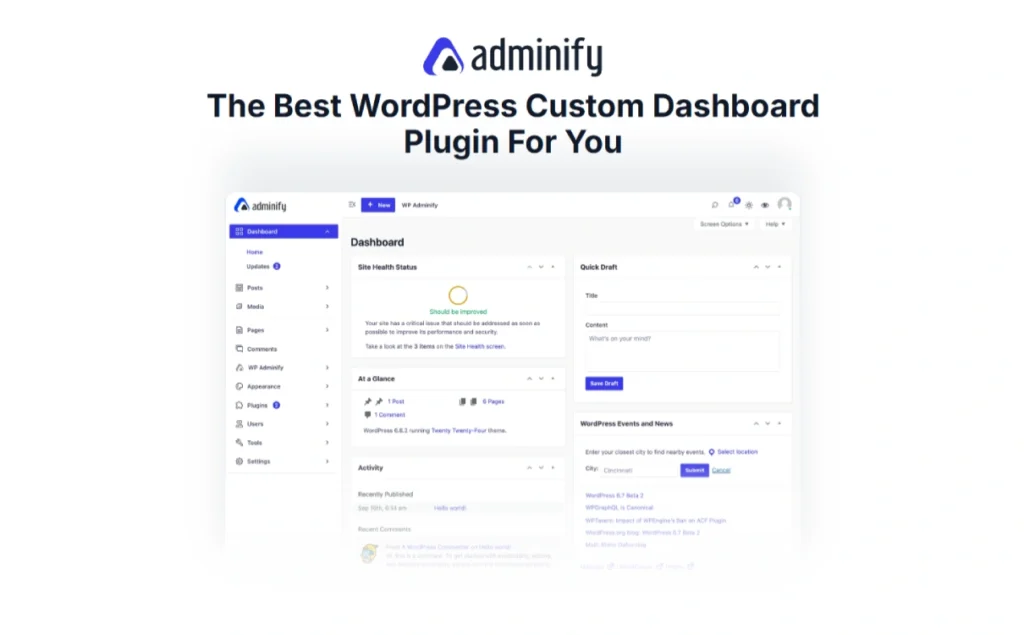
WP Adminify Pro provides a one-stop backend management customization solution that allows webmasters to highly personalize the WordPress dashboard and login interface. According to its official description, WP Adminify integrates more than 60 powerful modules that allow you to customize the backend panel, login page and improve performance and security. For example, WP Adminify comes with built-in media folder management, login redirection, dashboard widget customization, and other tools that make it easy to organize content, improve productivity, and enhance backend security. The interface is friendly and intuitive, which is suitable for enterprises or agencies to build branded backend for their clients, and also meets the needs of individual webmasters and developers to improve the efficiency of daily management, and solves the problems of single and inconvenient operation of traditional WordPress backend through flexible customization settings.
Key Features
- Branded Dashboard: Support global white label customization, replace the backend Logo, login page, Favicon, etc., rename or hide the default elements to create a backend interface that matches your brand.
- Modernized Interface ThemesProvide multiple built-in dashboard templates and color schemes, support automatic dark/light mode switching (can be switched by time period or system preference), so that the management interface is more aesthetically pleasing and eye-friendly.
- Flexible menu and page customization: Powerful backend menu editor with drag-and-drop rearrangement, renaming or hiding of menu items, and support for controlling menu visibility based on user roles. Also create unlimited custom admin pages (compatible with page builders like Gutenberg, Elementor, Bricks, Oxygen, Divi, etc.).
- Content and Layout Optimization: Built-in media library folder function, pages, articles, media files can be categorized drag-and-drop management, rapid organization of massive resources; management list editor supports adding/deleting/cloning columns (including support for taxonomy, WooCommerce product lists), to enhance the readability and efficiency of the backend list; and can be copied with one-click articles/pages for easy reuse of the content.
- Clean Back Office Experience: You can hide WordPress native and plugin-generated update notifications, welcome panels and other redundant information, and you can turn off the comments function or redirect the “Comments” menu, so that the background more neat and focused.
- Performance and Safety ToolsThe following features are supported: post-login redirection to direct users to a specific page for improved security; automatic email updates, login screen language switcher, and external content embedding can be turned off to simplify the backend and speed up loading; and parameters such as Heartbeat API frequency can be adjusted to avoid slowing down the site with too many requests. These settings help users optimize backend performance and security in many ways.
Target audience and usage scenarios
WP Adminify Pro is suitable for various user groups who need to deeply customize their backend and improve the efficiency of administration. Example:
- Web Developers/Agents: Create branded and exclusive management back office for clients, customize login interface, menu and dashboard layout to enhance professional image;
- Advanced User/Webmaster: Customize the background layout and shortcut menus to hide unneeded functional items, simplify the daily maintenance process and save operation time;
- Content-intensive websites: Quickly organize a large number of media resources and articles with the help of media library folders and batch operation functions to improve the efficiency of content management;
- E-commerce and membership site: Optimize product/order list visualization with menu editing and column editing in WooCommerce backend; present personalized backend interfaces and entrances for different user groups (e.g., members, editors, and customer service) with role-controlled menus and login redirection in membership/education sites.
Comparison of similar plugins
- Admin Menu Editor - While the plugin focuses only on rearrangement, hiding, and permission settings for backend menus, WP Adminify Pro embeds the menu editor into a more comprehensive customization framework that not only supports complex menu management, but also offers dashboard templates, dark mode, and login page branding.
- WP Admin UI Customize - It is a small plugin that can modify menus, toolbars, and login screens, but it is relatively single-function. In contrast, WP Adminify Pro is more feature-rich, managing dashboard styles, media folders, background widgets, and security optimization at the same time, allowing you to meet a variety of background customization needs with a single installation.
- White Label CMS (or WPShapere) - While similar plugins are mainly used for managing backend white labels and appearance optimization, WP Adminify Pro integrates a variety of advanced modules (e.g., custom backend pages, activity logs, etc.) including white labels for those who want an all-in-one backend optimization solution. Overall, the advantage of WP Adminify Pro lies in its modular design and rich customization options, which allow users to complete the backend beautification and management work without installing too many different plugins.
User Feedback Highlights
A lot of user feedback points to WP Adminify Pro's comprehensive functionality and ease of use. Users praise the plugin's intuitive operation, which makes it easy to use even if you don't have a basic knowledge of programming, and makes back-office administration “more intuitive, efficient, and secure”. The official team responds promptly and professionally, and users can get good support when they encounter problems. Comprehensive evaluation shows that users generally believe that WP Adminify's powerful features and modernized interface have brought significant productivity gains to the WordPress backend.
Matching Suggestions
WP Adminify Pro works seamlessly with many popular plugins and tools. For example, it works with Elementor/Divi/Gutenberg and other page builders can be used in conjunction with each other to create customized administration pages or help documentation in the backend, and can embed rich content components; for the WooCommerce Mall site, you can use its background menu and column editing features to optimize the display of product and order lists; for membership systems (e.g. Paid Memberships Pro, Ultimate Member, etc.) or multi-role sites, you can provide personalized background entrances and experiences for different user groups through role-based menu display and login redirection features. In addition, WP Adminify Pro is compatible with common data backup plug-ins and caching plug-ins, ensuring site performance and data security while maintaining backend customization.