


- Unlimited access to members-only content
- Member discounts on paid items
- More Membership Benefits
Confirm Purchase
Download Version
- Advanced Product Fields for WooCommerce Extendeds v3.0.8
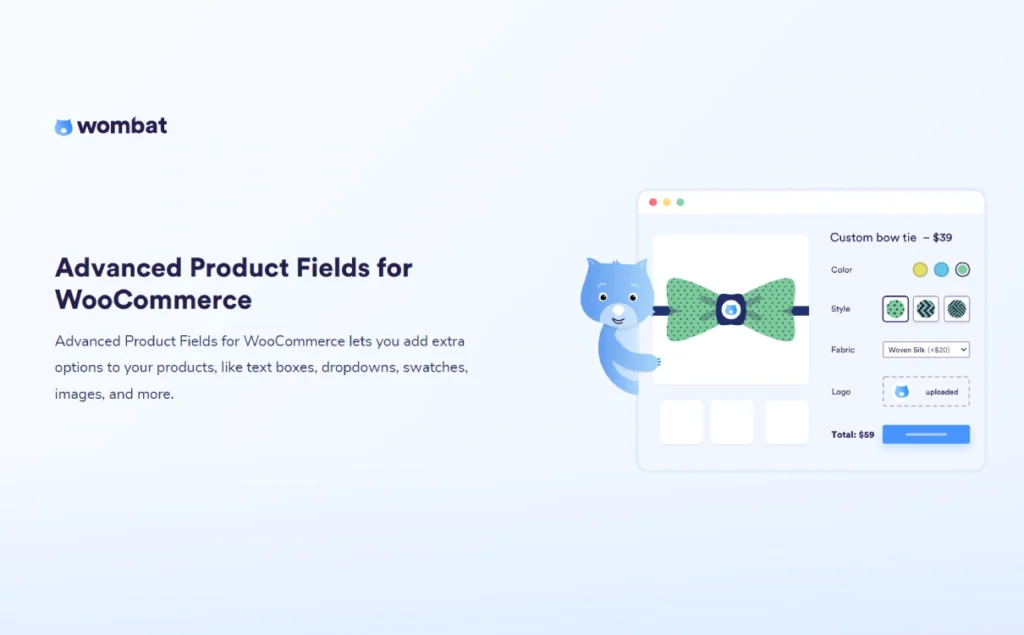
Advanced Product Fields for WooCommerce Extended introduce
Product Overview
APF allows you to add paid or free "add-ons" to your product pages and integrate buyer input with their selections.Simultaneously displayed in shopping cart, checkout, and order.This reduces after-sales communication. The free version already provides 10 commonly used fields and...Conditional LogicThe paid version further expands to include file uploads, image/color/text samples, dates, calculated fields, sub-product options, repeating fields, and more.Multiple pricing methods including formula/percentage/quantity/character length, etc.It also supports dynamically changing the main product image based on the selected options. The plugin is highly compatible with builders such as Elementor, Oxygen, Beaver Builder, and Divi, and also supports integration with WPML/Polylang multi-language, WOOCS multi-currency, and WooCommerce Subscriptions.
Key Features
- Rich field types: Text/Multiline/Email/URL/Number, Dropdown, Radio/Multiple Choice, True/False, Paragraph Description; Paid version addsFile upload, image/color/text samples, date, calculated fields, images with quantities, sub-products, cards, content fieldswait.
- Conditional LogicCreate a step-by-step form with dependencies based on the user's input "show/hide" field.
- Flexible pricingFixed fee, percentage, quantity/character length,Custom formula pricingWith discounts (negative prices).
- Order placement link visibleThe entered/selected options and the additional charges are inShopping cart, checkout, orders and emailsIt is clearly presented in the text.
- Sub-product options: Treat other items in the store as optional accessories and enjoy inventory linkage.
- Builder and Theme AdaptationElementor, Oxygen, Beaver Builder, Divi, etc.; lightweight front-end scripts.
- Multilingual/Multi-currency/SubscriptionWPML/Polylang, WOOCS, and various third-party integrations (including Woo Subscriptions).
Target audience and usage scenarios
Advanced Product Fields for WooCommerce's flexibility allows it to serve e-commerce sellers across various industries. Here are some typical use cases:
- Personalized gift and clothing customization merchants
- Scene DescriptionOnline sales of customizable T-shirts, engraved jewelry, photo-printed mugs, phone cases, and more.
- Core functional applicationsUse "text fields" to allow customers to enter their names or greetings; use the "file upload" function to allow customers to submit photos or design drafts; use "color/image samples" to visually showcase different styles; and charge for engraving services "by the number of characters".
- On-demand manufacturing and pricing by size industries
- Scene DescriptionSales of goods that require production and pricing based on dimensions provided by the customer, such as custom curtains, carpets, fabrics, glass, or building materials.
- Core functional applicationsThe system allows customers to input dimensions such as length and width by setting up a "numeric field"; then, using its unique "formulaic pricing" engine, it automatically calculates and displays the final price based on the input dimensions, achieving a fully automated quotation process.
- Complex Product Configurator (B2C/B2B)
- Scene DescriptionBuild a multi-step, multi-option online product configurator, such as assembling a custom-sized computer, selecting components for a modular sofa, creating a personalized pizza set, or configuring industrial equipment.
- Core functional applicationsThe system uses "conditional logic" to guide users through the configuration process step by step, with each choice determining the available options for the next step; it uses "partition" fields to logically group numerous options, making the interface clear and organized; it uses "image samples" to showcase the appearance of different components; and throughout the process, the price is dynamically updated in real time based on the customer's choices.
- Entities or service-oriented businesses that provide additional services
- Scene DescriptionThe cake shop sells custom birthday cakes, allowing customers to choose delivery dates and additional decorations; the equipment rental company offers optional insurance or accessory services.
- Core functional applicationsThe "Date Picker" allows customers to easily select service or delivery dates; "Checkboxes" offer additional value-added services such as "Extra Cream," "Premium Packaging," or "Equipment Insurance"; and "Text Fields" collect customers' special requests or notes.
Comparison of similar plugins
To help you make an informed decision, we've compared Advanced Product Fields with two mainstream alternatives on the market—the official... WooCommerce Product Add-Ons and widely popular YITH WooCommerce Product Add-Ons & Extra Options A direct comparison was made.
Functional Comparison Matrix
| Functions | Advanced Product Fields (This Product) | WooCommerce Product Add-Ons | YITH Product Add-Ons & Extra Options |
| Basic fields (text, checkboxes, etc.) | ✅ | ✅ | ✅ |
| Image/color sample | ✅ | ❌ | ✅ |
| File upload | ✅ | ✅ | ✅ |
| Conditional Logic | ✅ | ❌ | ✅ |
| Percentage pricing | ✅ | ✅ | ✅ |
| Formulaic pricing | ✅ | ❌ | ❌ |
| Pricing by number of characters | ✅ | ❌ | ❌ |
| Optimized for performance | ✅ | ❌ | ❌ |
| Edit options in shopping cart | ✅ | ❌ | ✅ |
| Global/Batch Application Fields | ✅ | ✅ | ✅ |
Analysis of exclusive advantages
The table clearly shows the functional differences, but the real value lies in the profound impact these differences have on your business.
- Advanced pricing models: Unlocking entirely new business models While all plugins support basic price adjustments, only Advanced Product Fields offers this feature.Formulaic pricingEngine andPricing by number of charactersFunctionality. This isn't just about adding features; it's a qualitative leap in capability. Formulated pricing allows you to enter markets where pricing is based on area, volume, or complex formulas—something competitors simply cannot offer. For personalized engraving, printing, and similar services, character-based pricing provides the fairest and most automated billing method.
- Performance optimization: the inevitable choice for professional vendors In today's increasingly feature-rich world, performance is often sacrificed. Many powerful plugins can slow down your website due to bloated code. Advanced Product Fields prioritizes performance in its design. As mentioned earlier, benchmark tests demonstrate its absolute advantage in speed and resource consumption. For any business that takes user experience and conversion rates seriously, choosing a powerful yet efficient plugin means lower bounce rates, higher customer satisfaction, and better search engine rankings.
- Intelligent Shopping Process: The Importance of Conditional Logic It's worth noting that the official WooCommerce Product Add-Ons plugin is completely...Conditional logic is not supported. This means you cannot create any form of interactive or guided form. All options must be displayed statically, which can cause significant confusion and pressure on customers, especially for products with a large number of options. Advanced Product Fields' powerful conditional logic capabilities make it far superior to official plugins in building user-friendly, customized processes, making it the essential choice for complex customization scenarios.
User Feedback Highlights
Genuine user reviews are the best proof of a product's value. We've extracted the following key highlights from user feedback across various platforms, which collectively illustrate the outstanding performance of Advanced Product Fields. .
- Unparalleled flexibility and powerful functionality Users widely praise this plugin as the most powerful and flexible solution on the market. It handles everything from simple option additions to extremely complex configuration needs with ease. Frequent reviews such as "Powerful Module," "Complete plugin," and "Best Advanced Plugin on the Market" demonstrate its exceptional ability to meet advanced requirements.
- Intuitive, easy to use, and developer-friendly Despite its powerful features, user feedback also emphasizes its simple and intuitive user experience. Many shop administrators without a technical background can quickly get started, and its clear and well-structured code has won unanimous praise from the developers. Users often describe their experience as "Simple & effective," "well developed," and "Really slick."
- Top-tier customer support with timely responses An excellent product is inseparable from outstanding support services. Throughout the feedback we've received, praise for our customer support team has been consistently high. Users emphasize that they receive fast, professional, and effective assistance no matter what problems they encounter. This reliable support service provides a solid guarantee for users to successfully implement complex customized projects, earning it the reputation of "The best support I've ever had!"
Suggestions for pairing with other plugins/themes
Advanced Product Fields adheres to the highest development standards of WordPress and WooCommerce, designed to integrate seamlessly with the vast ecosystem and ensure smooth operation of your existing workflows.
- Page Builders
This plugin is fully compatible with all themes and page builders that use modern AJAX "Add to Cart" technology. Whether you are using Elementor, Divi, Beaver Builder, or Oxygen, it ensures that field options display correctly and function properly, giving you complete design freedom. - Multilingual stores
For websites targeting global users, this plugin has undergone rigorous testing and is fully compatible with both WPML and Polylang, two major multilingual solutions, helping you easily create multilingual e-commerce websites. Furthermore, the plugin's front-end interface has been pre-translated into multiple languages, including English, French, German, Spanish, and Dutch, saving you significant translation and configuration time. - Multi-currency stores
The plugin natively supports integration with the popular WOOCS (WooCommerce Currency Switcher) plugin, enabling it to dynamically adjust the prices of product options based on the user's selected currency, providing a localized shopping experience for your international customers. - Recommended plugin combinations
Based on our compatibility testing list, we recommend the following plugins for use with Advanced Product Fields to achieve specific functionalities:- Product table displayWooCommerce Product Table
- Multi-currency supportAelia Currency Switcher
- Order Export: Advanced Order Export For WooCommerce
- Compatibility Transparency
To help you avoid potential conflicts, we have disclosed known information.IncompatiblePlugin list. For example, this plugin currently conflicts with plugins such as WooCommerce Product Bundles and WooCommerce Composite Products. This transparent communication aims to help you make the most accurate judgment before purchasing and avoid inconvenience caused by compatibility issues. This reflects our responsibility as a professional solutions provider and our commitment to customer success.
Frequently Asked Questions (FAQ)
1. What does this plugin do?
APF is used to add "additional options/custom fields" (such as text boxes, dropdowns, single/multiple selections, samples, file uploads, etc.) to WooCommerce product pages, and can affect product prices and order information display accordingly.
2. Which field types are supported?
Commonly used: Single-line/multi-line text, numbers, dropdowns, radio/selection, toggles (True/False), dates, paragraph descriptions; Advanced:File uploads, image/color/text samples, calculations/formulas, sub-products (with SKUs/inventory), images with quantities.wait.
3. Can the options be displayed/hidden based on user selection (conditional logic)?
Product backend → Create or edit "Field Group" → Enable relevant fieldsConditions display → Set "Display field B when field A = a certain value" → Verify by toggling options on the front end. Typical usage: First select "Engraving", then display "Engraving content and font".
4. Can you use "formula/calculus" pricing (such as area × unit price, character count pricing, etc.)?
Yes. Add a "Formula/Calculation" pricing function to the field group. The formula can reference user input and quantity. Example:
Character pricing:MAX(0, number of characters - 10) * 0.5(Additional charges apply for any part exceeding 10 characters)
The price will be different from the main price.Stacking or deductionAlternatively, the effect of "using the formula price as the standard" can be achieved through formulas.
Priced by area:Length (cm) * Width (cm) / 10000 * Unit Price (RMB/㎡)
5. On which pages will the buyer's selected "Custom Options" be displayed?
AvailableShopping cart/Checkout/Order details/EmailDisplayed. If not displayed:
Clear the cache and test the order placement process again.
Admin panel path:WooCommerce → Settings → Product fieldsCheck the box for "Show in cart/checkout";
If a newCart/Checkout blockPlease ensure the theme/blocks are compatible with the extensions on this page.
6. Could other items in the store be listed as "accessories/sub-products" for selection, and linked to inventory?
Yes. AddSub-productsThis field allows you to select the products or categories to be exposed as options; these sub-products will be added to the cart at checkout, retaining their SKUs/inventory. Layouts support lists, radio buttons, image styles, etc.
7. Does it support variable products?
Supported. Field groups can be applied to variable items and used with conditional logic in conjunction with attribute values (e.g., displaying special processing when "Large" is selected). The price/inventory of the variant itself is still managed according to WooCommerce rules.
8. Can I switch between the main product image and the gallery image based on the options?
Yes. Use the image/color sample field and enable "Switch main image/gallery image after selection" to configure a corresponding image for each option. Suitable for fabric/color matching products.
9. Does it support file/image uploads (such as uploading logos, prescription/parameter images, etc.)?
Supported. After adding the "File Upload/Image Upload" field, you can configure...Allowed file types (e.g., png, jpg, pdf)与Size limitYou can then choose whether to include a price. Common scenarios include: uploading a logo, uploading prescription/parameter images.
10. Which themes/plugins is it compatible with? Is the page builder and multilingual support available?
It can be used with common page builders (such as Elementor, Divi, Oxygen, Beaver Builder); it supports multi-language scenarios (WPML/Polylang, etc.) and multi-currency plugins.
11. Does it work with WooCommerce Subscriptions?
First orderIt allows you to add custom options and pricing to subscription products, which users can fill in and calculate when purchasing.
Renewal restrictionsRenewal orders are usuallyThe product field will not pop up again.It will not automatically change the price "based on new input"; if the business needs to collect information again before each period, it is recommended to change to placing new orders on a periodic basis or guide customers to update fixed information on the account page.
12. Does APF's pricing logic "add/subtract from the main price" or "completely replace the main price"?
The default isAdd/subtract from the main price(Add-on method). If you need "use formula price only", you can use the formula in the field group to calculate the final price of the product and reduce the influence of the main price to 0 or offset it with a negative value.
13. Is it possible to apply the same set of options to multiple products in batches?
path:WooCommerce → Product Fields Create a new "Field Group", and select the target product, category, or condition in "Application Scope/Target".Full site reuseSuitable for general options such as "gift wrapping/engraving".
14. Can the field configuration be exported or the orders containing "field data" be exported for reconciliation/analysis?
Export field configuration (field group): Backend Tools → Export → Product Field GroupsDownload and export the file for easy migration to other sites.
Export order data including fieldsUse mainstream export plugins (such as order export/report solutions) and check "Custom fields/metadata for product line items" in the field mapping.
15. The website is already live, but the shopping cart/checkout page is not displaying options or files. How can I troubleshoot this?
- switch:examine WooCommerce → Settings → Product fields The display switch;
- Page TypeIf using Cart/Checkout 块Confirm that the theme and extension are compatible (if incompatible, you can temporarily use the shortcode page for testing).
- Theme/CacheSwitch to the default theme and turn off caching for retesting, eliminating possibilities one by one.
16. How can a beginner quickly set it up?
(1) Install and enable the plugin → (2) In the product orWooCommerce → Product Fields Create a field group → (3) Add fields and pricing/conditional logic → (4) Set display position and style → (5) Self-test the complete order process (shopping cart/checkout/order/email) on the front end.






No Comments