


- Unlimited access to members-only content
- Member discounts on paid items
- More Membership Benefits
Confirm Purchase
Download Version
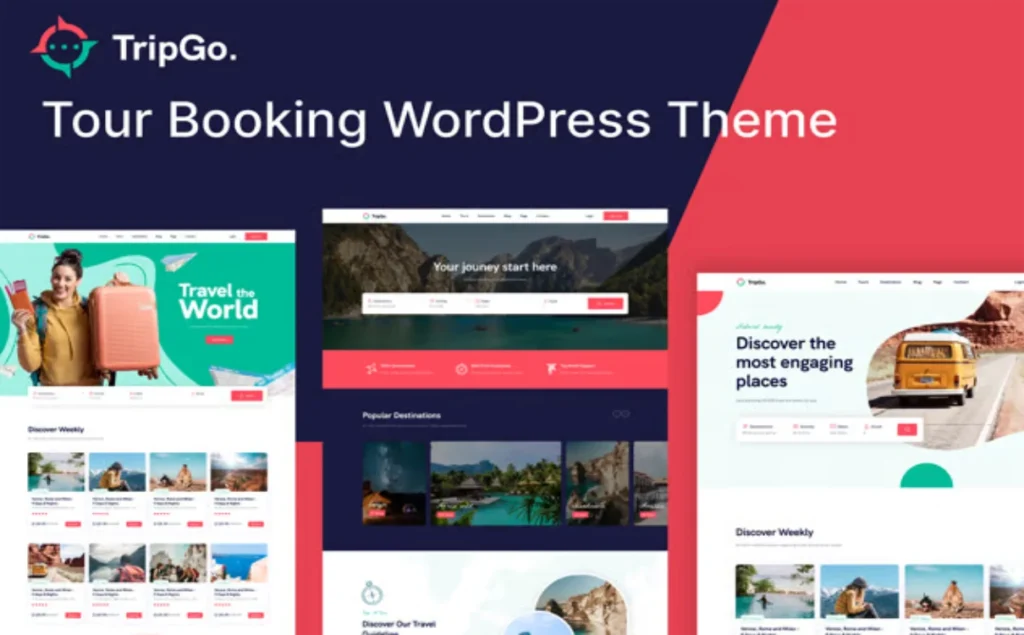
- Tripgo v1.5.2 – Tour Booking WordPress Theme
Tripgo Introduction
Product Overview
Tripgo Provides a complete site structure centered around "trip → order placement → payment → management":
You can create it in the backgroundBy adult/child or fixed datePriced tourism products, configurationDeposit percentage or fixed amountAnd automatically generateFinal payment ordersDisplay on the front endItinerary details, travel dates and available spotsOn the operations side, it is possible toManagement PanelThe system allows users to uniformly search for orders, view their status, and respond when needed.Create a new order in the backend(Suitable for telephone/offline consultations). Multiple themes are included. Elementor Components are used to build homepage, destination, and itinerary templates, and... WooCommerce Checkout/email integration; multilingual/multi-currency support available. WPML Multilingual & Multicurrency or CURCY Extended implementation.
Key Features
- Trip Model: Adult/child tiered pricing, by duration or fixed date, resource/service add-ons.
- Deposit and final paymentSupports fixed/percentage deposits;Automatic or manualGenerate the final payment order and send a payment reminder via email link.
- Insurance amount managementIt can be set whether to collect the payment in two installments, which is linked to the deposit, and supports status updates after the refund (Received → Paid).
- Reservation Management DeskOrder search (by guest/date/status), one-click access to WooCommerce order details.
- Manual order placement in the backgroundIt supports phone/private message inquiries, and allows users to enter tourist information, itinerary and number of people, and send online payment links.
- Pre-order calendarView booking availability (Check-in/Check-out) by individual trip or the entire site view.
- Elementor Deep AdaptationOffers multiple Tripgo-exclusive widgets and trip components.
- E-commerce/Growth ToolsWooCommerce checkout, ReviewX reviews, Mailchimp subscription forms.
- Multilingual/Multi-currencySupports Loco Translate/WPML; for multiple currencies, WPML Multicurrency or CURCY are available.
Target audience and usage scenarios
- Travel agency/local tour operator/DMCPackage tours, deposit lock-in, and automatic final payment reminders.
- Small group/independent tour guideTelephone inquiries were converted into manual orders in the back office, and then unified into online payment collection and itinerary management.
- Destination Operations/Experience ActivitiesRegistration is open by date/number of slots, and the available slots are displayed intuitively on the front-end calendar.
Comparison of similar topics
| Core functional items | Tripgo | Travel Tour(GoodLayers) | Traveler(ShineTheme) |
|---|---|---|---|
| Elementor adaptation | ✅ Exclusive Components | ✅ (Elementor available) | ✅ (Multiple templates/builders) |
| WooCommerce Checkout/Orders | ✅ | ✅ | ✅/Scalable with multiple gateways |
| Built-in reservation system | ✅ Workflow based on WooCommerce | ✅ Tour Master Booking System | ✅ Self-developed reservation system (multi-service) |
| Deposit/Final Payment | ✅ Fixed amount/percentage + automatic final payment slip | ✅ (Built-in support, deposits are not supported under WooCommerce payment) | ✅ Deposits are accepted (example: setting 50%) |
| Insurance amount | ✅ (Supports payment in installments along with the deposit) | ❌ (This built-in capability is not listed) | ❌/No official confirmation found |
| Manual order placement in the background | ✅ | ✅ (Add/Edit orders in the backend) | ✅ (Most orders were placed/edited within the system) |
| Booking calendar/availability | ✅ | ✅ | ✅ |
| Multilingual/Multi-currency | ✅ (Extended via WPML/CURCY) | ✅ (Multiple currencies supported; WP multilingual support) | ✅ (Compatible with WPML, multi-currency scalable) |
- For Tripgo's deposit/insurance/calendar/back-end manual orders and Elementor components, please refer to the documentation; multi-currency support is achieved through the WPML Multicurrency or CURCY plugins.
- Travel Tour Use Tour Master Plugin, supportsAdd/edit orders in the backend与deposit(butDeposits are not supported when paying with WooCommerce.)。
- Traveler supports multiple gateway extensions and deposit settings for various business scenarios (hotels/car rentals/trips, etc.) and is compatible with WPML.
User Feedback Highlights
- “"I am very satisfied with the theme I purchased. Its quality is impeccable, its design is stylish, its functions are abundant, and it perfectly meets my needs."”
- “"The theme is great, and overall, the code quality, functionality, flexibility, and design quality are all very good."”
Suggestions for pairing with other plugins/themes
- Page BuildElementor (Tripgo has a built-in widget that is useful for restoring demos and secondary development).
- Payment/E-commerceWooCommerce (Tripgo's order details, final payment slips, and email links all rely on WooCommerce).
- Evaluation and growthReviewX structured reviews, Mailchimp subscription forms.
- Multilingual/Multi-currency:WPML Multilingual & Multicurrency or CURCY; if you wishOther items in the storeIt also supports deposits/installments and can be used with WooCommerce deposit extensions.
Frequently Asked Questions (FAQ)
1. Which WordPress/PHP versions does Tripgo support? What are the basic server requirements?
Tripgo's official documentation states that it supports PHP 7.x/8.x (8.1 recommended), and it has been tested on WordPress 6.x. The installation documentation also provides suggestions for common PHP and hosting parameters (such as...). max_execution_time、upload_max_filesize (etc.), to facilitate the smooth import of demo data and the operation of the reservation function.
2. How do I install the theme and import the demo site?
Upload and enable the parent and child themes in the backend, and activate the required plugins; then you can import the demo content with one click in "Appearance → Import Demo Data" (manual import is also supported).
3. Is Tripgo compatible with Elementor? What widgets does it provide?
Yes. Tripgo offers a large number of Elementor blocks and templates related to itinerary/destination/search filtering, including product categories, search and filtering (Ajax), destination components, product lists and sliders, which can be used to visually build itinerary list pages and detail pages.
4. What can the theme's built-in booking system do? How do I create an itinerary?
In the "Create Trip" section, you can set differentiated prices for adults/children/infants, fixed dates or time-based pricing, seasonal/special period prices, resource and service add-ons, insurance and deposit, unavailable periods, and itinerary plans (included/excluding). The front-end booking form will calculate the total price and available bookings based on this information.
5. Which payment gateways will you use? Will you use WooCommerce?
Tripgo uses WooCommerce's shopping cart and checkout process (corresponding to the shortcode page), and orders are generated and managed within WooCommerce; therefore, it supports all payment gateways compatible with WooCommerce (such as Stripe, PayPal, offline transfers, etc.).
6. How do I set up "deposit/final payment"? Can it automatically remind me to pay?
A deposit can be initiated within the product, supporting either a "fixed amount" or a "percentage" payment method; the backend can display the deposit status as "partial payment." Alternatively, the system can be configured to process the deposit.automaticCreate the final payment order X days before departure and send the payment link via email, or have the administrator manually generate the final payment order link for the customer.
7. How do I set up and manage my "insurance deposit"? Does it support one-time or two-time payments?
Insurance deposits can be paid at either a "general price" or a "customer group price"; they can be paid in one lump sum with the down payment, or split into two payments with the deposit/final payment (only applicable when the deposit is a percentage). After the trip is completed, the administrator will update the insurance status to "refunded to customer" in the backend.
8. What if a customer places an order by phone or private message? Can the order be manually created in the backend and the customer pay online?
Yes. You can manually enter your order through "Tripgo → Create New Booking" (optional: pricing, number of adults/children, dates, insurance/deposit, etc.). The system will then generate the order in WooCommerce and support sending a payment link to the customer for online payment.
9. How do I view the "Reservation Calendar" and "Available Spaces/Inventory"?
In the "Booking Calendar," you can view check-in/check-out and occupancy status for a single trip or all trips. Inventory can be calculated by "total available bookings" or separately by "adults/children/infants" and deducted independently.
10. Can I customize the fields in the "Reservation/Inquiry Form" and calculate the price?
You can add various types of form fields (text, email, phone, dropdown, file, checkbox, radio button, etc.) to the "Custom Checkout Field"; among them, checkboxes/radio buttons/dropdowns can include prices for adding additional charges. Fields can be created globally and accessed by category or individual product.
11. How do I enable multiple languages and currencies?
Multilingual: Loco Translate can be used for translation, or WPML can be enabled to enable multilingual support for the site (supporting language switching shortcodes, header and footer translation, etc.).
Multi-currency: The official FAQ recommends using free/common solutions such as "CURCY – Multi Currency for WooCommerce" or "WPML Multilingual & Multicurrency for WooCommerce".
12. Will clicking "Book Now" take me directly to the checkout page (skipping the shopping cart)?
Yes. In the subtopic functions.php Add the following filter to redirect users directly to the WooCommerce checkout page after clicking "Book Now":
add_filter('woocommerce_add_to_cart_redirect', 'skip_cart_go_checkout');
function skip_cart_go_checkout() {
  return wc_get_checkout_url();
}
13. What "operation-oriented" configurations are available for bookings and messaging (verification codes, cancellation rules, reminder emails, etc.)?
You can configure this in "Tripgo → Settings (WooCommerce → Settings → Booking Tour)":
- The booking form displays the total price, available quantity, insurance amount, and other related information.
- reCAPTCHA (V2/V3, used on booking/inquiry forms)
- Cancellation policies (such as latest cancellation time, order amount threshold, etc.)
- Booking reminders (reminder emails sent based on travel dates)
These configurations help reduce spam submissions, standardize cancellations, and improve conversion rates.
14. Which common marketing/form tools can it be used with?
The theme has built-in support for Contact Form 7 and provides integration guidance with Mailchimp (form code examples + API Key configuration) for easy subscription collection and marketing automation.
15. How to build a product detail page with complete visual visualization?
Tripgo comes with two pre-set itinerary detail templates. You can drag and drop the "Tour Elements" component in Elementor to freely arrange the layout, or copy the template files to a sub-theme for in-depth customization as needed.
16. What are the features of the theme in terms of mobile/cross-browser compatibility and performance?
Official features include mobile-first design, high loading score, SEO friendliness, cross-browser compatibility (Chrome/Firefox/Safari/Edge, etc.), and support for RTL.
17. Does it support multiple sites or membership/e-commerce expansion?
Tripgo is based on the WooCommerce order settlement and payment process and can be used in conjunction with WooCommerce ecosystem extensions such as memberships, coupons, and payment gateways. For adaptation to multiple sites and premium membership systems, it is recommended to prioritize WooCommerce and its mature extensions.
18. Can you limit the "latest time you can place an order" for the same day or set a "pre-trip reminder"?
Yes. Configure the latest bookable time of the day (before X o'clock) in "Booking Form" and "Reminder" respectively, as well as the pre-departure reminder email (as per the email notification on the departure date).
19. How to choose between inventory logic based on "number of people" and "orders"?
Optional when creating a trip:
- Inventory by customer groupDeductions are made separately for adults, children, and infants, precisely controlling the maximum number of slots for each customer group;
- By overall inventoryOnly the total number of orders is counted, without distinguishing the number of customer groups.
Different strategies are suitable for different business models and tour sizes.





No Comments