


- Unlimited access to members-only content
- Member discounts on paid items
- More Membership Benefits
Confirm Purchase
Download Version
- FluentBooking Pro (v1.9.11)
FluentBooking Core Introduction
Product Overview
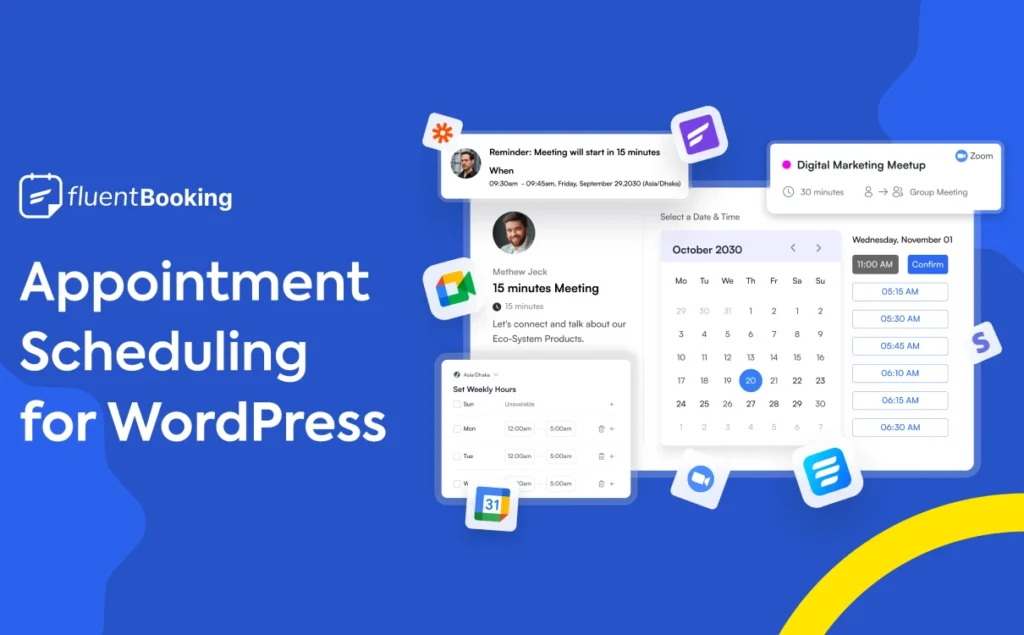
FluentBooking is a WordPress plugin that focuses on "Appointment and Meeting Management". You can create multiple calendars and appointment types in the backend of your site, which can be used in a variety of scenarios, such as personal consultation, team meeting, online course, event registration, sales call, customer service and so on. Visitors just need to select the time, fill in the information and submit in the front-end, and the system will automatically record the appointment in your calendar and trigger follow-up notifications and automated processes.
In terms of time management, FluentBooking supports flexible setting of available time slots, weekdays, days off with buffer time, and one-click opening of one-on-one appointments or multiple/group appointments, allowing you to serve a single client as well as open up multiple slots for an event. All appointments are displayed in a visual calendar, allowing you to quickly see what's scheduled for that day, week or month.
In terms of integration capabilities, FluentBooking can synchronize with Google Calendar and Outlook Calendar in both directions to reduce the risk of double booking; at the same time, it supports the creation of corresponding products for appointments through WooCommerce, reusing the existing payment methods and ordering system; combined with plug-ins such as FluentCRM, Fluent Forms, you can automatically add customers into the email marketing automation process after making appointments, sending confirmations, reminders, follow-ups and evaluation invitations. Combined with FluentCRM, Fluent Forms and other plug-ins, you can automatically add customers to the email marketing automation process after making an appointment, sending confirmations, reminders, follow-ups and evaluation invitations, turning appointments into ongoing customer relationships and sales opportunities.
Overall, FluentBooking is more like a "business operation center with reservation as the entrance": it not only helps you solve the problem of "how to make an appointment with a customer", but also helps you to open up the whole chain of "how to follow up after the appointment and how to convert".
Key Features
Visual Appointment Calendar & Flexible Time Management
- The backend provides an intuitive calendar view that supports viewing appointments by day/week/month.
- Customizable availability, days off, holidays and buffer time to avoid time conflicts.
One-on-One and Multi-Person Appointment Support
- It supports single person meetings, and can also open up fixed slots for multiple clients to book the same time slot at the same time, suitable for small group classes, briefing sessions, online sharing and so on.
Unlimited Hosts & Unlimited Calendars
- There is no limit to the number of Hosts, and you can create separate calendars and appointment types for different members of your team.
- Supports multiple brands/service lines sharing the same system.
Google / Outlook calendar synchronization to avoid double bookings
- Appointments can be automatically synchronized to Google or Outlook calendars.
- Slots that have been marked as busy in the calendar cannot be rebooked on the front end, reducing the risk of conflicts.
WooCommerce Integration for Paid Reservations
- Tie appointments to WooCommerce products and collect payments in the same payment process.
- Reuse the existing payment gateway and order management, suitable for sites that have built e-commerce malls.
Deeply linked appointment forms with Fluent Forms
- Add FluentBooking fields to Fluent Forms to build more complex appointment forms (custom fields, conditional logic, etc.).
Marketing Automation Integration with FluentCRM
- Appointment participants can be automatically added to the FluentCRM contact list.
- Automated workflows can be triggered based on events such as appointment creation, completion, cancellation, or rescheduling, for grouping, tagging, emailing, and more.
Automated email and reminder notifications
- Send appointment confirmation, reminder and follow-up emails for clients and hosts to minimize missed appointments and forgetfulness.
- Use with FluentSMTP or other email sending plugins to improve delivery rates.
Multi-purpose scenarios: appointments, meetings, events & sales calls
- It also applies to various business forms such as "appointment service", "online meeting", "event registration", "sales call", etc., which can be unified and managed in one plug-in.
Target audience and usage scenarios
Suitable website type and business:
- Professional services websites: consultants, attorneys, counselors, coaches/mentors, financial advisors, etc., and would like to allow clients to choose their time online and complete their appointments.
- Education and training websites: Language training, online courses, small group instruction, one-on-one tutoring in music/painting/skills.
- Personal Services & Lifestyle: fitness instructors, nutritionists, personal stylists, photographers, housekeeping/cleaning services, etc.
- B2B Sales & SaaS Products: Product demonstrations, sales negotiations, customer success meetings, onboarding training, and other scenarios that require video conferencing or telephone communication by appointment.
- Online Events & Webinars: Launch parties, live enrollment, keynote sharing sessions, online recruiting briefings, and more.
Examples of typical usage scenarios:
- Place a "Schedule a Demo" button on the landing page to jump directly to the FluentBooking appointment page, where the customer chooses their own sales consultant and time.
- The online course website offers "Free Trial Class Reservation", which collects student information through the reservation form and automatically enters into FluentCRM for follow-up.
- Consultants embed an appointment module on their personal homepage, allowing visitors to select a time slot and complete a paid appointment through WooCommerce.
- The Customer Service and Customer Success teams provide "one-on-one return" appointments for repeat customers, and all appointments are written directly to the calendar and CRM.
Comparison of similar plugins
| Core functional items | FluentBooking | Amelia | BookingPress |
|---|---|---|---|
| One-on-one appointments and meetings | ✅ | ✅ | ✅ |
| Multiple/Group Appointments | ✅ (Multi-Visitor Appointment) | ✅ (Groups & Events) | ✅ (support for group appointments) |
| Visual calendar view with appointment management | ✅ | ✅ | ✅ |
| Google / Outlook Calendar Synchronization | ✅ | ✅ (with Google/Outlook) | ✅ (provides integration with mainstream calendars) |
| WooCommerce Payment Integration | ✅ (native module) | ✅ (WooCommerce support) | ✅ (can be extended with more gateways via WooCommerce) |
| Deep integration with FluentCRM | ✅ (native integration) | ❌* | ❌* |
| Deep Linking with Fluent Forms Forms | ✅ (native field) | ❌* | ❌* |
| Free version available (installable from the WordPress plugin repository) | ✅ | ✅ (Amelia Lite) | ✅ (BookingPress Lite) |
| Ideal for building a complete WordPress automated marketing loop | ✅ (in synergy with Fluent ecology) | Partially (mail and meeting tools can be integrated) | Partial (favoring reservations and payments) |
Differences and selection recommendations
FluentBooking's Unique Advantage:
- With FluentCRM, Fluent Forms, FluentSMTP, FluentAffiliate and other products from the same development team, it is more suitable for one-stop sites that want to integrate "Appointment + Forms + Email Marketing + Membership/Affiliate System" within WordPress.
- Stronger ability to convert and follow up on business that starts with a meeting, such as "personal service, sales meeting, marketing activities".
Amelia is better suited to the direction:
- Strong demand for "Total Appointment and Event Management", especially for SMBs that require multi-employee scheduling, complex event ticketing, and extensive third-party integrations (e.g., Zoom, Apple/Google/Outlook Calendar).
BookingPress is more suitable for the direction:
- Service merchants who need rich payment gateways, POS, price discounts (e.g. Happy Hours, service packages), multi-store and employee management scenarios are more concerned with the integration of "Reservation+Payment+Report" rather than CRM granular marketing.
User Feedback Highlights
Quick to get started, clear interface:: Users generally commented that FluentBooking's backend interface is intuitive, the appointment process is clearly set up, and non-technical people can quickly create usable appointment calendars and forms.
Linking Fluent Forms with FluentCRM is a "no-brainer"!: Some users mentioned that using Fluent Forms to create complex reservation forms and FluentCRM for follow-up emails, together with FluentBooking, the overall experience is "like using the same system", which reduces the problem of "mismatch" between different plug-ins.
Startup and small team friendly: According to some reviews, FluentBooking provides an easy way for entrepreneurs offering services as a personal brand or small team to "build bookings + automate them within their own WordPress site" without having to rely on third-party SaaS booking platforms.
Suggestions for pairing with other plugins/themes
Combination with Fluent family of plug-ins:
- Fluent Forms: For building complex appointment request forms (multi-step, multi-condition, multi-field) and interfacing with the FluentBooking calendar.
- FluentCRM: Tagging and grouping users for appointments, triggering automated processes such as welcome emails, reminder emails, post-class callbacks, and renewal reminders.
- FluentSMTP: Ensure delivery stability of appointment notifications and marketing emails.
- FluentSupport / FluentAffiliateThe former is suitable for after-sales Q&A and work order management; the latter is suitable for building a promoter/affiliate membership system to drive traffic to reservation-based businesses.
Works with WooCommerce and its plugins:
- WooCommerce Core Plugin: Consider appointments as "service goods" and use WooCommerce's capabilities for collection, invoicing, coupons, etc. in a unified way.
- Flexible pricing strategies (early bird pricing, member pricing, package pricing, etc.) can be used with WooCommerce extensions (e.g. multi-currency, discount rules, etc.) for reservation services.
Pair it with the page builder:
- Use theme/page builders like Elementor, Blocksy, Kadence, etc. to embed FluentBooking's Appointment Module as a button, popup, or exclusive "Appointment Page" into key conversion pages to increase appointment conversions.
Pair it with an LMS or membership system:
- For course and training websites, it can be combined with plugins such as LearnDash, LifterLMS, MemberPress, etc., so that "Course Purchase + One-on-One Tutoring Appointment" can be formed as a total solution.
Frequently Asked Questions (FAQ)
1. What is FluentBooking? What can it do for me?
FluentBooking is a WordPress calendar plugin that focuses on "Online Appointment & Schedule Management" to handle consultation appointments, online meetings, course enrollment, event signups, sales talks, interviews, and various other time-based services. You can create multiple appointment calendars and event types in your site, set available appointment times, form questions, payment methods, and centrally manage all appointment data with automated notifications and reports.
2. Do I need to use it with other Fluent series plug-ins?
No. FluentBooking is a complete booking system in its own right, and can be used standalone in a pure WordPress environment without the need to install FluentCRM, Fluent Forms, or any other product.
Of course, if you use FluentCRM (email automation), Fluent Forms, FluentBoards (project management) and other plug-ins at the same time, you can connect "Appointment→Forms→CRM→Tasks" to realize a whole set of automated processes such as lead collection, email follow-up, and task assignment.
3. How many Hosts and appointment calendars can I create?
The current version of FluentBooking does not limit the number of Hosts and calendars, so you can create individual calendars for different members of your team, or multiple themed calendars for different services and events, and centralize the management in a single backend.
4. What types of reservations does FluentBooking support? What kind of business scenarios is it suitable for?
FluentBooking supports a variety of reservation types, commonly including:
- One-on-one appointments (1:1 consultation, treatment, counseling, etc.)
- Small group or group reservations (e.g., online sharing sessions, classes, event registration, etc., some of which are advanced features);
- Round Robin (multiple advisors taking turns taking orders, suitable for sales and customer service teams);
- One-off Event (for single online/offline event scenarios).
So whether you're a personal consultant, a counselor, a training instructor, or a business with a full sales and customer service team, you can organize your appointments with different event types depending on the actual business.
5. What calendar, payment and videoconferencing tools can be interfaced?
calendar synchronization: Supports bi-directional synchronization with Google Calendar, Apple Calendar, Outlook Calendar, Nextcloud Calendar, etc. to avoid double bookings and time conflicts (advanced feature).
Payment Gateway: Support for Stripe, PayPal, and indirect access to Google Pay and Apple Pay via Stripe; can also be combined with WooCommerce to package services as products for sale, utilizing WooCommerce's coupons, taxes, and other capabilities (advanced features).
Videoconferencing toolsSupport mainstream online meeting platforms such as Zoom, Google Meet, Microsoft Teams, etc., and automatically generate and send meeting links after the user completes the reservation (advanced feature).
6. Can it be used for paid appointments, paid courses or consulting services?
Yes. FluentBooking supports the integration of reservation and payment processes:
- pass (a bill or inspection etc) WooCommerce IntegrationYou can set up each service as a WooCommerce product, allowing users to order and pay directly at the time of booking;
- Supports the use of payment gateways such as Stripe, PayPal, etc. to complete online billing, and can be used with coupons, taxes, partial prepayment, and other strategies to reduce malicious bookings and increase attendance.
This makes it perfect for counseling, training sessions, one-on-one tutoring, fitness/beauty services, expert consultants, and other businesses that require fee-based appointments.
7. How compatible is the page builder? Does it support Elementor / Gutenberg?
- FluentBooking has several Gutenberg blocks built-in (e.g. Calendar, Event, Team, etc.) that allow you to insert appointment components directly in the block editor;
- In recent releases, an Elementor integration has been added to the free version, allowing you to select calendars for display in Elementor;
- Both shortcode and front-end calendar loading options are provided for use in most theme and page builder environments.
As long as your page builder supports shortcodes or Gutenberg blocks, you can generally embed FluentBooking's Reservation component without any problems.
8. Is multilingualism and users in different time zones supported?
The FluentBooking plugin has been translated into several languages and continues to supplement and optimize translations;
The plug-in has an automatic time zone conversion mechanism built into the usability design. The system will automatically display the correct available appointment time according to the visitor's time zone without requiring the user to manually convert, which is beneficial for cross-border business and remote teams to make appointments with overseas students.
9. Can a reminder be sent automatically after a customer makes an appointment? Can the reminder content be customized?
You can.
Notification content supports customization, and you can write reminder copy for different scenarios based on brand tone and business processes.
FluentBooking supports automatic email notifications for appointment creation, cancellation, rescheduling, pending review, etc., which significantly reduces the number of missed appointments and communication gaps;
If the SMS module is enabled and works with Twilio, it is also possible to send SMS or WhatsApp reminders to the user (advanced feature);
10. What are the advantages of pairing FluentBooking with FluentCRM, Fluent Forms, etc.?
- With Fluent Forms: Embedding FluentBooking calendar fields in the appointment form allows users to complete the appointment while submitting the form and collect more customized information (e.g., needs, budget, health status, background information, etc.) for more granular pre-screening of the appointment.
- with FluentCRM: Every appointment is automatically recorded as a contact activity, triggering email automation processes, such as sending pre-meeting preparation guides, post-meeting callbacks, and course upgrading recommendations, forming a complete closed-loop of "Appointment→Follow-up→Conversion".
- With project tools like FluentBoards: Automatically convert appointments into tasks, assign them to team members, and follow up with Kanban views.
This portfolio is suitable for sites with ongoing services, reordering and upgrade paths (e.g. training organizations, consultancy services companies, etc.).
11. Can FluentBooking replace SaaS reservation tools like Calendly?
Many users use FluentBooking as a team-level alternative to Calendly:
- Running on your own WordPress siteThe data is in your hands, which is better for compliance and privacy management;
- supportUnlimited number of presenters with calendarsIt is suitable for teams that need to assign separate schedules to different consultants/teachers/sales;
- Deep integration with WooCommerce, FluentCRM, Fluent Forms, etc. allows you to connect appointments with payments, email marketing, project management;
- The free plan already includes basic reservation functionality and more customization capabilities, making it more cost-effective for sites that want to build a reservation system directly within WordPress.
If you're a WordPress site yourself and want to avoid the SaaS subscription model, FluentBooking would be a better fit for self-hosting needs.
12. Will it slow down the site? Where is the data stored?
FluentBooking is a native WordPress plugin that stores booking data in your own website database, making it easy to back up and export in a unified way, and more compliant with local data controls and privacy compliance requirements such as GDPR.
The plug-in itself for the reservation business to do a special interface and logic design, to avoid redundant features, with a reasonable host environment and cache configuration, generally does not become a performance bottleneck; if the site reservation volume is very large, you can work with the object cache, database optimization and other measures to further optimization.





No Comments