


- Unlimited access to members-only content
- Member discounts on paid items
- More Membership Benefits
Confirm Purchase
Download Version
- Checkout Field Editor for WooCommerce 3.7.4
Checkout Field Editor for WooCommerce Core Introduction
Product Overview
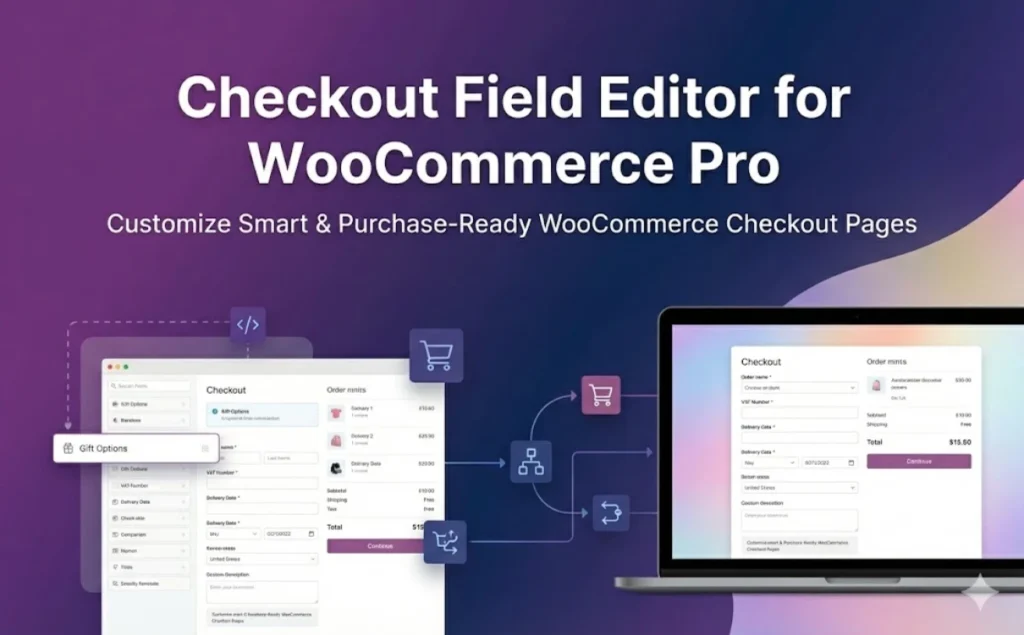
Checkout Field Editor for WooCommerce (Pro) is a checkout field management and form customization plugin for WooCommerce merchants. Through the visual interface, you can add, delete, reorder, modify labels and placeholders of the default fields in the checkout page, and create new custom partitions outside the billing, delivery, additional information, etc., so that the checkout form perfectly matches your business process.
The plugin comes with 24+ field types, including text, dropdown selection, single-select, multi-select, date/time selection, file upload, URL, title/description, etc., which can be used to collect basic customer information as well as supplemental delivery requirements, invoice information, B2B information, or service add-on options. You can insert these fields into 14 pre-defined positions in the checkout process, creating a clearer grouping structure and a more customizable fill path.
In terms of advanced features, the Pro version offers Conditional display rules, field/partition duplication rules, price fields, custom validation and address field rewriting and other capabilities. You can control whether fields are displayed or not based on shopping cart items, quantities, user roles or selected field values, automatically repeat field groups by quantity, directly adjust the total price of an order with the price field, and strictly verify key data such as email, phone number, zip code, etc. with custom regular expressions. At the same time, the plug-in supports controlling the display of fields on checkout page, order details page, email and thank you page and many other links to realize end-to-end data display and tracking.
The plugin already supports WooCommerce Checkout Blocks and integrates with WPML Multilingual and Zapier workflows, making it easy to translate field labels and placeholders across multi-language sites and to map checkout data to CRM, automated marketing and business systems for everything from small and medium-sized stores to established brands for a wide range of scenarios.
Key Features
24+ custom field types: Text, dropdown, multiple choice, radio, checkbox group, date/time selection, file upload, URL, title/description, etc., covering common information collection needs.
Visual field management with drag-and-drop sorting: Quickly add, edit, disable or delete fields in the backend interface, drag and drop to adjust the order, and build complex forms without writing code.
Customized checkout partitions & 14 insertion locations: New checkout chunks have been added, where relevant fields are grouped and inserted into 14 positions in the checkout process, resulting in a clearer and more logically coherent form structure.
Conditional Logic (Conditional Display Rules): Control the display and hiding of fields/partitions based on cart items, categories, quantities, user roles, or other field values to display only the information that is useful to the current customer and reduce distractions.
Field/Partition Repeat Rules (Repeat Rules): Automatic repetition of certain fields or partitions by number of items or number of shopping carts, suitable for capturing personalized information (e.g., name, engraved content, participant information, etc.) for each item.
Price Fields & Dynamic markups/offers: Set additional fees or discounts for certain options, such as gift wrapping fees, expedited service fees, installation services, etc., via the price field and automatically factor them into the total order price.
Address field rewriting and Google address autocompletion: Rewrite WooCommerce's default address format, add or adjust address fields, and enable Google address auto-completion for improved efficiency and accuracy.
Advanced Verification and Confirmation Verification: Supports built-in validation (e.g. Email, Phone, URL, Zip) and custom validation with regular expressions for fields, as well as validation fields (e.g. Repeat Email Entry) to reduce errors.
Multi-site display control: Independently control the display of fields on the checkout page, backend order details, customer order details, administrator emails and customer emails, making it easy for operations and customer service to view key information.
Support for Checkout Blocks, WPML and Zapier: Compatible with WooCommerce Checkout Blocks to add/manage fields in blocked checkout and supports WPML multi-language translations to integrate with Zapier to stream checkout data to more business systems.
Target audience and usage scenarios
Applicable Population:
- WooCommerce mall operators and store owners who want to fine-tune their checkout process
- Businesses that need to capture more order-related information at the checkout stage (e.g., B2B, customized services, e-commerce brands)
- Webmasters and site builders who want to freely adjust checkout field layout and presentation logic without writing code
- Cross-border e-commerce and brand sites with multi-language requirements that want to synchronize checkout data to CRM or automation tools
Typical usage scenarios:
- Customized products and personalized services: Collect information such as engraved content, size preference, participant name, appointment time, etc. for each item at checkout and automatically repeat fields based on the number of items.
- B2B & Invoice Information Collection: Add new fields such as Company Name, Tax ID, Department, Purchase Order Number, etc. and display them only for specific user roles or country regions.
- Logistics and Distribution Optimization: Add fields for delivery time preferences, access control information, detailed address supplements, and more, and reduce incorrect addresses with Google address autocomplete.
- Additional Services and Surcharges: Provide options for gift wrapping, installation services, and value-added guarantees at checkout, with additional charges factored into the total order price via the price field.
- Multilingual & Automated Marketing: Translate fields with WPML and push checkout data through Zapier to email marketing, work order systems or CRM for follow-up and marketing automation.
Comparison of similar plugins
| Core functional items | Current Product: Checkout Field Editor for WooCommerce (Pro) | WooCommerce Checkout Field Editor (Official Extension) | WooCommerce Checkout Manager (QuadLayers) |
|---|---|---|---|
| Visualize Add / Edit / Delete Checkout Fields | ✅ Support for default and custom fields with drag-and-drop sorting | ✅ Support for adding/editing/deleting fields in the billing, distribution and additional information areas | ✅ Fields can be added, deleted and rearranged |
| Number of customized field types | ✅ 24+ field types (with file upload, date/time, title/description, etc.) | ✅ Multiple base field types, but relatively small number of types (>20 not emphasized in official documentation) | ✅ 20+ custom field types (with file uploads, etc.) |
| Conditional Display / Conditional Logic | ✅ Support setting up conditional display rules by shopping cart, user role, field value, etc. | ❌ Official extensions mainly provide field additions, deletions, and changes, and do not emphasize conditional logic | ✅ Support for conditional field display based on parent field values |
| Field/partition duplication rules | ✅ Support for automatic duplication of fields and partitions by number of items or number of shopping carts (Pro) | ❌ Characterization related to duplicate rules not provided | ❌ Unhighlighted field duplication functionality in the official description |
| Price Fields & Surcharges | ✅ Built-in price field to set up surcharges or discounts for options that directly affect the total order price | ❌ Concerns about field management, not emphasizing price field functionality | ✅ Advanced version supports field-based surcharge functionality |
| Checkout Blocks Support | ✅ Support for WooCommerce Checkout Blocks, some field types are now compatible! | ✅ The official extension has recently added support for Cart & Checkout Blocks! | ✅ Recent versions support block compatibility, but with classic checkout as the main focus |
| Address Field Rewriting with Google AutoComplete | ✅ Rewritable address formatting and enable Google address auto-population | ❌ Official extensions mainly manage the field itself and do not provide address auto-complete integration | ❌ Google address autocomplete not built-in |
| Custom Validation & Regular Validation | ✅ Support for customizing regular and validation validation fields | ❌ Provides basic field validation and does not emphasize regular-level custom validation | ✅ Supports basic validation and required controls, but regular customization is less mentioned |
| Multi-Language & Integration Capabilities | ✅ Support WPML multi-language and Zapier integration for easy extension to CRM and other systems. | ✅ Works with other official extensions within the WooCommerce ecosystem | ✅ Works with common themes and plugins, but does not emphasize specialized multi-language/automation integration |
Differences and selection recommendations
Advantages of current products:
- Richer field types to meet complex information collection needs;
- Provide conditional display, repeat rules, price fields, address autocomplete, custom validation and other more “advanced” form logic and user experience capabilities;
- Compatible with Checkout Blocks and with built-in WPML integration with Zapier, it's better suited for multi-language and highly automated sites.
Scenarios for alternatives:
- The official extension is better suited for sites that only need to “add, delete and change basic fields”, and is highly consistent with the official WooCommerce ecosystem;
- QuadLayers' WooCommerce Checkout Manager performs well with conditional fields and file uploads, and is suitable for sites that need simple conditional logic with file uploads, but don't require advanced validation and address autocompletion.
User Feedback Highlights
“Solving Complex Business Logic.” Users generally feedback that the conditional logic function of the plug-in is very powerful, and can perfectly deal with “if you choose product A, you must fill in the information of B” this kind of complex scenarios.
“The Gospel of the Unskilled”: Many store owners report that they can tweak the layout and copy on their checkout pages in minutes on the backend themselves without hiring a developer to change the code.
“Data validation is accurate.” By customizing the validation rules, it effectively reduces the logistic communication costs due to customers filling in the wrong phone number or address format.
Suggestions for pairing with other plugins/themes
Plugin with Product Options Extension: Can be used with product field plug-ins such as Extra Product Options to capture personalized requirements on the product page, and further supplement order-level information on the checkout page to achieve closed-loop information capture of “product fields + checkout fields”.
With Multi-Step Checkout / Conversion Enhancement Plugins: When using multi-step checkout or solutions that optimize checkout conversions (e.g., Multi-Step Checkout Theme, Optimized Checkout Funnel Plugin, etc.), reduce churn by streamlining the content of fields at each step with this plugin and retaining only the information that is most relevant to the current step.
With multi-language / regionalized plug-ins: For multi-language or cross-border sites, work with translation plugins such as WPML to translate labels, placeholders, and prompts for checkout fields into different languages to enhance the local user experience.
Pairing address autocompletion with automation tools: If a site is using Google address autocompletion or a third-party address service, leverage this plugin's address field rewriting feature to link with related add-ons and reduce input errors; and utilize Zapier integrations to push key checkout fields to CRM, Helpdesk, or marketing automation tools.
Frequently Asked Questions (FAQ)
1. Is this plugin compatible with WooCommerce Checkout Blocks?
Yes. Checkout Field Editor for WooCommerce supports classic checkout (shortcode) and the new version of Checkout Blocks.
When using block checkout, you need to add and adjust fields separately in the Blocks Checkout Fields area.
Classic Checkout manages fields in the Classic Checkout Fields area of the plugin;
2. What are the core differences between the Free and Pro versions?
free version:
- Supports 20+ common field types (Text, Dropdown, Radio, Multi, Date, Phone, Email, etc.);
- You can add/edit/hide the default checkout fields and adjust the order;
- Supports basic authentication (numbers, Email, phone, zip code, URL, etc.);
- Control the display of custom fields on the order details page and in emails;
- Can be reset to WooCommerce default checkout fields with a single click.
Pro version(available on this page):
Extended Display and Integration: Fields can be displayed in multiple places such as checkout page, my account, backend user profiles, etc., and supports CSV export, PDF invoices, Zapier, multi-language, and more.
Provide more field types (e.g. file upload, time selection, labels, etc.) and more flexible price fields;
Supports setting conditional display rules (Display Rules) based on cart contents, total price, products, user roles, field values, and so on;
Supports Repeat Rules for fields/partitions to automatically repeat fields by item count or cart item count;
Support customized validation rules and “confirmation field” validation (e.g. confirmation email/password);
Price fields can be added to apply surcharges, percentage fees, or custom price calculations to the total order price;
3. How do I install and enable this plugin?
Go to the WordPress backend and go to Plugins → Install Plugins.
search “Checkout Field Editor (Checkout Manager) for WooCommerce” and install the free version.
After enabling the plug-in, the WooCommerce → Checkout Form You can see the checkout field management screen in the center.
Advanced features (conditional rules, price fields, duplicate rules, etc.) can be used from the same interface after activating the Pro version license (or uploading the Pro version plug-in).
4. I added fields in the backend, why can't I see them on the checkout page?
Common causes are usually:
- Inconsistent checkout page types
- If the classic checkout shortcode is used
[woocommerce_checkout]In the Classic Checkout area, you will need to add/modify fields. - If you are using Checkout Blocks, manipulate the fields in the Blocks Checkout area.
- If the classic checkout shortcode is used
- Field is set to disabled or condition is not met
- Check if this field is set to Disabled;
- If Display Rules are set, confirm that the current cart/user role meets the conditions.
- caching causes
- Clear the page cache, object cache, and refresh the front checkout page.
5. Can I revert to the WooCommerce default checkout fields at any time?
Can. The plugin offers a “Reset to Default Fields” one-click reset feature that restores WooCommerce's original checkout field configuration when clicked, perfect for quick rollbacks after testing or misuse.
6. Is it possible to set an additional price for a checkout field, such as a gift-wrapping fee?
Yes, but it is a Pro version feature. With Price Fields you can:
- Set a fixed surcharge for a checkbox (e.g. gift wrapping, expedited shipping);
- Let users customize amounts (e.g., tips, donations);
- Fees are calculated as a percentage of the shopping cart total, merchandise subtotal;
- Dynamically calculated service fee based on quantity (e.g. installation fee per item).
The free version does not support price fields, users who need “fields affecting the total price of the order” need to use the Pro version.
7. Can customized fields be displayed on the order details page, in emails and in My Account?
Can. The plugin supports the display of control fields in multiple locations as follows:
- Front desk checkout page;
- Customer's “My Account → Orders/Addresses” page (Pro version supports editing and reusing);
- Backend order details page, user profile page;
- In administrator email and customer email (can be displayed by field with separate checkboxes).
This allows operations and customer service to see the information that the user fills in at checkout in multiple nodes.
8. Is it possible to show or hide fields based on conditions such as commodity, country, user role, etc.?
Yes. The Pro version provides Display Rules (display rules/conditional logic), which allow you to control the display of fields/partitions by a combination of the following conditions:
- Cart: product, product category, variant, quantity, cart total/subtotal;
- User information: user roles;
- The value of other fields (e.g., an option is selected to show additional fields);
- Some versions also support country/state based conditional display.
This approach allows the checkout form to display only the fields that are relevant to the current user, reducing distractions and increasing completion rates.
9. Is it possible to implement “Repeat field by item quantity” and fill in the information for each item individually?
The Pro version provides Repeat Rules, which can be used in accordance with:
- The number of cart items (cart count);
- The number of individual products purchased (product quantity);
Automatically repeat a field or an entire partition. For example, fill in the recipient's name, greeting card content, participant information, etc. for each gift.
10. What kind of validation does the plugin support? Can I write my own regular validation?
The free version has built-in common validations: numbers, Email, phone, state/zip code, URL, etc. to prevent users from submitting illegitimate data.
The Pro version allows you to create custom validation rules, use regular expressions for stricter or more personalized validation of fields, and support “confirmation field validation” (e.g., whether the email address is the same twice).
11. Does the plugin support multilingual websites? Is it compatible with WPML/Polylang?
Yes. The plugin supports common multilingual programs:
- Translate field labels, placeholders, prompt text, etc. with tools such as WPML, Polylang, Loco Translate, and more;
- WPML string translation and compatibility instructions are also provided in the documentation;
- The plugin itself has been translated into 20+ languages and is suitable for cross-border e-commerce and multilingual brand sites.
12. Where will the data for the customized fields be saved? Can it be exported?
Custom field values filled in by users during checkout are saved in WooCommerce orders and user profiles for easy viewing and reuse.
The plug-in supports adding custom fields to extensions such as CSV exports, PDF invoices and packing lists, and provides the ability to import/export fields and partition configurations, making it easy to migrate checkout settings between sites.
13. Will this plugin slow down the site?
From the design point of view, Checkout Field Editor mainly runs in the checkout process, the function focuses on field rendering and validation, the amount of code is relatively lightweight and has been used by a large number of WooCommerce malls for a long time. Plugin authors also emphasized in the official introduction of the product lightweight, focused on performance, and listed with a variety of mainstream themes and plug-ins compatible with the test.
Use it in conjunction with the following to ensure good performance when your website is in use:
- Avoid stacking too many “optional” items on the checkout page by keeping only the fields you really need;
- with caching, object caching and database optimization plugins;
- Test checkout page load times with Frontend and Lighthouse/Pagespeed after major changes.
14. What is the compatibility with common themes and plugins?
Plug-ins have been adapted for a variety of common themes and extensions, such as: Astra, WoodMart, Divi, Avada, Flatsome, Storefront and other themes, as well as PDF invoices, CSV export, Zapier, multi-language support and other plug-ins.
If you are using a major theme such as Astra, WoodMart, Avada, Flatsome, etc., this plugin usually integrates seamlessly. For highly customized themes or plugin combinations, if you encounter style or compatibility issues, you can troubleshoot by turning off other plugins or contacting technical support for assistance with adjustments.






No Comments