


Download Version
- Analytify Pro v7.0.2
- Analytify WooCommerce v5.5.1
- Analytify Email v5.5.0
- Analytify Goals v5.5.0
- Analytify Authors v5.5.0
- Analytify Forms v5.5.0
- Analytify Campaigns v5.5.0
- Analytify EDD v5.0.4
Introduction to Analytify
Product Overview
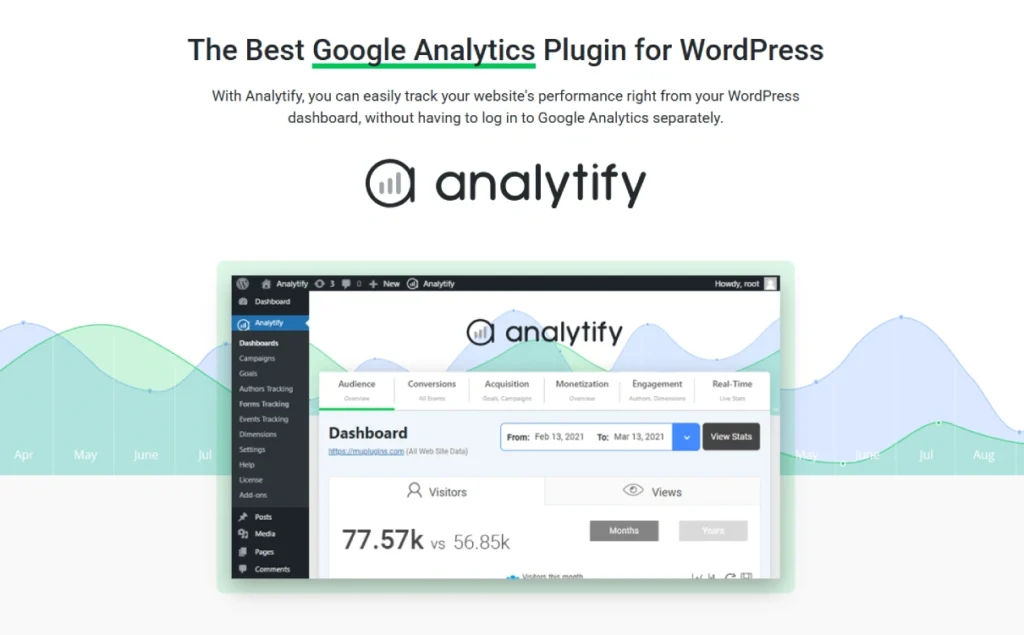
Analytify is positioned to bring GA4 Data visualization Takes you directly to the WordPress backend, eliminating the need to switch to Google Analytics so often. the free version covers the core dashboards of Visitors, Views, Locale, Top Pages, etc.; the advanced version offers Real-time Reporting, Activities (UTM) & Events, Forms, Goals/Conversions, Email Reports and other more comprehensive marketing reports. Its page-level stats can be viewed directly under the post/page edit view for individual performance.
For the e-commerce scenario, Analytify has been able to provide a more comprehensive view of the e-commerce scenario through the Enhanced Ecommerce Tracking for WooCommerce and Easy Digital DownloadsThe new version of WordPress brings key metrics such as order revenue, conversions, upsells, and checkout behavior into WordPress, making it easy to complete an operational review at the station. Recent versions have also added Video Tracking and PageSpeed Insights Gauge etc. extended Kanban.
Additionally, the plug-in has no effect on the CookieYes, Cookie Notice and other compliance plugins have built-in compatibility and provide backend System/equipment statistics、Goals Kanban vs. Front-end shortcode public statistics Ability.
Key Features
- GA4 Dashboard Direct: Centralized view of core metrics such as visitors, sessions, pageviews, geography and origin in the WP backend.
- Page-level statistics (by single article/single page): View metrics such as views, users, bounce rate, average stay, etc. directly in the post/page.
- Real-time reporting (Pro): Observe online users, sources and behaviors of the station in real time.
- Enhanced e-commerce (Woo/EDD): Track product views, add-ons, checkouts, transactions, AOV and other metrics to support e-commerce funnel analysis.
- Marketing & Conversion Tracking: UTM activity, event and goal (conversion) reports to evaluate channel placement and page conversion.
- Form Tracking (Pro): Key behaviors such as statistical form presentation, submission, etc. (for lead collection & conversion optimization).
- Automated mail reports (Pro): Supports sending site summary reports on a weekly/monthly basis for easy team alignment.
- Compliance and Compatibility: Compatible with CookieYes, Cookie Notice, supports multiple languages/translations.
- Additional capabilities:supply PageSpeed Insights Instrumentation、video tracking、User Interests (Demographics) and other Kanban items.
- Front-end short code: Specified statistical modules can be publicly displayed on the front end (if required).
Target audience and usage scenarios
- Content media/corporate website: Teams that want to see single-article data right on the editorial page and quickly assess the effectiveness of their selections and revisions.
- WooCommerce/EDD Store: Store owners who need to see GMV, conversion rate, AOV, Top products/sources and do a cycle review in the WP backend.
- Reseller / WebmasterUse Mail Report Report key metrics to clients or bosses and reduce cross-platform export costs.
- Teams looking to reduce learning costs: Not familiar with the complex interface of native GA4, but need readable charts and action clues.
Comparison of similar topics
addressee: MonsterInsights (Lite/Pro eco), Site Kit by Google (official free plugin)
✔️/❌ only indicates “whether this type of capability is built-in or covered by an official module”, different versions and add-ons may affect availability.
| Core functional items | Analytify | MonsterInsights | Site Kit by Google |
|---|---|---|---|
| GA4 Dashboard (background view) | ✅ | ✅ | ✅ |
| Page-level statistics (single article/single page) | ✅ | ✅ (Page Insights) | ✅ (Admin Bar page level) |
| Enhanced e-commerce (Woo/EDD) | ✅ | ✅ | ❌ |
| Real-time reporting | ✅ | ✅ | ❌ |
| Automated mail reports | ✅ | ✅ (Email Summaries) | ❌ |
| Form Tracking | ✅ | ✅ | ❌ |
| Customized dimensions/authors, etc. | ✅ | ✅ | ❌ |
| GDPR/Cookie Plugin Compatible | ✅ | ✅ | ❌ |
| PageSpeed Insights Instrumentation | ✅ (built-in meter) | ✅ (Site Speed Report) | ✅ (Integrated PSI) |
Rationale and sources:
- Analytify: GA4 dashboards, page-level statistics, real-time reporting, email reporting, Woo/EDD enhanced e-commerce, UTM/Event/Forms, custom dimensions, cookie plugin compatibility, PageSpeed Insights gauges, and more.
- MonsterInsights: Dashboards, Woo/EDD eCommerce, Form Tracking, Real-Time Report, Site Speed, Custom Dimensions, Page Insights, GDPR/EU Compliance & Cookie Plugin Integration.
- Site Kit: Officially integrates Analytics/Search Console/AdSense/PSI, providing basic reports and page-level views in the backend and Admin Bar; advanced marketing reports such as Woo/EDD e-commerce, form tracking, and email reports are not provided.
Discrepancies and additional explanations
- Analytify The salient points of the Article/page level readable reports, front-end shortcode disclosure statistics 与 Enhanced E-Commerce Reports, facilitating the station to complete a closed-loop analysis from content to transaction.
- MonsterInsights Broader ecological coverage (e.g., extended reporting on videos, affiliate links, user journeys, etc.) for teams that need a richer marketing dimension.
- Site Kit The best thing about it is that it's free and “officially integrated”, so it's good for getting started and checking basic trends; in-depth e-commerce/conversion analytics often still need to be supplemented by third-party plug-ins.
User Feedback Highlights
- Page-level insights are clear: Users praised the ability to see more in-depth information under each article, eliminating the need for complex lookups in GA.
- Understand key data without logging into GA: More friendly to customers/team members who are not familiar with GA.
Suggestions for pairing with other plugins/themes
- e-commerce:and WooCommerce 或 Easy Digital Downloads Used together, it opens up enhanced e-commerce tracking to form a full-link analysis from browse-add-checkout-close.
- form (document): Enable form tracking (Pro) for conversion monitoring for lead collection/registration/inquiry (common form plugins are accessible).
- complianceMatching CookieYes 或 Cookie Notice Manage consent and script loading to reduce compliance risk.
Remarks and Adaptation Suggestions
The above features are based on the plug-in version and enabled modules; first-time deployments are recommended to complete the GA4 Connection & Basic Kanban CalibrationThen turn it on gradually. E-commerce/Events/Forms/Email and other modules in order to verify the integrity and consistency of the data.
Frequently Asked Questions (FAQ)
What is Analytify? What can it do?
Analytify is a program that puts Google Analytics 4 (GA4) Data carryover plugin for WordPress backend and frontend presentation with support for page-level statistics, real-time data, email reports, and multiple extensions (e-commerce, forms, campaigns, authors, etc.). Integration process is simple, no need to write code.
Is GA4 supported and does Universal Analytics (UA) still work?
Analytify provides GA4 integration and reporting views.UA was launched on 2023-07-01 stops processing new data from 2024-07-01 Access will be phased out and a full migration to GA4 is recommended.
How do I connect my website to GA4?
In WordPress backend, you can complete the Google account authorization through Analytify's guide and select the GA4 attribute. It is also recommended to use your own API key to complete the authorization configuration.
Why does the data not match the GA backend or WooCommerce reports?
Common causes include GA4 standardized reports have a 24-48 hour processing delayThe following are some of the issues that may have been resolved during the troubleshooting process: adblocking/no consent cookies used by visitors, cross-domain or currency settings, order status discrepancies, filtering settings, time zone inconsistencies. Troubleshooting starts with checking that the GA4 events and e-commerce parameters are correct and waiting for data processing to complete.
Support WooCommerce / Easy Digital Downloads eCommerce statistics?
Support, enabled through e-commerce extensions Enhanced e-commerce(product clicks/add to cart/checkout/transactions etc.) and view key metrics in the WP backend. Also provides EDD Extended for digital merchandising statistics.
Can you track forms, activities (UTM) & author performance?
You can.Forms Extended support for major form plug-ins (e.g. Gravity Forms, Contact Form 7, WPForms, Formidable, etc., recent versions also support Fluent Forms);Campaigns Extended for activity/UTM tracking;Authors Extended summary author dimension performance.
“What do you mean by ”goal/transformation"?
In GA4, the “goals” of the UA era corresponded to “Key events / ConversionsAnalytify's related Kanban/Extensions are displayed and summarized based on key events/transformations from GA4.
Are there real-time stats and email reports?
Available. The Professional Edition offers real time data; and also through the Email Notifications Configure regular emails to send metrics such as visits, sources, GSC clicks/CTR, etc. to a specified email address.
Is it possible to display some of the stats in the frontend for readers to see?
Yes. (Pass) Front-end statistics Switch or ShortcodesThe GA metrics can be displayed in posts/pages for selected GA metrics or lists (e.g. popular countries/cities/social traffic, etc.), with support for both simple and advanced shortcodes.
Can you exclude stats for admins or specific pages?
Can. It is possible to press the user role Exclusion tracking and support for the Backend or frontend Specify page ID exclusion statistics to avoid “internal traffic” interference.
Is WordPress Multisite supported?
Support. Multi-site environment can be separately for the sub-station to authorize and view statistics.
Is it GDPR / Consent compliant?
Analytify offers the same features as the common Cookie Consent Plugin(e.g., CookieYes, Cookie Notice & Compliance) compliant programs that can load tracking after user consent; and support for IP Anonymization etc. settings.
Does it affect site loading speed? Is the data cached?
The plugin mainly renders reports in the background and allows for report data to be 24-hour cache to reduce API requests; minimal impact on frontend performance.
Is it OK to use with Google Tag Manager (GTM)?
Yes. You can choose to deploy GA4 events with e-commerce tracking via GTM, while letting Analytify take care of visualizing the reports (to avoid duplicate code insertion).
Kanban is blank or reporting an error, possibly GA4 Data API quota?
Yes. GA4 Data API Tokenized/Concurrent/Hourly/Daily etc. quota limits, complex or high-frequency requests may trigger thresholds. It is recommended to turn on report caching, staggered viewing, or streamlining of dimensional metrics.
Who can view these reports in WordPress?
can be configured in the settings for the Different user roles Control visibility of backend dashboards with article-level stats (segmented dashboard access is available in the Pro version).
Is there support for multiple languages and WPML?
Analytify with WPML Maintain compatibility and provide multi-language translation support.
How to minimize missing statistics due to ad blocking?
Analytify Professional offers Locally hosted GA4 scripts(filenames change daily), which helps to reduce the probability of interception; it is also recommended to work with consent management and event validation.
Do I need to set up additional settings in GA4 for Ecommerce Enhanced Statistics?
Required. Please send in GA4 as per the e-commerce event specification view_item、add_to_cart、begin_checkout、purchase and other events (WooCommerce/EDD extensions will assist) to enable full funnels with revenue metrics.
Can it co-exist with other GA plugins like Site Kit/MonsterInsights?
Repeated insertion of GA4 codes is not recommended and is likely to cause Repeat Pageview/Event.. If coexistence is required, please keep only one tracking source and use the other only for report presentation.
hint: After the first access, if the standard report is low/delayed for a short period of time, this is a normal GA4 processing mechanism; the real-time report can be used to quickly verify that accesses and events have been captured.



