


Download Version
- Client Portal For WordPress v5.4.2
The [client-portal] shortcode can be added to any page and logged in users will be redirected to their private page when they visit it. For user login and registration, we recommend using the free Profile Builder plugin. You can then use the [wppb-login] shortcode on the page where the [client-portal] shortcode is located.
Client Portal For WordPress Introduction
Product Overview
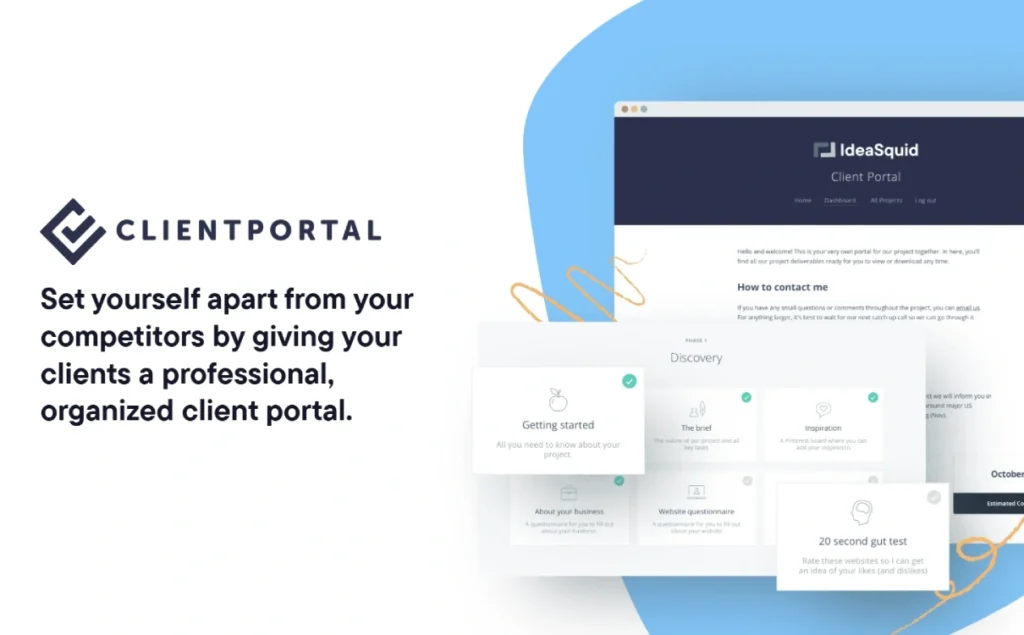
Client Portal for WordPress is a lightweight plugin for WordPress websites designed to help businesses and professionals of all types easily create and manage highly professional and organized client portals on their own platforms. . The development of the plug-in aims to completely solve the widespread pain points such as scattered project files, inefficient communication and difficult centralized management of customer information. . By providing a centralized platform, it aims to significantly reduce the problem of repetitive inquiries and document loss due to fragmented information, thereby improving operational efficiency and customer satisfaction.
With Client Portal, users can create an unlimited number of independent portals per client or per project. . This flexibility is especially important for clients who need to manage multiple projects or have a large number of recurring operations, as it ensures that each project has a separate, highly organized and dedicated space. All relevant information such as invoices, contracts, deliverables, training videos, calendar events and online forms can be securely stored in one place. This centralized approach not only drastically reduces the number of “how do I find that file? This centralized approach not only drastically reduces the number of ”how do I find that document?" emails, it also ensures the privacy and security of sensitive information, as access to portals and documents is restricted to authorized users and their corresponding clients. .
The plugin is designed to be “super simple” and lightweight. This means that it is extremely easy to operate and can be quickly deployed and used without any development knowledge. This feature is designed to dramatically save users' time and effort, allowing them to focus on delivering excellent service and core business development rather than tedious technical setups! The Client Portal for WordPress is a powerful tool for businesses to optimize their customer experience. Ultimately, Client Portal for WordPress is deployed to dramatically enhance a company's professional image, optimize the customer experience, and save companies valuable time and effort in order to stand out in a competitive marketplace! .
Key Features
- Unlimited Customer Portal: The plugin allows users to create private portals for each client or project, supporting an unlimited number of portals. This feature is designed to flexibly respond to diverse business needs and repetitive tasks, ensuring that content is highly customizable and organized, thereby increasing productivity and customer satisfaction.
- One-stop project asset management: Client Portal is designed to centralize the storage of all project-related documents, including invoices, receipts, contracts, deliverables, etc. This centralized management is designed to help users say goodbye to scattered email attachments and information. This centralized management is designed to help users say goodbye to email attachments and scattered information, and achieve efficient, organized document filing and access, significantly reducing the time spent searching for documents.
- Secure and private file sharing: The plugin is designed to provide a highly secure mechanism for uploading private documents and portal access. Its purpose is to ensure that sensitive and confidential information is viewed only by authorized users and their corresponding customers, thereby safeguarding data security and privacy and building customer trust.
- Smart notifications with real-time updates: The system is designed to automatically notify customers when their portal content is updated, and users can also receive reminders of customer actions. This two-way notification mechanism is designed to ensure that both parties are synchronized, improving communication efficiency and reducing information lag.
- Rich content embedded support: Users can easily embed Google/Outlook calendars, training videos, online forms, agreements, contracts and more. This feature is designed to provide customers with comprehensive information support and a convenient interactive experience, reducing repetitive explanations and communication costs.
- Enhance the brand's professional image: Client Portal is designed to help organizations stand out from the competition by creating a clean and professional interface for customer interaction. The goal is to provide customers with an exceptional five-star service experience, which in turn enhances brand loyalty and word-of-mouth.
- Minimal operation, no code required: Client Portal is designed to be lightweight and simple to set up and use without any development knowledge. This feature is designed to save users' time and effort, allowing them to get started quickly and focus on their core business, lowering the technical barrier.
Target audience and usage scenarios
Client Portal for WordPress is designed for any WordPress website that needs to efficiently and securely communicate with clients or users and centrally manage project assets. The value of the plug-in is that it brings together dispersed client information and project data into an easily accessible centralized platform. The value of the plugin lies in its ability to bring together dispersed client and project information into a centralized platform that is easily accessible, thus solving the problems of information clutter, miscommunication and lack of professional image. . It can especially bring significant value to the following types of businesses and professionals:
- Agencies & Digital Creatives: Agents can utilize Client Portal to provide a dedicated collaboration space for each client or project. This is designed to help them easily share designs, copy, project progress updates, contracts and invoices to improve client satisfaction and project delivery, and to reduce email exchanges and missing information.
- Accountants & Tax Professionals: For accountants and tax professionals, Client Portal is designed to provide a secure distribution channel for financial reports, tax documents, and invoices. They can also update the status of their tax returns in real time, designed to ensure that clients have the information they need at their fingertips, streamline communication, and enhance the security of sensitive financial information.
- Educational Institutions & Schools: Schools and educational institutions can create parent portals for sharing class schedules, notifications, student performance reports and important forms. This is designed to enable easy and private communication between home and school, ensuring that parents are kept informed of student learning and school news.
- Lifestyle & Business Coaches: Coaches can centrally provide training videos, learning materials, homework templates and progress tracking . This approach aims to reduce repetitive Q&A and help students acquire knowledge and guidance in a systematic way, thus enhancing teaching efficiency and students' learning experience.
- Law Firms: Law firms are able to securely share case documents, legal agreements, client notes, and provide updates on the progress of their cases. This is designed to ensure the privacy and traceability of sensitive legal information while providing clients with transparent and easy access to case information.
- Other service-oriented businesses: Any business that provides repetitive services and needs to share documents or information with clients on a regular basis, such as consulting firms, freelancers, web developers, etc., can improve the quality of their services and operational efficiency with Client Portal. The plugin is designed to help these businesses build more professional and efficient customer service processes that save time and increase customer trust.
Comparison of similar plugins
In the market for WordPress customer portal solutions, Client Portal for WordPress stands out for its unique positioning. It was designed to provide a lightweight, focused and highly integrated native WordPress customer portal experience! Client Portal Client Portal demonstrates significant advantages in terms of native integration, ease of use, feature focus, and cost-effectiveness over other common alternatives on the market.
Core strengths:
- Native WordPress integration: Client Portal is a plugin built entirely on WordPress, meaning that all client data and portal content is hosted directly on the user's website. This native integration is designed to provide users with the highest level of data control and a seamless WordPress ecosystem experience. This is in contrast to cloud-hosted solutions such as SuiteDash or Clinked, which typically store data on third-party servers and may have limited functional integration, potentially leading to data sovereignty and platform dependency issues.
- Focus and minimalist design: In contrast to “all-in-one” solutions such as SuiteDash or Jetpack CRM, which integrate CRM, project management, invoicing, and more, Client Portal focuses on delivering pure, efficient customer portal functionality. Described as “super simple” and lightweight, it is designed to avoid complex configuration or redundant functionality, making it ideal for organizations that simply need a powerful, easy-to-use customer portal, rather than a full-blown business management system. This focus is designed to ensure the stability of its core functionality and the simplicity of the user experience.
- Unlimited portal flexibility: Client Portal allows users to create an “unlimited number of portals” for each client or project. This unique feature is especially important for agents, consultants, etc. who have a large number of recurring or multi-project clients. It is designed to ensure that each project has a separate, highly organized and dedicated space, thus improving project management efficiency and client satisfaction, and avoiding information confusion.
- Cost-effective and autonomous: As a WordPress plugin distributed under the GPL, Client Portal is designed to provide more autonomy and long-term value. Users can avoid the ongoing costs of many cloud services with monthly subscriptions and gain greater freedom of customization. This model is designed to provide users with a more affordable and flexible long-term ownership experience.
The following table is intended to further compare the core features of Client Portal with other common alternatives:
| Plugin Name | Type | Core Functionality | Key Strengths | Client Portal's Advantage |
|---|---|---|---|---|
| Client Portal | Native Plugin | Customer portal, project file sharing, notifications, content embedding | Lightweight, focused, easy to use, unlimited portals, data self-control | Native Integration, Highly Focused, Unlimited Portals, Cost Effective |
| WP Customer Area | Native Plugin | Private content management, basic customer portal | Easy to set up, free basic version, suitable for simple needs | Client Portal is richer in functionality and more professional in interface. |
| SuiteDash | Third-Party Cloud | All-in-one CRM, customer portal, project management, invoicing | Powerful, highly integrated, cloud-hosted | Client Portal data self-control, lighter, no monthly fee burden |
| Jetpack CRM | Third-Party Integration | CRM, customer portal, sales, invoices, tasks | Powerful CRM, WooCommerce Synchronization | Client Portal focuses on the portal experience, more concise |
User Feedback Highlights
Client Portal for WordPress is trusted by more than 8,000 organizations worldwide. , users have been raving about the business enhancements it has brought. These positive feedbacks aim to demonstrate the effectiveness of the plugin in solving real business pain points and improving customer satisfaction. Below are some selected user testimonials that aim to demonstrate its core value:
- “Client Portal was the saving grace, the missing link for our creative agency!” (Jennifer Ann Love)
- This evaluation is intended to emphasize that the plug-in addresses a long-standing pain point and is a key tool that is essential to business operations. It demonstrates Client Portal's ability to fill in the gaps in an organization's client management process, making its operations more complete and efficient, especially for creative agencies that require highly organized collaboration.
- “My clients were impressed with the organization and ease of use of the content, fantastic!” (Tasha Hussey)
- This feedback is intended to be a direct reflection of the plugin's excellence in enhancing the customer experience, content organization and interface navigation. It demonstrates that Client Portal is not only business owner friendly, but also easy and enjoyable to use for its end-users (customers), resulting in increased customer satisfaction and loyalty.
- “The platform is extremely simple, easy to customize, and performs well on mobile. It allowed us to launch our new customer dashboard three weeks early!” (Richard Walsh)
- The review aims to highlight the plugin's ease of use, high degree of customizability, and excellent mobile compatibility. More importantly, it highlights Client Portal's ability to dramatically accelerate project go-live, delivering tangible efficiency gains and time savings for users, which is important for organizations seeking rapid deployment and flexibility to adapt.
Suggestions for pairing with other plugins/themes
Client Portal for WordPress comes as a native WordPress plugin designed to work seamlessly with the existing WordPress ecosystem. Its functionality can be further extended by using it in conjunction with other popular plugins and themes to build a more powerful and comprehensive client management solution. This synergy is designed to maximize the user's investment in the WordPress platform and provide a unified, efficient experience for customers.
- Page Builders: Client Portal is designed to create standard WordPress pages as client portals. As such, it is compatible with major page builders such as Elementor, Divi, Beaver Builder and others. Users can take advantage of the powerful drag-and-drop capabilities of these tools to design and customize the page layout and visual style of the client portal to create a professional client interface that is fully aligned with the brand's image. This pairing is designed to ensure that the portal is not only powerful, but also highly visually aligned with the brand, enhancing professionalism.
- E-commerce Plugins: The plugin can be used in conjunction with e-commerce solutions such as WooCommerce or Easy Digital Downloads (EDD) . For example, after a customer completes a purchase, a dedicated portal can be automatically created for them to deliver digital products, provide post-sales support, share exclusive resources or manage subscription information. This integration is designed to enhance the post-purchase customer experience, seamlessly linking the sales process to customer service, thereby increasing customer loyalty and repeat purchases.
- Membership Systems: Client Portal is designed to work perfectly with MemberPress, ARMember, Simple Membership and other membership plugins. In this pairing, the membership system takes care of user registration, login and rights management, while the Client Portal provides a highly personalized, content-rich private space for each member (client). This space is used to manage and access project documents, communication records and proprietary content. This division of labor is designed to ensure rigorous user authentication and content access control while providing a customized information center for each client.
- Form Builders: Client Portal supports embedding all kinds of content inside the portal, including forms. Therefore, it works with popular form plugins such as Gravity Forms, Contact Form 7, WPForms and others. Users can embed various forms within the customer portal for customers to submit requests, feedback or upload documents, aiming for easier data collection and interaction. This is designed to streamline the exchange of information between customers and the business and increase efficiency.



