Download Version
- ColorMag Pro v5.1.4
ColorMag Pro Core Introduction
Product Overview
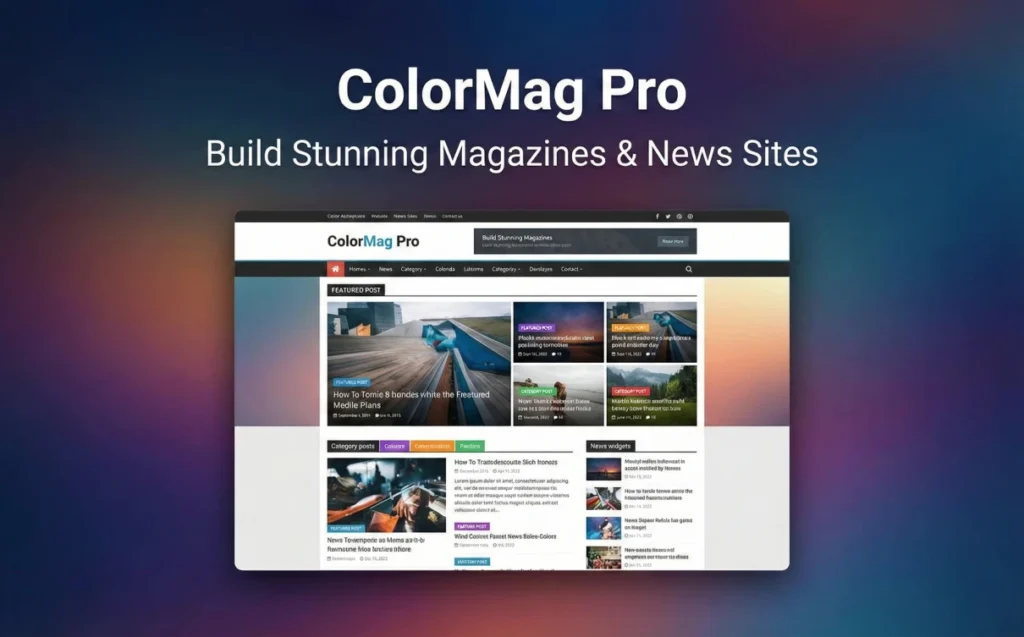
ColorMag Pro is well positioned:Providing a reusable magazine-based information architecture for the Content Distribution Web site.--You can use ready-made Starter Templates to start with, and then use the magazine layout blocks to quickly assemble the front page skeleton of “Headline + Category + Featured + List Stream”; at the same time, you can incorporate the “Reading Experience” and “Traffic Realization” into the layout design through modules such as Ads, Ticker, and Breaking News. At the same time, through the advertising component, news ticker and Breaking News modules, the "reading experience" and "traffic realization" are incorporated into the layout design. For the operator, it solves the problem:Home page layout build efficiency is low, content block reuse is difficult, ad space/recommendation space is not systematic, theme customization needs to change the codeand other common pain points.
Key Features
Magazinized Layout Capability: Designed around the grid, columns, lists and other structures commonly used in news/magazine sites, and combined with the Magazine Blocks idea to make it easy to make a channelized home page.
Starter Templates Quick Start: Provide importable site templates/demo site ideas to reduce the cost of building from 0 to 1.
Header Builder (more like an “editor” header builder): A componentized approach to header areas such as navigation, search, buttons, etc. is suitable for content sites with a higher information density header.
Advertising and Realization Components: Provide ad-related widgets/ad space capabilities to make it easier for content stations to incorporate display space into the layout system.
Breaking News / News Ticker: Suitable for media stations to do “newsletter” “breaking / top columns”, to enhance the sense of home page information update.
SEO and Speed Oriented: Emphasis on SEO-friendliness, loading speed and modern experience at the theme level.
Compatible with mainstream page builders: can work with common builders (for quick layout of feature, landing or section pages)
Content site common experience items: More complete basic capabilities such as top/sticky navigation, responsive, translation and RTL.
Target audience and usage scenarios
News Portal / Vertical Media: Needed a standard news structure of “Headlines + Channels + List Streams + Alerts” and wanted to reserve ad space and referral space.
Content-based company website (information center)The official website is brand-oriented, but the “newsroom/blog” should be as professional as the media section.
Theme Operation Station / Content Aggregation Station: The need to quickly stack “feature pages/collection pages/channel pages” in blocks and frequently adjust the layout.
Bloggers who want to do light cash: I want “ad space that doesn't break the experience” and make the ad/recommendation module a controllable component instead of stuffing code all over the place.
Comparison of similar plugins
| Core functional items | ColorMag Pro | Newspaper (tagDiv) | JNews (Jegtheme) | Kadence Theme |
|---|---|---|---|---|
| News/magazine-specific layout module (grid/channelized home page idea) | ✅ | ✅ | ✅ | ❌ |
| Starter Templates / Import Demos with One Click | ✅ | ✅ | ✅ | ✅ |
| Header Builder (visual construction of headers) | ✅ | ✅ | ✅ | ✅ |
| Advertising/marketing module (ad space or Google Ads integration, etc.) | ✅ | ✅ | ✅ | ❌ |
| Breaking News / News Ticker (news ticker / breaking module) | ✅ | ❌ | ❌ | ❌ |
| AMP support (clearly labeled) | ❌ | ✅ | ✅ | ❌ |
| Multilingual / RTL (explicitly labeled) | ✅ | ✅ | ✅ | ❌ |
| E-commerce related competencies (shopping cart/e-commerce elements, etc.) | ✅ | ✅ | ✅ | ✅ |
Differences and selection recommendations
ColorMag Pro's “unique/more prominent points”The emphasis is on the combination of “newsletters/blasts + ad components in the media station layout”, and making these directly usable modular capabilities for content stations to rapidly develop their “structure and cash position”.
Advantages specific to alternatives:
- Newspaper: The template library and component ecosystem is very large and explicitly supports AMP, Google Ads/AdSense, RTL, etc., and provides Header/Fooer Builder and a lot of importable design resources.
- JNewsThe emphasis is on the “Publishing Family Bucket”, which includes a large number of Demos, one-click import, Header Builder, Google AMP, JSON-LD schema, advertising/marketing modules, content wall/subscription, and other media-operation oriented feature packs.
- Kadence: More general-purpose and performance-oriented, focusing on “Fast + Header Builder + Starter Templates”, suitable for lighter content or branding sites, but media-specific modules and advertising/newsletter modules usually need additional programs to make up for it.
User Feedback Highlights
Layout specialization: “This theme instantly gives my site the texture of a large news portal, especially the widget configuration on the homepage is very intuitive.”
Responsiveness: “Even after loading a lot of images and articles, the access speed on mobile is still surprisingly fast.”
Easy to get started: “No need to know code, you can adjust almost any visual detail through the customization panel, very newbie friendly.”
Suggestions for pairing with other plugins/themes
Page BuilderWhen you make special page/activity page/landing page, you can use Elementor and other builders to improve the efficiency of layout; while the home page “channelized information flow” is more suitable for long-term operation with the theme's own magazine block system.
SEO Plugin: Recommended with Rank Math / Yoast, etc. for title templates, structured data strategy and indexing management (the theme emphasizes SEO-friendly, but SEO operations still require plugin layer configuration).
Caching and Performance: The content station is updated frequently, it is recommended to work with mainstream caching plug-ins and image optimization solutions, taking into account Core Web Vitals and editing experience.
Ad Scheduling and TrackingIf you need more complex ad scheduling / AB test / crowd placement, you can access professional ad management plug-ins on top of the theme “ad space capabilities” to form a combination of “layout + placement system”.
Frequently Asked Questions (FAQ)
1. What type of website is ColorMag Pro suitable for?
It is more suitable for news portals, online magazines, content publishing/channel blogs and other “information flow + columnization” structure of the site, the theme itself is designed around the magazine/news site layout needs.
2. Does ColorMag Pro support the Gutenberg block editor?
Support. Its feature comparison page is clearly labeled Gutenberg Compatible, which is suitable for building page content and section structure in blocks.
3. Is there an importable site template/demo site that can be used to quickly build a home page?
The WordPress theme directory page mentions that ColorMag has multiple starter demos; the Free vs Pro comparison page also lists Pre Built Demos, and shows that the Pro version offers a larger number of pre-built demos.
4. What is the main addition of the Pro version over the free version?
The official FAQ summarizes it as follows: the Pro version includes more customization options, templates, widgets, and more complete support; you can also see in the Free vs Pro table that Pro unlocks more capabilities in terms of header functionality, the number of demos, and more!
5. Is it possible to customize the site header (logo, menu, search, buttons, etc.) without writing code?
ColorMag offers Header Builder, a visual drag-and-drop way to build/adjust the header structure, with styling and layout settings in the WordPress customizer.
6. What are the usual components that can be placed in a Header Builder?
According to its features, common components include: Site Title and Logo, Main Menu/Multi-Level Menu, Search, Social Icons, Buttons, Custom HTML, Widgets, and more.
7. How do I turn on and set up the News Ticker / Breaking News?
The theme provides News Ticker and gives customization path (e.g. Appearance → Customize → Header → News Ticker). It also supports setting display position (Top Bar / Below Navigation), content filtering (latest articles / specified categories), title tags, font layout, animations and so on.
8. Does ColorMag support ad space/ad components? Is it suitable for content liquidation?
The WordPress.org theme description mentions that the layout provides multiple ad spaces; the open source repository description also emphasizes the use of these ad spaces for display and cash.
9. Is it compatible with WooCommerce (want to do content + e-commerce/peripheral selling)?
Free vs Pro lists WooCommerce Compatible in its feature list, and its repository description mentions that you can rely on WooCommerce compatibility to sell your products and services.
10. After I imported Magazine Blocks' homepage layout, why can't I change the homepage in "Widgets"?
This is a common situation: if you import a Magazine Blocks layout, the home page content often needs to be adjusted in the Page Editor (Edit Home Page), instead of continuing to change the “Home Module” in Widgets. (There is a clear guideline in the official support reply: go to backend Pages to edit Home page to update the content.)
11. Can ColorMag be used with the Magazine Blocks plugin?
The Magazine Blocks plugin page clearly lists its compatibility with several themes and includes ColorMag in the examples.
12. Does it support responsive and mobile access experience?
Support. Its repository introduction lists features such as Responsive Design, which is suitable for content stations to maintain readability and layout stability on the mobile side.
13. Is multilingualism/RTL (right-to-left languages) supported?
Support. The repository description clearly states Translation & RTL Ready.
14. Does the theme emphasize SEO friendly and basic performance experience?
Its warehouse introduction lists SEO Optimized as one of the key features and also emphasizes cross-browser compatibility, responsiveness, and other basic experience items.