


- Unlimited access to members-only content
- Member discounts on paid items
- More Membership Benefits
Confirm Purchase
Download Version
- Industrie v1.5.4
Industrie Core Introduction
Product Overview
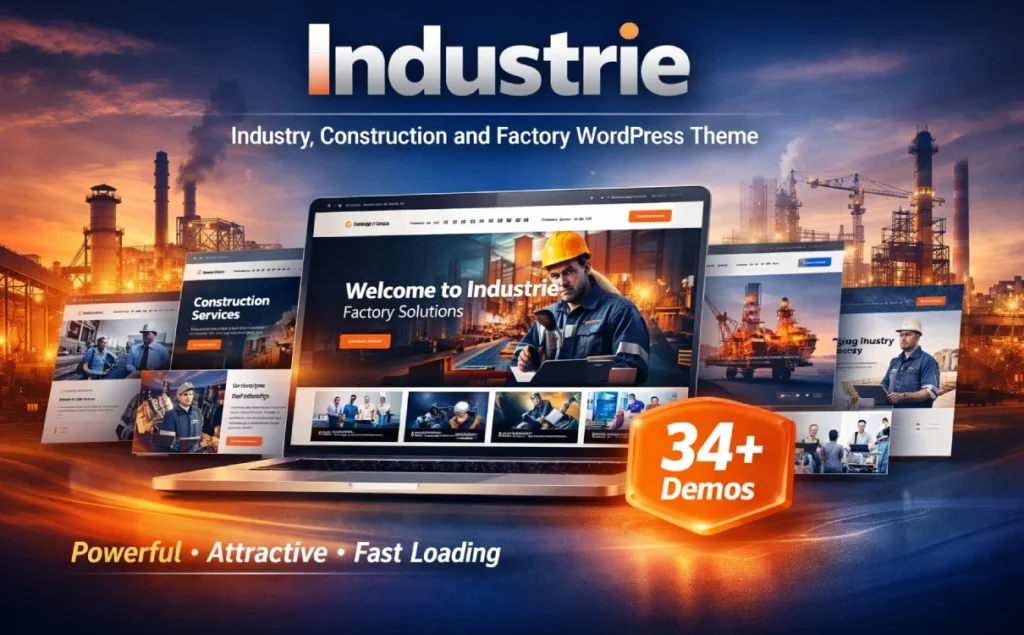
If your client is in the “Industrial/Manufacturing/Engineering/Construction” category, the website is usually stuck on two things:Industry Trust Presented(qualifications, team, projects, data) with the Inquiry Conversion Path(Industrie's idea is to make these “high-frequency modules for industrial sites” into reusable pages and components: you can use Elementor to build a page by dragging and dropping it directly, and use one-click import to quickly get a complete skeleton of the site, then replace the content with your own products, services and cases and go live. You can then replace the content with your own products, services, and case studies to go live.
It also covers the common columns of industrial station (team, blog, project/portfolio, customer evaluation, etc.), and provides a large number of ready-made inner pages and element libraries, which is suitable for teams who want to make their official website “look professional, have a complete structure, and can be continuously updated” in a shorter period; for foreign trade stations, multi-language and RTL support, For foreign trade sites, multi-language and RTL support, WooCommerce compatibility (including catalog display requirements) are also more conducive to expanding business scenarios.
Key Features
Elementor Visual Building: Drag-and-drop editing, WYSIWYG, and lower customization thresholds.
34+ Full Demos (Multi-Page + Single-Page)The “pick one and go” approach is easy to adapt to different branches and styles of industry.
500+ Inside Page Templates + 70+ Elements: No more “Service Page/Case Page/About Us/Contact Us” from scratch.
Elementor head/bottom build: Navigation, footer, and CTA areas are easier to harmonize and reuse.
55+ Theme Exclusive Premium Addons: Covers common industry modules such as Teams, Portfolio, Services, Counters, Evaluations, Blog Showcase and more.
WooCommerce Compatibility + Cataloging Claims: Can do both e-commerce and “product display catalog site”.
WPML Multilingual + RTL Demo: More suitable for foreign trade, multilingual and Arabic/Hebrew oriented sites.
Responsive & Retina Optimized: Adaptation for mobile/tablet/desktop display.
Contact Form 7 Integration: Easy to quickly build inquiry forms and lead collection.
Bootstrap 5.x, SEO friendly and other basic engineering items: Robust base for industrial business stations.
Updates and compatibility maintenance are more active: Page markup adapted to WordPress 6.x / Elementor 3.x / WooCommerce latest, and continues to iterate.
Target audience and usage scenarios
population (esp. of a group of people)
- Industrial manufacturing enterprises: want to quickly “professionalize” the official website, can show the production line/capability/cases/qualifications
- Engineering/construction/architectural firms: need project case deposits, team and service system demonstrations
- Mechanical equipment/automation/robotics related: emphasizing product solutions and industry scenario landing
- Foreign Trade Team/Multilingual Site Operators: WPML Multilingual and RTL Orientation Required
Typical usage scenarios
- Corporate Brand Official Website (Home + About + Services + Cases + News + Contact/Inquiry)
- Industrial product catalog site (WooCommerce for product structure, but mainly “display/inquiry”)
- Multi-industry substation/multi-landing page matrix (use single-page Demo to quickly make advertisement landing page)
- Bidding/qualification oriented official website (combination of team, certificates, milestone data, customer evaluation modules)
Comparison of similar plugins
| Core functional items | Industrie | Industo | Industrium |
|---|---|---|---|
| Elementor Visual Building | ✅ | ✅ | ✅ |
| WooCommerce Compatible (with product/service selling or catalog) | ✅ | ✅ | ✅ |
| Multilingualism (WPML/translation-ready) | ✅ | ✅ | ✅ |
| Prefabricated Demo quantities at 30+ levels | ✅ | ❌ | ❌ |
| 500+ leveled inserts/template libraries | ✅ | ❌ | ❌ |
| 55+ Theme Exclusive Premium Addons (clearly labeled) | ✅ | ❌ | ❌ |
Basis of comparison:
Industrie's strengths are more on the side of “Scaled Template Library + Industry Coverage”.”: The official page clearly emphasizes 34+ Demos, 500+ Inserts, 55+ Addons, and Elementor header/footer building capabilities, which are more suitable for projects that “want to be fast, full, and like a mature industrial website”.
Industo is characterized more by “lean demos + clear plugin compatibility instructions”.”: The page emphasizes 4 Demos, Elementor, WooCommerce/WPML compatibility and header/footer build support, suitable for users who don't pursue a huge number of templates, but want to build a set of industrial stations quickly.
Industrium is characterized as more of a “more generalized framework for industrial enterprise sites”.”: Emphasizes that Elementor editing is compatible with WooCommerce and has a list of features (e.g., 13 homepage layouts, etc.) for teams looking for a stable traditional enterprise site structure.
User Feedback Highlights
Design specialization: “The layout is very industrially intuitive, and the color scheme and font choices make our facility look like an industry leader.”
Getting started is quick: “Even without programming basics, with one-click import and Elementor, I was able to build my initial site in half a day.”
Stable performance: “Neat code and performs very well in search results when paired with the SEO plugin.”
Suggestions for pairing with other plugins/themes
Elementor / Elementor Pro: Industrie itself uses Elementor as its core editing method, but if you need more forms, popups, and site-wide templates, you can extend it with Elementor Pro (good for inquiry funnels and landing page A/B).
WooCommerce (catalog site/e-commerce)WooCommerce is the most direct match if you want to do “Product Center + Category Filtering + Product Detail Pages + Inquiries/Orders”; the Industrie page also explicitly mentions WooCommerce compatibility and cataloging requirements.
WPML (multilingual station): Suitable for EN/ES/FR/AR and other multi-language industrial foreign trade station; Industrie markup WPML support and provide RTL Demo.
Contact Form 7: Industrie's Addons list includes the Contact Form 7 integration, which is ideal for quick go-live “Request for Quotation/Appointment/Project Inquiry”.
SEO plugins (Rank Math / Yoast etc.): Mark SEO Friendly at the theme level, with SEO plugins for structured headings, breadcrumbs, sitemaps and multi-language SEO, it will be more conducive to indexing and ranking.
Frequently Asked Questions (FAQ)
Q1: What type of website is Industrie good for?
It is mainly oriented to industry, factories, manufacturing, engineering construction, machinery and equipment, energy/oil and gas, laboratories and other enterprises official website scenarios, providing a complete set of Demo and a large number of inner page templates, suitable for quickly building a “company profile + service capabilities + project cases + team qualifications + inquiries into the conversion of the structure of the enterprise station.
Q2: What page editor does it use? Do I need to write code?
The theme is based on Elementor as the core visual construction method (drag and drop, real-time editing), positioning is “no code can also complete most of the page construction and layout”.
Q3: Is there a one-click import for Demo and does it include images/icons after import?
Supports One Click Demo Import, and states that the demo import includes images and icon materials (which is good for you to import and directly replace with your own branded content).
Q4:Demo import stuck/failed, how to troubleshoot usually?
Class problems are mostly related to host resources or limitations, and it is recommended to troubleshoot them in turn:
Increase PHP execution time/memory limit (common when importing a large number of pages)
Temporarily disable caching/security plugins and turn them on again after the import is complete
Ensure that Elementor is enabled with theme companion components (see next article)
Also, the topic has been mentioned several times in the changelog as a compatibility fix for “One Click Import/Elementor Kit Import”, and keeping the version up to date usually reduces import exceptions.
Q5: What supporting components/plug-ins need to be installed? What happens if I don't install it?
Theme pages explicitly contain a large number of theme-specific elements (e.g. 55+ Addons, 70+ Elements), and there have been several updates/compatibility fixes for Industrie Addons and RS Header Footer Builder in the update logs; if you don't enable these companion components, it is common to see some Elementor widgets missing, headers and footers not editable or styled consistently. If these companion components are not enabled, it is common that some Elementor widgets are missing, headers and footers are not editable or inconsistently styled.
Q6: Can header/footer be edited with Elementor?
Yes, you can. The theme emphasizes with Elementor Header & Footer Builder, i.e. use Elementor to manage header/footer structure and style.
Q7:Does it come with Child Theme? Why is child theme recommended?
With child theme. The advantage of using a child theme is: the customizations you make (functions.php, template fine-tuning, style overrides) won't be overwritten when the theme is updated, and it's more suitable for long-term maintenance and secondary development.
Q8:Is it compatible with WooCommerce? Can I just do “Product Catalog Display” without e-commerce ordering?
It is compatible with WooCommerce and clearly mentioned with WooCommerce Catalog Feature. Therefore, it can be used for normal e-commerce as well as “product display + inquiry” industrial catalog site.
Q9:Does it support multi-language? Can I do RTL site like Arabic?
Supports WPML multi-language with RTL Demo (suitable for right-to-left layout for Arabic/Hebrew etc.).
Q10: How about the mobile adaptation? Do I need to make a separate mobile page?
The theme emphasizes “Fully Responsive / Mobile-friendly”, generally do not need to do a separate mobile site; you can do in Elementor's responsive view of the key modules for mobile spacing, font size, arrangement of fine-tuning.
Q11:Can I change the color scheme, change fonts, upload custom fonts?
Can. Theme emphasis can be done in the theme settings / Elementor Kit color and style uniform adjustment, and support Google Fonts and custom fonts upload (suitable for branding font system).
Q12: Is there a built-in form/subscription integration (e.g. contact us, email subscription)?
It supports the use of common plug-ins, the demo site features also listed Mailchimp Integrated and other capabilities; used for inquiries “Contact Us/Quote” form with the general form plug-ins can be quickly landed.
Q13:What can I do if I can't open the Elementor editor and the style of the element is messed up?
Prioritize three things:
Updated Elementor and theme to compatible versions (page notes continued adaptation to WordPress 6.x, Elementor 3.x, WooCommerce latest)
Make sure that the Theme Package Addons/Header and Footer build components are enabled (there have been several compatibility fixes around these components in the update logs)
Clearing the cache and troubleshooting cache/compression conflicts (especially JS merges, delayed loading class settings)
Q14: Will the theme update affect the changes I've made? How can I update it more securely?
If you make code-level changes, it is recommended to put them into child themes or custom plugins; backup before updating, and verify key pages (home page, service page, case page, product catalog page, inquiry form) in the test environment. The theme update log shows that it has been doing compatibility and plugin updates (e.g. Revolution Slider, Addons, etc.), so “backup before updating” will be more stable.
Q15:How about SEO? What else do you need to do to optimize?
Theme features emphasize SEO Friendly, structured enterprise station page modules (services/cases/blogs/evaluations, etc.), suitable for industry content and case precipitation; the real SEO effect still depends on: content quality, information architecture, internal chain, speed and image optimization.




No Comments