


Download Version
- WPC Frequently Bought Together for WooCommerce v7.8.5
Core Overview
Product Overview
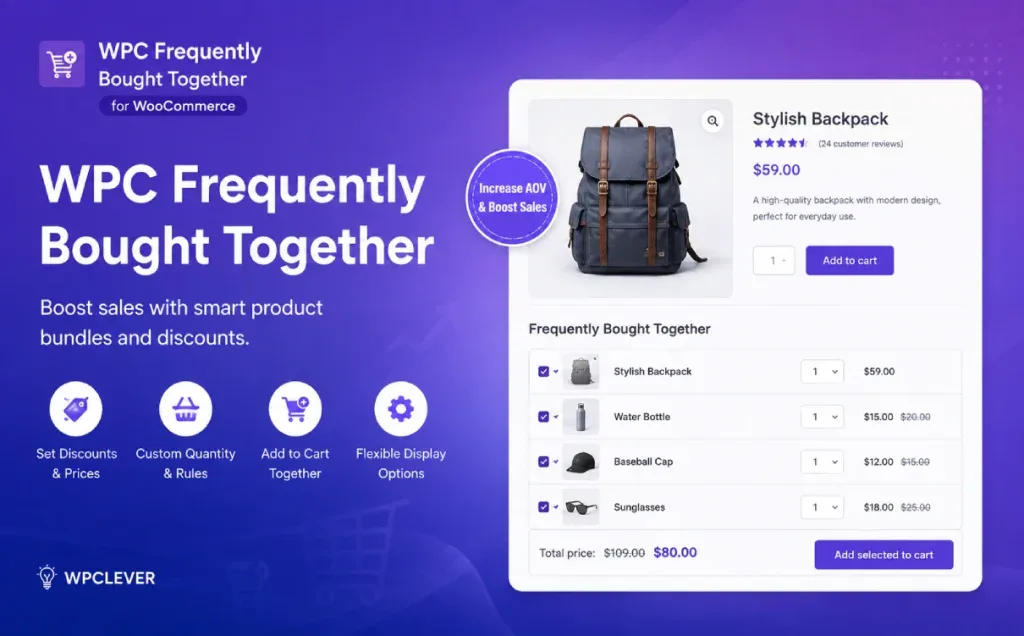
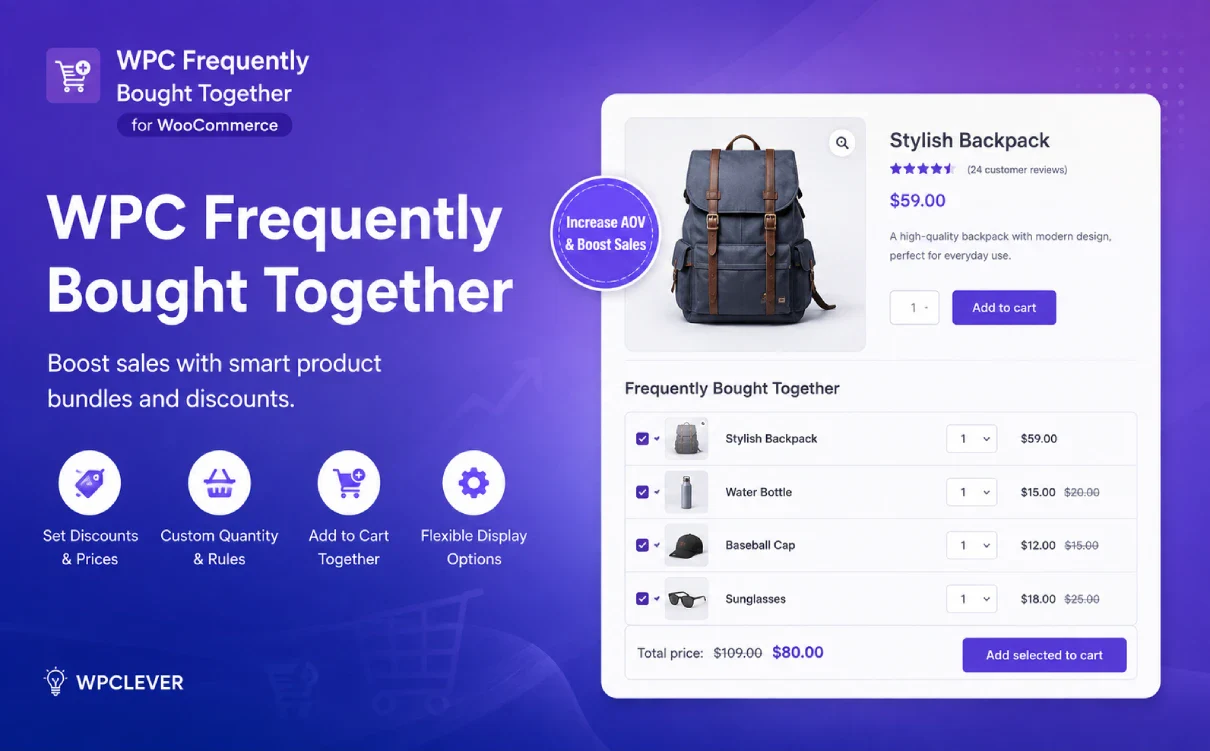
The core function of "WPC Frequently Bought Together for WooCommerce" is to display related or complementary products when a customer is viewing a specific item as Frequently Bought Together Feature these recommendations so customers can discover items they might also need without having to search again.
For example, recommend chargers, mice, or laptop bags on laptop product pages; recommend pants, shoes, or accessories on clothing pages; and showcase jewelry from the same collection on jewelry pages. Merchants can also set up exclusive discounts for these complementary products, thereby transforming simple “related recommendations” into bundled offers that provide an incentive to buy.
Unlike standard “Related Products,” which simply "display related items," WPC Frequently Bought Together places greater emphasis onOutfit combinations available for immediate purchase. Customers can select or deselect additional items, adjust the quantities of items that can be modified, and add the selected items to their cart together.
For merchants, it’s not just a recommendation module—it’s a comprehensive tool for cross-selling products: You can individually control the products to be paired, prices, quantities, display order, selection methods, product information, and module placement. For stores that need to manage a large number of products, the Premium version also allows you to use Smart Rules to create recommendation rules in bulk based on criteria such as product, type, brand, category, tags, attributes, and shipping category.
It is worth noting that the additional products listed under “Frequently Bought Together” generally fall underOptional Items. If the business requirement is that “a specific service or accessory must be purchased along with the main product,” WPClever officially recommends using WPC Force Sells; the two can also be used in combination to offer both required and optional add-ons.
Key Features
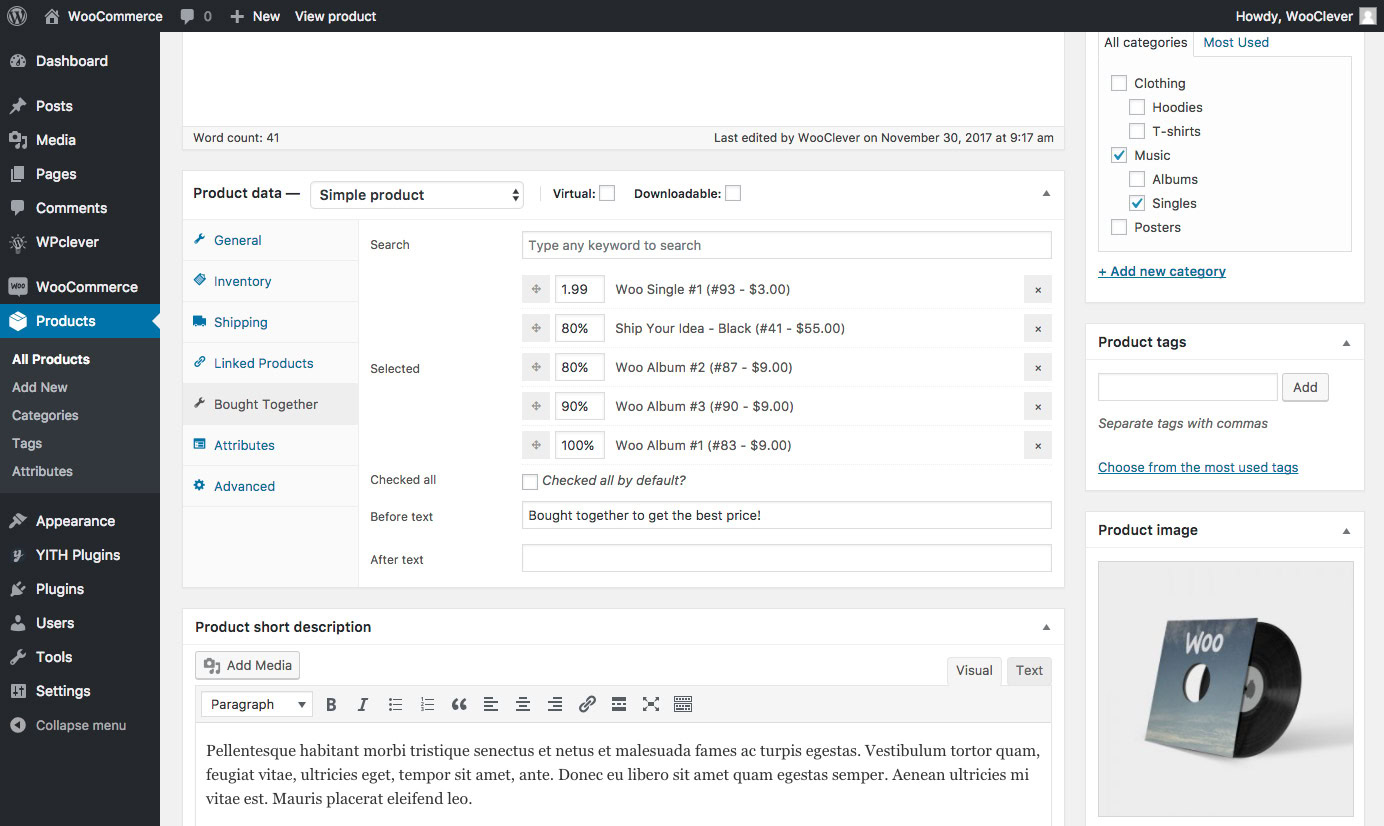
Customize “Frequently Bought Together” Product Combinations: You can manually specify "Bought Together" products for individual WooCommerce products, allowing merchants to design product bundles based on actual product relationships, profit structures, or marketing strategies, rather than relying solely on the system's automatic recommendations.
Reusing "Related Products," "Upsells," and "Cross-sells": There’s no need to manually maintain all product relationships; you can directly use WooCommerce’s pre-configured related products, upsells, or cross-sells as the default source for “Bought Together” products.
Flexible Settings and Combination Deals: You can use this for coordinating items byPercentage or Fixed Amount/Price MethodAdjust the new prices and choose whether to calculate them based on the Regular Price or Sale Price, allowing you to apply different promotional discounts to different products.
Set a default quantity for each product individually: Different add-on items can be configured with different default quantities; for example, a main product can be paired with 1 accessory, 2 consumables, and 3 refills, making it suitable for designing more complex bundle purchase options.
Customers can adjust the purchase quantity: This feature allows consumers to modify the quantity of add-on items in the "Bought Together" module and continue to adjust quantities in the shopping cart, thereby reducing the effort required when purchasing multiple add-ons or consumables of the same type.
Minimum / Maximum Quantity Limits: Supports setting minimum and maximum quantity limits for "Bought Together" products, allowing you to control the product bundle structure while increasing purchasing flexibility.
Various Front-End Display Options: It offers layouts such as Lists, Multi-column Grids, and Separate Images, and supports different layouts for desktop and mobile devices, allowing the module to better adapt to various page structures and screen sizes. Subsequent versions have also added display features such as Carousels.
Custom Placements: You can control where the "Bought Together" section appears—above or below the "Add to Cart" button, for example—and it provides a shortcode for more flexible page layouts.
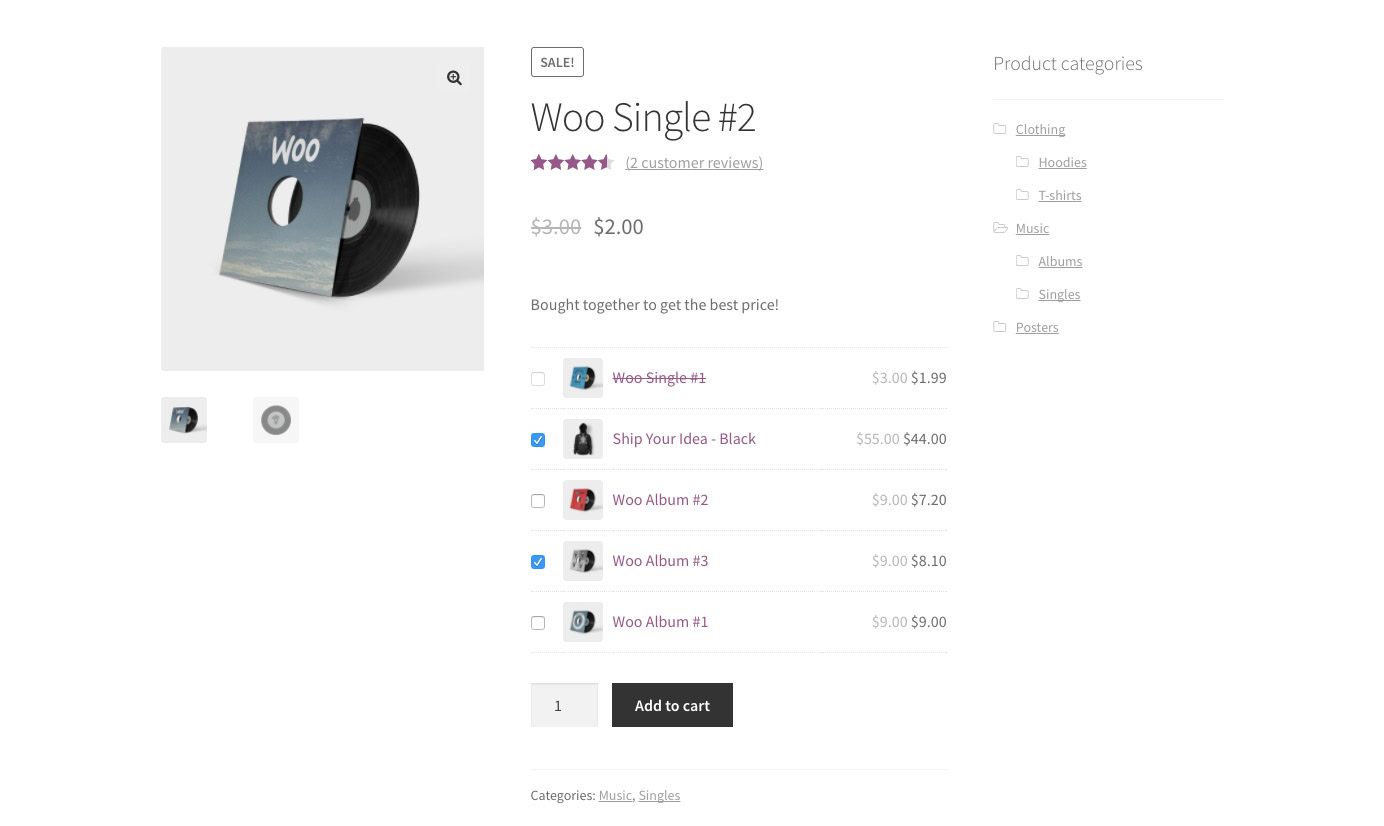
Custom Product Information: You can control whether to display product thumbnails, prices, short descriptions, and other information, and you can also adjust the main product’s image, price, and visibility to maintain a cleaner visual hierarchy throughout the entire bundle section.
Product Redirects and Quick View: Related products can be linked to their product detail pages, or customers can use the Quick View feature to quickly view product information, reducing the need to navigate between pages frequently while browsing.
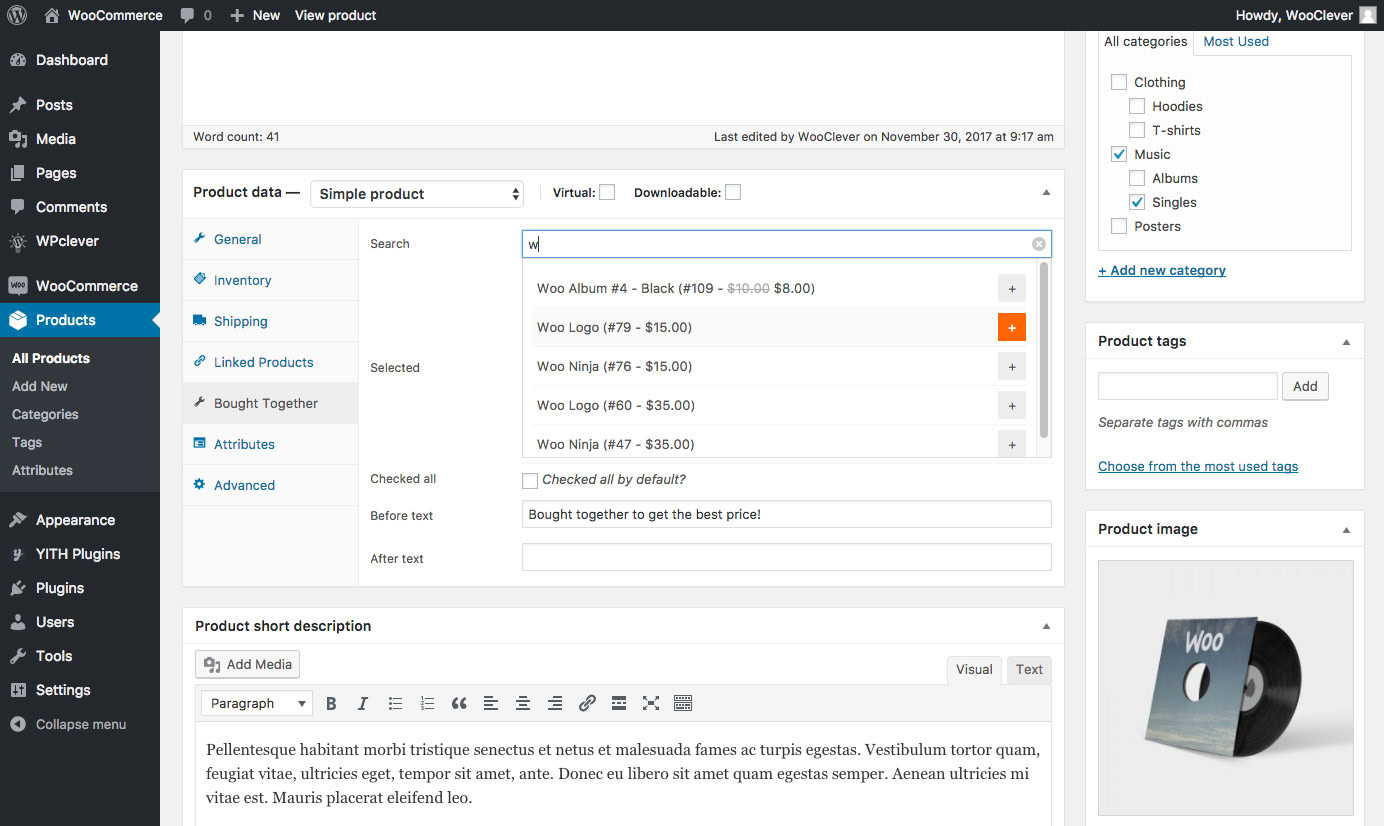
Advanced Product Search: When adding "Bought Together" products in the admin panel, you can search for products by SKU, ID, keywords, or exact search terms, which is especially convenient for WooCommerce stores with a large number of SKUs or an extensive product catalog.
Add Separately: Individual Product Mode: Add-on items can be treated as standalone items rather than always being tied to the main item, providing greater flexibility for different shopping cart and pricing needs.
Support for Variable Products and Specified Variations:Premium features. You can directly add a Variable Product or a specific Variation as a "Bought Together" item, which is suitable for clothing sizes, colors, specifications, and other scenarios involving products with multiple variations.
Smart Rules: Batch Recommendation Rules:Premium features. You can apply "Bought Together" rules in bulk based on criteria such as all products, specific products, product types, brands, collections, tags, categories, product visibility, shipping classes, and product attributes, significantly reducing the workload involved in configuring settings one by one for large product catalogs.
Target audience and usage scenarios
WooCommerce Comprehensive E-commerce Website
Ideal for online stores that want to add sales modules such as “Frequently Bought Together,” “Recommended Combinations,” or “Save More When You Buy Together” to their product detail pages.
For example:
Cell Phone + Phone Case + Tempered Glass Screen Protector
Laptop + Mouse + Laptop Bag
Camera + Memory Card + Battery
Allow users to quickly select related accessories on a product page.
Clothing, Footwear, and Fashion Mall
You can recommend pants, shoes, hats, bags, or accessories on the tops page to create "Complete the Look" outfit combinations.
Digital and Electronics Store
This is particularly well-suited for industries where the relationship between the main product and its accessories is clear, allowing for the recommendation of related products—such as chargers, data cables, protective cases, and expansion devices—on the product page.
For example, when a customer buys a mattress, recommend pillows, sheets, or mattress protectors; when a customer buys a table, recommend chairs and table accessories to help them complete all related purchases in one go.
Beauty and Personal Care Store
You can organize products from the same line, skincare steps, or complementary items into recommended sets—for example, pairing a cleanser with a serum and moisturizer.
Food, Consumables, and Refills
The default quantity and adjustable quantity features are particularly well-suited for businesses selling consumables, such as equipment + multiple filter cartridges, printers + multiple boxes of color ink, or coffee machines + multiple boxes of capsules.
Large online stores with a large number of SKUs
Premium Smart Rules reduces the effort required to set up product combinations for each individual product, making it ideal for WooCommerce product catalogs with a large number of categories, tags, brands, and product attributes.
Comparison of similar plugins
Common alternatives include YITH WooCommerce Frequently Bought Together、Frequently Bought Together for WooCommerce by WebToffee As well as the official Woo Product Recommendations.
The ✅ below indicates that the current official documentation explicitly lists this capability; ❌ indicates that the current official documentation for this product does not list this capability as a feature or explicitly mention it. Since the product positioning of different plugins varies, it is not appropriate to judge their relative merits based solely on the number of features.
| core functionality | WPC Frequently Bought Together | YITH Frequently Bought Together | WebToffee: Frequently Bought Together | Woo Product Recommendations |
|---|---|---|---|---|
| Product Page: Frequently Bought Together | ✅ | ✅ | ✅ | ✅ |
| Manually Specify Recommended Products | ✅ | ✅ | ✅ | ✅ |
| Use Related / Upsell / Cross-sell | ✅ | ✅ | ✅ | ✅ |
| Bundle Deals / Discounts | ✅ | ✅ | ✅ | ❌ |
| Control the price and default quantity of each item separately | ✅ | ❌ | ❌ | ❌ |
| Customers adjust the quantity of items in their order | ✅ | ❌ | ✅ | ❌ |
| Automatically Generate FBT Based on Order History | ❌ | ❌ | ✅ | ✅ |
| Conditional Batch Recommendation Rules | ✅ | ✅ | ❌ | ✅ |
| Specify Variable Product / Variation | ✅ | ✅ | ✅ | ❌ |
| Various "Bought Together" Layouts | ✅ | ❌ | ✅ | ❌ |
| Custom Shortcode Location | ✅ | ✅ | ✅ | ❌ |
| Referral Revenue / Conversion Analysis | ❌ | ❌ | ❌ | ✅ |
Key Features of WPC "Frequently Bought Together"
The main advantage of WPC is not that it “automatically guesses what customers will buy,” but ratherHave the store owner create a precise outfit combination.
For example:
- Accessory A: 1 piece, 10% off
- Accessory B: 2 pieces, 20% off
- Accessory C: 3 pieces, 25% off
- An additional discount on the main product itself
This complex combination of controlling prices and quantities separately for different products is one of the capabilities that WPC officially emphasizes.
Therefore, if your product pairings are well-defined and you want precise control over “what to recommend, how many to recommend, and how much of a discount to offer,” WPC offers a clear advantage.
Key Features of WebToffee
WebToffee Stands Out MoreAutomatic Recommendations: The plugin can analyze WooCommerce order history, automatically identify products that are frequently purchased together, and also allows you to create custom product bundles.
Therefore, for stores that already have a large volume of orders and do not want to spend a lot of time manually maintaining product relationships, WebToffee’s automated approach is more appealing.
Key Features of Woo Product Recommendations
Woo's official Product Recommendations are closer to a completeProduct Recommendation Engine...and not just a "Frequently Bought Together" plugin.
It can analyze order relationships to automatically generate "Bought Together" recommendations and establish rules using Filters, Amplifiers, and Visibility Conditions. These recommendations can be displayed in over 20 locations, including product pages, category pages, the shopping cart, checkout, and the thank-you page, while also providing revenue and conversion reports.
Therefore, if you need a site-wide product recommendation system and data analysis—rather than detailed bundled promotions on individual product pages—Woo Product Recommendations offers a broader range of features.
Key Features of YITH
YITH stands out in terms of visual customization and its own plugin ecosystem; it allows you to modify module text, background colors, and button colors, and offers integration with YITH WooCommerce Wishlist Official integration.
If your website already makes extensive use of the YITH series of plugins, YITH Frequently Bought Together will integrate more easily into your existing setup.
User Feedback Highlights
As of this WordPress.org page, WPC Frequently Bought Together has Over 10,000 active installs, with an overall rating of 4.5/5; 72 out of 84 reviews are five-star ratings.
Common positive feedback in public reviews includes:
Effectively implements product add-on scenarios
A user review from 2026 specifically mentioned that the plugin successfully addressed the need to add another product as an add-on to a product.
Fully featured and with fast response times
Some five-star user reviews particularly praise the plugin's practicality, as well as the technical support team's responsiveness and ability to resolve configuration issues or other problems.
It is highly competitive among similar FBT plugins
Some users have said that after testing several “Frequently Bought Together” plugins, they prefer the overall experience offered by WPC.
Objective Explanation: Reviews of WordPress.org are not all positive; there has been some negative feedback in 2024–2025 regarding compatibility issues, front-end styling, and the technical support experience. Therefore, product descriptions should focus on citing overall ratings and typical user experiences, rather than using absolute statements such as “zero negative reviews” or “universally praised by all users.”
Suggestions for pairing with other plugins/themes
WooCommerce
Required.
WPC Frequently Bought Together is an extension designed specifically for WooCommerce; its products, shopping cart, and cross-selling logic are all built on top of the WooCommerce product system.
WPC Variation Swatches / WPC Variations Radio Buttons
If your online store contains a large number of variable products, you can use WPC’s Variation Swatches or Variations Radio Buttons to allow customers to select different colors, sizes, or specifications in a more intuitive way.
WPC Frequently Bought Together also provides a corresponding Variation Selector option and related compatibility support.
WPC Smart Quick View
Suitable for outfit combinations with a large amount of product information.
When customers click on a related product, they can use Quick View to quickly view its details without having to leave the current main product page, which helps maintain continuity in the purchasing process.
WPC Custom Related Products
Ideal for stores that need more precise control over Related Products.
You can first define related products using WPC Custom Related Products, and then automatically set these Related Products as the default source for "Frequently Bought Together," thereby reducing duplicate configuration.
WPC Smart Linked Products
For websites with a large number of products, you can use Smart Linked Products to manage upsells, cross-sells, and related product relationships in bulk, and then apply these relationships to "Bought Together" recommendations.
WPC Forced Sales
This plugin complements "Frequently Bought Together" very well.
"Frequently Bought Together" is better suited for:“You might also need these items; feel free to purchase them.”
Force Sells is better suited for:“This item must be purchased together with this accessory or service.”
WPClever has explicitly stated that both methods can be applied simultaneously to the same product to implement a combination sales model featuring “required items + optional add-ons.”
WPC Product Bundles / Composite Products / Grouped Products
If your website has already created bundled products using WPC Product Bundles, Composite Products, or Grouped Products, Frequently Bought Together can further leverage these special product types for cross-selling scenarios.
For example:
Smart Bundle + Optional Accessories
Composite Product + Recommended Supplies
Grouped Product + Additional Accessories
This combines fixed bundles with optional cross-selling.
WPC Smart Messages
If you want to further highlight bundle offers, you can use WPC Smart Messages to add promotional prompts, marketing messages, or a countdown timer to product pages, thereby increasing the visibility of "Bought Together" offers.
Page builders such as Elementor and Bricks
WPC Frequently Bought Together - Provided by the Official Source Shortcodes and Various Module PositionsTherefore, for websites using Elementor, Bricks, or other WooCommerce page template systems, you should prioritize using shortcodes or standard WooCommerce page positions for layout.
However, current official documentation does not list Elementor, Bricks, and others as dedicated “native widget integrations,” so it is more appropriate to describe them in the product description as:
“Supports shortcodes, allowing for flexible customization of WooCommerce product page layouts.”
However, we do not recommend writing it as “Native Integration with Elementor.”
One-Sentence Product Positioning
Add flexible and customizable “Frequently Bought Together” bundles to WooCommerce product pages. Through product recommendations, bundle discounts, and quantity controls, elevate cross-selling from simple recommendations to ready-to-purchase product bundles.
Frequently Asked Questions (FAQ)
Q1: What does the "WPC Frequently Bought Together for WooCommerce" plugin do?
WPC Frequently Bought Together is a WooCommerce upselling and cross-selling plugin that displays “Frequently Bought Together” products on product detail pages, allowing customers to easily select accessories, consumables, or other related items while purchasing the current product.
Merchants can set separate prices, discounts, and quantities for different product bundles, and allow customers to add selected items to their cart all at once, which helps increase cross-selling opportunities and the average order value.
Q2: What is the difference between WPC Frequently Bought Together and regular WooCommerce Related Products?
WooCommerce Related Products is primarily used to show customersShow other items you might be interested in; WPC Frequently Bought Together further organizes these items into a bundle that customers can select and purchase directly.
Not only does it support “Related Products,” but it can also utilize WooCommerce's pre-configured upsells and cross-sells, and set separate prices, quantities, and bundle discounts for “Bought Together” products. This makes it particularly well-suited for real-world purchasing scenarios such as "computer + mouse + laptop bag" or "camera + battery + memory card."
Q3: Does WPC Frequently Bought Together support variable products?
The official feature description currently explicitly lists “Add a Variable Product or Specify a Variation” as a Premium feature. WPClever also states in the WordPress.org support forum that the free version primarily supports Simple Products and Simple Subscription Products as “Bought Together” items, while Variable Products and Variations require the Premium version.
Therefore, for WooCommerce stores with a large number of variations—such as clothing, footwear, colors, sizes, and capacities—the Premium version is a better fit.
Q4: Do customers have to purchase all the items listed under “Frequently Bought Together”?
No. "Bought Together" products are classified as optional add-ons by default.
Customers can purchase only the current main item, or they can choose one or more add-on items as needed; they are not required to purchase all recommended items in order to buy the main item.
If the business requirement is “When purchasing the main product, a specific accessory or service must also be purchased,” WPClever recommends using WPC Forced Sales"; Frequently Bought Together is better suited for optional add-on scenarios."
Q5: Can I apply a discount to "Frequently Bought Together" items?
You can.
Merchants can set new prices for "Bought Together" items using a fixed amount or a percentage—for example, setting the price of a particular add-on item to 90% of the original price—or they can set different prices for different items.
The plugin also allows you to set discounts for the main product; for example, the main product is eligible for the discount only when the customer purchases at least one "Bought Together" item at the same time.
This means you can create something like:
- Featured Product: Original Price
- Accessory A: 10% off
- Accessory B: 20% off
- Appendix C: Specified Discounted Prices
A bundled sales plan like this.
Q6: Can I set different quantities and discounts for different product bundles?
Sure, that's one of the standout features of WPC Frequently Bought Together.
In the official examples, you can configure the following:
- Item A: Quantity 1, price at the original price of 90%
- Item B: Quantity 2, price at the original price of 80%
- Item C: Quantity 3, price at the original price of 75%
You can also adjust the price of the main product itself.
As a result, it is suitable not only for simple “one main product + one accessory” combinations, but also for more complex sales models such as consumables, refills, and multi-item bundles.
Q7: Can customers change the purchase quantity of "Bought Together" items on their own?
Yes, but you'll need to enable the corresponding Custom Quantity setting.
The plugin allows customers to adjust the quantity of add-on items, while also enabling merchants to set minimum and maximum purchase quantities. Whether quantity adjustment is enabled can be controlled on a per-item basis, so merchants can either design promotional bundles with fixed quantities or allow customers to increase the purchase quantity on their own.
Q8: Can "Frequently Bought Together" recommendations be automatically generated for all WooCommerce products?
It is possible to a certain extent toAutomatic Configuration.
In the global settings, you can configure WooCommerce’s:
- Related Products
- Upsells
- Cross-sells
Serves as the default source for "Bought Together" items. If a specific item has its own "Bought Together" configuration, the item-level setting takes precedence over the global default setting.
The Premium version also offers Smart RulesYou can create "Bought Together" rules in bulk based on criteria such as products, categories, tags, attributes, product types, brands, and shipping categories, making this feature particularly well-suited for online stores with a large number of products.
Q9: Does it automatically analyze “which products are frequently purchased together” based on past orders?
Currently, the core mechanism of WPC Frequently Bought Together does not rely on automatic learning of purchasing relationships based on historical orders.
Currently, the automation methods provided in the official documentation primarily involve calling the Related Products, Upsells, and Cross-sells features, as well as using Premium Smart Rules to create product pairing rules in bulk.
If you need to automatically generate product recommendations based on joint purchasing behavior in actual orders, WPClever currently offers another WPC Smart Recommendations...and its functional description explicitly includes Co-Purchase Analysis based on completed orders.
Therefore, WPC Frequently Bought Together tends to favorMarketing Tools for Coordinated Promotions That Merchants Can Control, rather than an AI/algorithm-based recommendation engine.
Q10: Does WPC Frequently Bought Together support Elementor?
Support.
WPClever’s official support team has confirmed that this plugin is compatible with Elementor and can be used via:
[woobt]
Use the shortcode to place the "Frequently Bought Together" product list where you want it to appear.
Therefore, when using Elementor to customize the WooCommerce Single Product Template, you can use the Shortcode Widget to control the position of the "Buy Together" module.
However, the official team has noted that some block-based themes and templates may have compatibility issues, so it is recommended that you test them in practice when using highly customized WooCommerce Cart or Checkout blocks or theme templates.
Q11: Why aren't "Bought Together" products showing up on the product page on the front end even though they've been set up?
Some of the more common causes areThe display position has not been set correctly, or the current theme/product template does not execute the corresponding WooCommerce hook for the plugin..
WPClever's official support recommends first checking the "Position" setting in the plugin. You can also use the following directly:
[woobt]
Use the shortcode to manually insert the "Bought Together" module. If the shortcode displays correctly but does not appear in the default location, it usually means that your current theme or Single Product Template has modified WooCommerce’s default page structure.
Q12: Can the WPC Frequently Bought Together plugin be used with the WooCommerce Discounts plugin and the Dynamic Pricing plugin?
This point requires special attention.
WPClever's official support has explicitly stated that,WPC Frequently Bought Together is incompatible with the pricing calculation mechanisms of external plugins that use dynamic pricing or discount rules.. The reason is that Bought Together needs to maintain specific associations between related products in order to preserve the bundle discount, while some dynamic pricing plugins recalculate prices by treating products as independent items; these two mechanisms may conflict.
Therefore, if your website already uses complex dynamic pricing, discount rules, or other price calculation plugins, we recommend testing the prices in the shopping cart and at checkout before going live.
I think this FAQ should remain on the product page., because it represents a very important compatibility boundary in real-world use.
Q13: What does “Add Separately” mean? Why does the “Bought Together” discount disappear when this option is enabled?
"Add Separately" will cause the add-on item to be treated asStandalone ProductAdd to Cart, rather than maintaining the "Bought Together" grouping.
Therefore, once this option is enabled, the discounts set for bundled products in "Bought Together" may no longer apply. WPClever clearly states in its official support documentation that if you want bundled products to retain their "Bought Together" discount in the shopping cart, you should disable "Add Separately."
In simple terms:
Turn off "Add Separately":
Maintain bundle relationships and bundle offers.
Enable "Add Separately":
Treat the product as a regular, standalone shopping cart item.
Q14: What are the main differences between the Free and Premium versions?
The free version already offers the core features of "Frequently Bought Together," including product pairing, discounted prices, quantity control, display placement, product detail page display, default "Related" and "Upsell" recommendations, and the "Add Separately" option.
The two most important extensions currently available in the Premium version are:
① Variable Products / Variations
You can directly add a variable product or specify a specific variation as a "Bought Together" item.
② Smart Rules
You can create "Bought Together" recommendation rules for a large number of products at once based on criteria such as product, category, tag, attribute, brand, and type.
For typical small online stores, the free features already cover basic product configuration and sales needs; for stores with a large number of variable products or SKUs, the value of the Premium features is even more evident.
Q15: What is the difference between "Frequently Bought Together" and "Product Bundles" on WPC?
The problems they address are not exactly the same.
Frequently Bought Together Better suited for:
“When you buy this item, you might also want these items.”
Add-on items are typically optional, and users can still purchase the main item on its own.
而 Product Bundles It tends to organize multiple products into a specific product bundle. WPClever also categorizes “Frequently Bought Together,” “Product Bundles,” “Composite Products,” “Grouped Products,” and “Force Sells” as distinct product bundling models.
Therefore, if the goal is to increase the addition of accessories to shopping carts and cross-selling on product pages, "Frequently Bought Together" is usually a more direct approach.






No Comments