


- Unlimited access to members-only content
- Member discounts on paid items
- More Membership Benefits
Confirm Purchase
Download Version
- Max Mega Menu Pro v2.4.6
Max Mega Menu Core Introduction
Product Overview
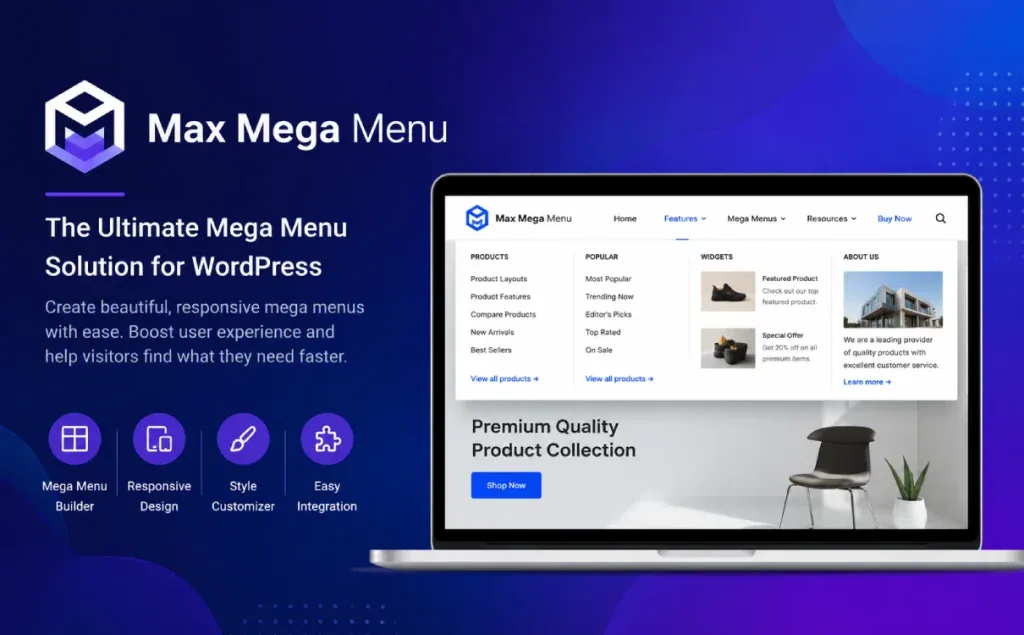
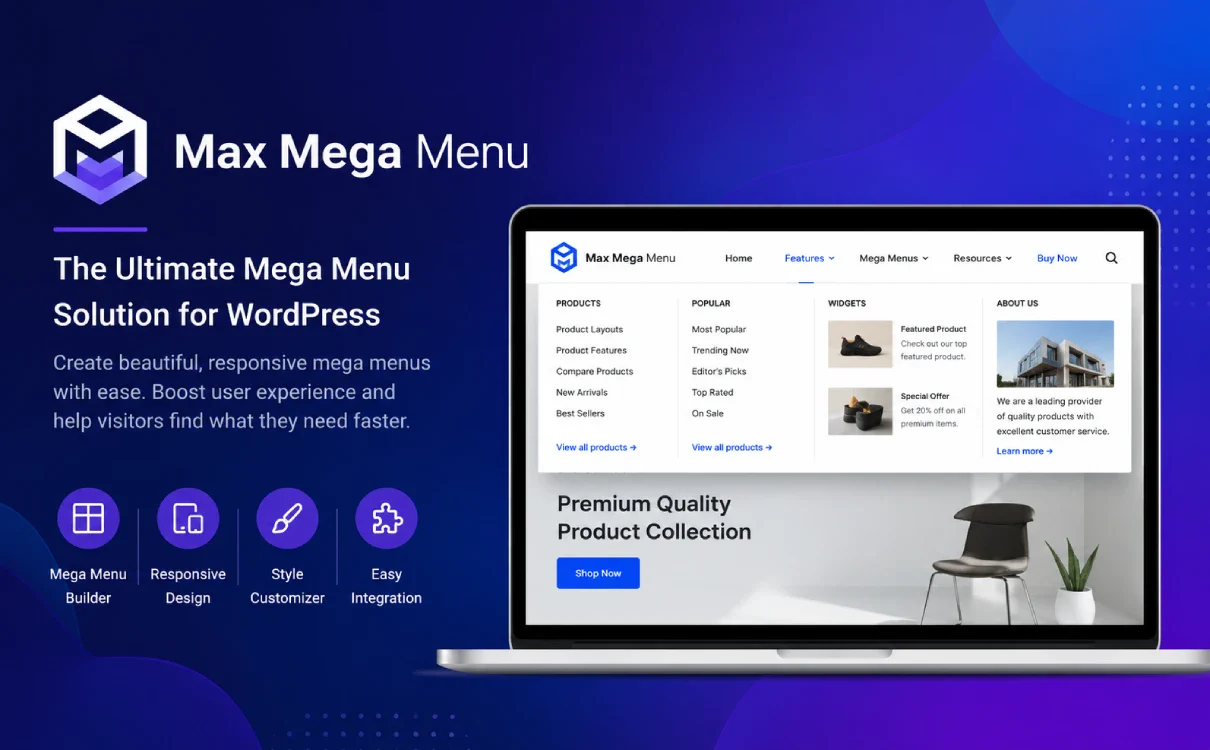
Max Mega Menu is a plugin for enhancing WordPress navigation menus. It can be based on the WordPress native menu system, the ordinary drop-down menu upgraded to a clearer, more visually hierarchical super-menu, support for sub-menu to add menu items, WordPress gadgets, block content, Block Patterns or customized HTML, so that the site navigation is no longer just a simple list of links, but can carry the classification of the entrance, product recommendations, graphic content, contact information, search portal and other rich information.
It's core value is:Helps visitors find content faster, reduces the cost of navigating a complex site, and improves the overall professional feel of the siteFor WooCommerce shopping malls, content sites with many columns, and enterprise websites with many services, Max Mega Menu can organize the original crowded menu structure into multiple columns, multiple layers, and multiple levels. For WooCommerce malls with many product categories, content sites with many columns, and official corporate websites with many services, Max Mega Menu can organize the originally crowded menu structure into a multi-column, multi-level, responsive navigation system. The plugin also comes with a built-in theme style editor, mobile menu options, keyboard navigation support, and the ability to customize the menu via Elementor, Divi, Bricks, Blocks, Widgets, Shortcodes or wp_nav_menu etc. to output the menu.
If you use the Max Mega Menu ProYou can also get Vertical Menu, Accordion Menu, Sticky Menu, Tabbed Mega Menu, WooCommerce / Easy Digital Downloads Shopping Cart Information, Role Visibility Control, Search Box, Menu Logo, Custom Icons, Individual Menu Item Styling Control, and other advanced capabilities for sites with high demands on navigation interactions, brand visualization and e-commerce conversion requirements.
Key Features
– Super Menu Layout: Support for organizing submenus into multi-row, multi-column structure, suitable for displaying product categories, service items, article columns or graphic entries.
Support for widgets, blocks and custom HTML: You can put WordPress widgets, Block Patterns, images, forms, contact information and more in the menu.
Responsive Mobile MenuSupport for mobile Off Canvas menus, custom breakpoints, mobile expand logic, and mobile Toggle Bar style control.
Menu Style EditorBuilt-in theme editor to adjust menu color, layout, spacing, fonts, and other visual effects; the official website feature page mentions 100+ built-in style customization options.
Multiple opening methods and animation effects: Support hover, hover intent, click trigger, and provide fade, slide and other sub-menu transition effects.
Icon and menu item control: Supports adding icons to menu items with separate options to hide text, disable links, hide on mobile, etc.
Page builder compatibility: Support for Elementor Widget, Divi Module, Bricks, Blocks, Widgets, Shortcodes and Auto Menu Position integration.
Accessibility friendly: Keyboard navigation is supported, and users can operate the menus by using the Tab, Enter, Space, and Esc keys.
E-commerce empowerment: The Pro version supports displaying cart totals and item counts for WooCommerce or Easy Digital Downloads in the menu.
Role and Login Status Control: The Pro version controls the display of menu items by user role and logged in/unlogged out status, making it suitable for membership and permission-based sites.
Target audience and usage scenarios
Suitable website types:
- WooCommerce Mall: Websites with many product categories that need to display main category, subcategory, promotion portal, and shopping cart information in the top menu.
- Enterprise official website / Foreign trade independent website: Websites with many service lines and complex product lines that need to allow customers to quickly understand the business structure.
- Content site / Blog / Portal: Sites with many column hierarchies and complex article categorization that need to improve content discovery efficiency with multi-column navigation.
- Membership Site / Online Course Site: Sites that need to display different menu entries based on user role or login status.
- Sites that use Elementor, Divi, Bricks, or block editors: Items that require flexible output menus in the page builder.
Typical usage scenarios:
- The top navigation needs to show a lot of categories, but you don't want the menu to be too long or cluttered.
- Poor mobile menu experience, need clearer collapsing, slide-out or click-to-expand effects.
- Would like to add images, icons, search boxes, contact information, product categories or promotional entries to the menu.
- Want different users to see different menus, e.g. “Login/Register” for visitors and “My Account/Course Center” for members.
- The hope is to reduce the number of steps a user has to take to find content and increase page view depth and conversion rates.
Comparison of similar plugins
Common alternatives available UberMenu、JetMenu、ElementsKit Mega MenuUberMenu is a standalone menu plugin, JetMenu is for Elementor / Gutenberg scenes and ElementsKit Mega Menu is a menu module in the Elementor plugin suite. UberMenu is more of a standalone menu plugin, JetMenu is more of an Elementor / Gutenberg scenario, and ElementsKit Mega Menu is a menu module in the Elementor plugin suite.
| Core functional items | Max Mega Menu | UberMenu | JetMenu | ElementsKit Mega Menu |
|---|---|---|---|---|
| WordPress Mega Menu | ✅ | ✅ | ✅ | ✅ |
| Multi-column / Grid Menu Layout | ✅ | ✅ | ✅ | ✅ |
| Responsive Mobile Menu | ✅ | ✅ | ✅ | ✅ |
| Add images / custom content to the menu | ✅ | ✅ | ✅ | ✅ |
| Support WordPress Widgets / Shortcodes / Custom Content | ✅ | ✅ | ✅ | ✅ |
| Built-in menu style editor | ✅ | ✅ | ✅ | ✅ |
| Elementor Integration | ✅ | ❌ | ✅ | ✅ |
| Gutenberg / Block Editor Support | ✅ | ❌ | ✅ | ❌ |
| WooCommerce Menu Enhancement | ✅ | ✅ | ✅ | ✅ |
| Character / Login Status Menu Display Controls | ✅ | ❌ | ❌ | ❌ |
| Accordion Menu | ✅ | ❌ | ❌ | ❌ |
| Sticky Menu | ✅ | ❌ | ❌ | ❌ |
| More partial standalone menu plugin | ✅ | ✅ | ❌ | ❌ |
| More in favor of Elementor ecology | ❌ | ❌ | ✅ | ✅ |
Current product highlights:
The advantage of Max Mega Menu is that it is more compatible and doesn't serve only one page builder. It works based on the WordPress native menu system, but also supports Blocks, Elementor, Divi, Bricks, Widgets, Shortcodes, and Auto Integration, which is suitable for general navigation enhancement needs under different themes and different site building methods.
Characterization of alternatives:
UberMenu's strength is its traditional standalone mega menu building capabilities, offering grids, images, icons, shortcodes, widgets, and responsive menu capabilities, while JetMenu is more suited to sites that already use Crocoblock / Elementor, and can use Elementor or Gutenberg to build more visual menu content. ElementsKit Mega Menu is for Elementor users, especially sites that already have the ElementsKit suite installed.
User Feedback Highlights
The official website shows that it has a WordPress.org 300,000+ active installs, 4.8/5 average rating, more than 750 five-star reviews, with a larger overall user base.
User feedback highlights can be distilled into:
- Good accessibility performance: Some users have mentioned that it works well in sites that pursue AA accessibility standards.
- Suitable for e-commerce navigation: There is user feedback that it helps to display a more complete product menu, allowing shoppers to find their target items faster.
- Full-featured and easy to use: User evaluations focused on the richness of options, the relative intuitiveness of configurations, and the ability to replace complex custom menu development.
Suggestions for pairing with other plugins/themes
A page builder suitable for matching:
- Elementor: Max Mega Menu provides Elementor Widget to select and export the specified menu location in the Elementor page.
- Divi: Supports Divi Module, which can be used for menu presentation on Divi sites.
- Bricks Builder: The WordPress plugin library description mentions that menus can be exported via the Bricks element.
- Gutenberg / Block Editor: Menus can be placed in blocks and support Block Patterns as menu content.
E-commerce plugin suitable for pairing:
- WooCommercePro version supports displaying WooCommerce cart totals and item counts.
- Easy Digital DownloadsPro version supports the display of shopping cart information in the menu.
A membership/permission system that fits together:
- Paid Memberships Pro, MemberPress, Ultimate Member, WooCommerce Memberships and more!Max Mega Menu Pro supports differentiated navigation for “Guest Menu / Member Menu / Administrator Menu / Course User Menu” by combining the role and login status display controls of the Pro version.
The type of theme that fits the match:
- It is available for business website themes, WooCommerce mall themes, content portal themes, standalone themes, block themes and classic themes, and the WordPress plugin repository description explicitly mentions that it is available for block editors, page builders and classic themes!
Frequently Asked Questions (FAQ)
Q1: What is Max Mega Menu for?
Max Mega Menu is a WordPress menu enhancement plugin, mainly used to upgrade ordinary navigation menu to mega menu. It can create multi-column drop-down menus, graphic menus, mobile menus, categorized navigation, product navigation and complex site structure menus, suitable for more content, more categories or want to improve the navigation experience of the site to use.
Q2:What kind of websites is Max Mega Menu suitable for?
It is suitable for corporate websites, foreign trade standalone sites, WooCommerce malls, content sites, blogs, portals, membership sites and course sites. You can use Max Mega Menu to optimize the navigation structure whenever your website has a lot of menu levels or you need to show more content entries in the top navigation.
Q3:Can Max Mega Menu directly modify the existing menu?
Yes. Max Mega Menu works based on the WordPress native menu system and can be used to enhance existing menus or create new menu structures. When enabled, Mega Menu can be set in menu items with submenus, blocks, widgets or custom content.
Q4:Does Max Mega Menu support mobile?
Max Mega Menu converts to a more mobile-friendly menu format on small-screen devices and supports touch operation for mobile and tablet access. It also provides mobile menu related settings to adjust the expansion method, breakpoints and mobile style.
Q5: Can I add images, icons or customized content to the menu?
Max Mega Menu supports adding WordPress widgets, blocks, Block Patterns, custom HTML, icons and other content to the menu, so you can put not only normal links, but also images, section descriptions, contact information, search portals or product category modules.
Q6:Does it support WooCommerce mall?
Max Mega Menu is suitable for WooCommerce shopping malls to display product categories, brand categories, promotional portals and shopping navigation.The Pro version also supports WooCommerce related enhancements, such as displaying cart quantity and cart amount in the menu.
Q7: Does it support Elementor, Divi, Bricks or Block Editor?
Max Mega Menu can output menus in a variety of ways, including Elementor widgets, Divi modules, Bricks, Gutenberg blocks, gadgets, shortcodes, and PHP manual integration. It is also suitable for use with classic themes and block themes.
Q8:Can I set the menu style of Max Mega Menu?
Can. The plugin has a built-in menu theme editor that allows you to adjust colors, fonts, spacing, menu width, sub-menu animations, hover effects and other styles. For users who do not want to write a lot of CSS, you can complete most of the menu visual adjustments through the background settings.
Q9:Does Max Mega Menu support click to expand or mouse hover to expand?
Support multiple triggering methods. It can be set to Hover, Hover Intent or Click to Expand according to the website requirements, and supports fade, slide and other sub-menu transition animations.
Q10: What are the additional features of Max Mega Menu Pro compared to the regular version?
The Pro version mainly adds more advanced menu types and interaction capabilities, such as Vertical Menu, Accordion Menu, Sticky Menu, Tabbed Mega Menu, Search Box, Menu Logo, Menu Item Badge, Role Permission Control, WooCommerce Menu Enhancement, Custom Icons, and Individual Menu Item Style Control.
Q11:Can different menus be displayed according to user roles?
Yes, the Pro version supports the Roles & Restrictions feature, which controls the display of menu items based on login status or user role. This is ideal for membership sites, course sites, B2B sites or sites that need to differentiate between visitor and member entries.
Q12:Does Max Mega Menu affect the website speed?
Any menu plugin adds some front-end resources, but Max Mega Menu offers CSS output settings with optional CSS loading. The actual speed impact usually depends on the complexity of the menu, the number of images, the number of widgets and the performance of the theme itself. It is recommended not to stack too many large images, rotations or complex shortcodes in the menu and to use it with caching and image optimization plugins.
Q13:Do I need to write code for Max Mega Menu?
Most of the basic uses do not require writing code. Regular menu creation, column layouts, icons, styles and mobile settings can all be done in the backend. Shortcodes, blocks or PHP integrations may only be required if the theme menu is in a non-standard location, requires a special layout or if the menu is exported manually.
Q14:If the theme comes with a menu function, do I still need Max Mega Menu?
It depends on whether the theme menu functionality is enough. If the theme only provides normal dropdown menus and you need multi-column menus, graphic menus, mobile enhancements, permission controls, shopping cart entrances or finer style controls, Max Mega Menu will be more suitable. If the theme itself already has powerful Mega Menu features, you can choose whether to replace it according to the actual effect.
Q15:Is Max Mega Menu suitable for beginners?
Suitable. It continues the WordPress native menu management logic, novices can start from the existing menu transformation, and gradually add multi-column layout, icons, blocks and mobile styles. For complex websites, it is recommended to plan the menu hierarchy first, and then configure it so that the final effect will be clearer.





No Comments