


- Unlimited access to members-only content
- Member discounts on paid items
- More Membership Benefits
Confirm Purchase
Download Version
- Motors v5.6.99
- Motors Bundled Plugins (17)
Motors: An Overview
Product Overview
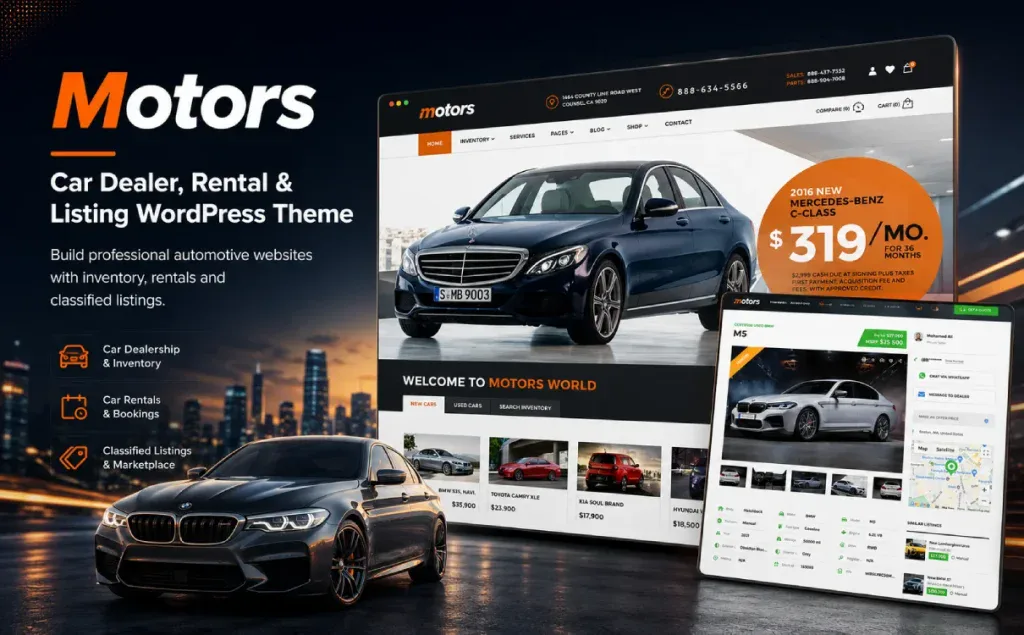
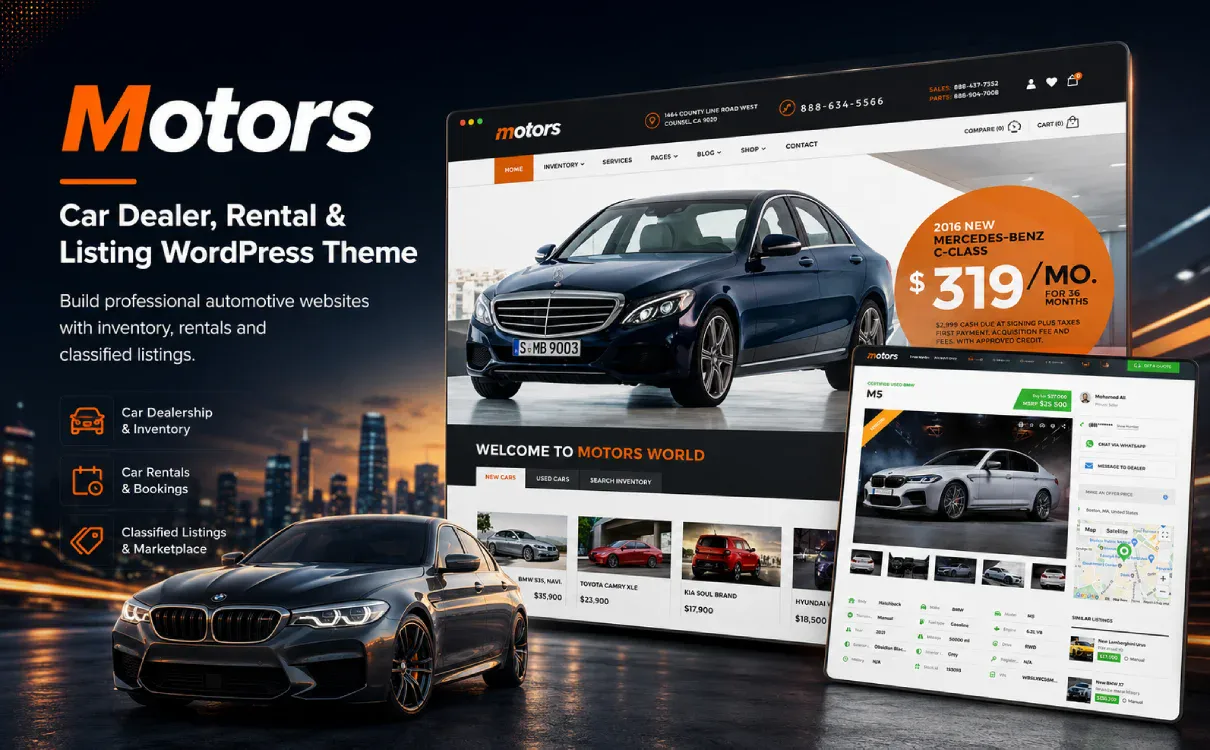
Motors – Car Dealer, Rental & Listing WordPress Theme is a purpose-built WordPress theme designed specifically for the automotive industry, focusing on vehicle showcases, inventory management, classified listings, and lead generation. It is ideal not only for traditional car dealerships, but also for car rental companies, used car marketplaces, motorcycle, boat, aircraft, and heavy equipment dealerships, automotive repair services, and auto parts stores. The theme includes over 18 professionally designed demo websites and is fully compatible with Elementor, WordPress 6.x, and WooCommerce 9.x, making it easy to build a modern, feature-rich automotive website with minimal setup.
Its core value lies in integrating the most complex aspects of an automotive website—vehicle data entry, field filtering, inventory display, dealer information, vehicle comparisons, inquiry and contact forms, car rental pricing, and data import—into a single, cohesive theme system as much as possible. For users looking to quickly build a vertical automotive website, Motors aligns more closely with business processes than generic enterprise themes; for websites that need to publish large volumes of vehicle information, it is better suited than standard showcase themes for hosting a searchable, filterable, and conversion-ready vehicle inventory.
Key Features
Professional Vehicle Inventory Management: You can add vehicle descriptions, images/videos, technical specifications, configuration options, location, contact information, PDF manuals, loan calculators, and other details—making it ideal for creating comprehensive vehicle detail pages.
Advanced Search and Filters: Allows users to filter by brand, model, category, specifications, and other criteria, helping them find the vehicle they're looking for more quickly and improving browsing efficiency and inquiry conversion rates.
Listings for Various Types of Vehicles: Supports the creation of different types of listings on the same website—such as cars, motorcycles, boats, airplanes, and construction equipment—and allows for the configuration of separate fields and display formats for each type.
Classified Ads and User Postings: Supports seller/dealer registration, vehicle listings, paid listings, membership plans, and more. Ideal for used car information platforms or vehicle transaction websites.
Car Rental Business Features: Features such as built-in car rental discounts, special-date pricing, hourly rates, and customizable calendar date formats make it ideal for car rentals, short-term rentals, long-term rentals, or scenarios involving special pricing cycles.
CSV/XML Inventory Import: Supports importing vehicle inventory via CSV/XML and provides integration instructions for AutoManager and WebManager XML, making it ideal for businesses that already have a vehicle database or need to manage their inventory in bulk.
Dealer and Seller Profile Pages: Displays information such as contact details, address, business hours, and a list of vehicles for sale, making it easy for buyers to contact the relevant dealer or individual seller directly.
Elementor / WPBakery Page Builder Support: You can use Elementor or WPBakery to customize pages and listing templates, making it easier to build pages.
WooCommerce compatible: Suitable for expanding an auto parts marketplace, paid listings, membership plans, or other transaction-related features.
Multi-language and RTL support: According to official documentation, it includes multilingual localization and supports WPML translation, making it suitable for websites targeting international users or multilingual markets.
Target audience and usage scenarios
Good for the crowd:
- Car Dealers, Used Car Dealers, and Car Dealership Websites
- Car Rental Companies, Luxury Car Rentals, Short-Term and Long-Term Vehicle Rental Services
- Classifieds Platform for Used Cars, Vehicle Trading Platform
- Exhibition booths for vehicles such as motorcycles, boats, airplanes, construction equipment, and RVs
- Websites related to auto repair, auto services, and auto parts
- Website development agencies looking to quickly build niche automotive business websites using WordPress
Typical usage scenarios:
- Build an official car sales website to showcase inventory and collect inquiries
- Create a classifieds platform for used cars, allowing users or dealers to list vehicles on their own
- Set up a car rental website and configure rental rates by the day, by the hour, or for specific dates
- Batch import vehicle inventory to reduce manual data entry costs
- Add images, videos, technical specifications, a loan calculator, PDF manuals, and contact options to the vehicle details page
- Customize Vehicle Listing Pages, Detail Pages, the Home Page, and Marketing Landing Pages Using Elementor
Comparison of similar plugins
| Core functional items | Motors (Current Recommendations) |
Vehica | Car Dealer | Listivo |
|---|---|---|---|---|
| Car Dealership / Vehicle Showcase Website | ✅ | ✅ | ✅ | ✅ |
| Used Cars / Vehicle Classifieds Platform | ✅ | ✅ | ✅ | ✅ |
| Car Rental Services / Vehicle Reservation Scenarios | ✅ | ❌ | ❌ | ❌ |
| Various Types of Listings (Motorcycles/Boats/Equipment) | ✅ | ❌ | ❌ | ✅ |
| Advanced Search Filters | ✅ | ✅ | ✅ | ✅ |
| Vehicle Comparison Feature | ✅ | ✅ | ✅ | ❌ |
| CSV / XML Vehicle Inventory Import | ✅ | ✅ | ✅ | ✅ |
| AutoManager / DMS System Integration | ✅ | ❌ | ❌ | ❌ |
| Elementor Page Builder Support | ✅ | ✅ | ✅ | ✅ |
| WPBakery Page Builder Support | ✅ | ❌ | ✅ | ❌ |
| Full Compatibility with WooCommerce | ✅ | ✅ | ✅ | ✅ |
| Paid Posting / Scenarios for Monetizing Memberships | ✅ | ✅ | ✅ | ✅ |
Comparison Note:
Motors“ strength lies in its more comprehensive coverage of the automotive industry; in particular, its combination of ”dealerships + classifieds + car rentals + multiple vehicle types + AutoManager/DMS inventory import” is better suited to the full spectrum of automotive business scenarios. Vehica focuses more on the modern car dealership and vehicle listing experience, emphasizing Elementor, custom fields, search, and user submissions; Car Dealer is also geared toward automotive dealerships, emphasizing inventory, inquiry forms, vehicle comparisons, and WooCommerce; Listivo, on the other hand, is a more general-purpose classifieds theme suitable for directory sites across multiple industries—including automotive, real estate, and services—but it is not specifically designed with car rentals and vehicle-related businesses in mind.
User Feedback Highlights
“A leasing and inventory system that truly addresses business pain points”: Many brick-and-mortar car dealerships have reported that Motors’ built-in inventory manager has greatly simplified their daily data entry tasks; its features for time-based billing and date-specific discounts for rental services perfectly replicate the actual operational logic of brick-and-mortar businesses.
“Extensive customization options and a clean code architecture”: A seasoned technical webmaster emphasizes that Motors isn’t just visually stunning on the front end; more importantly, its underlying logic is clear. It works seamlessly with Elementor to create a smooth building experience, and the website’s front end performs surprisingly well on Core Web Vitals and Google PageSpeed tests.
“A Seamless Commercial Monetization Ecosystem”: The operator of the classifieds platform noted that its built-in paid posting module is intuitive and very stable, effectively establishing a clear revenue model.
Suggestions for pairing with other plugins/themes
Elementor: Suitable for visual design of the homepage, vehicle listing pages, vehicle detail templates, and marketing landing pages. The official Motors documentation explicitly supports Elementor and allows the use of Elementor to create listing templates.WooCommerce: Suitable for expanding auto parts marketplaces, paid listings, membership plans, and payment-related processes; the official Motors documentation states that it is compatible with WooCommerce.WPML: Suitable for multilingual car dealerships, international car dealerships, and international car rental services, among other scenarios. The official Motors documentation mentions WPML and translation support.WP All Import: Suitable for sites that need to bulk import vehicle inventory from CSV/XML files, especially merchants who already have a vehicle database, ERP system, or third-party inventory spreadsheet.Contact Form 7 / Form Plugin: Suitable for form-based scenarios such as scheduling test drives, requesting quotes, financial consultations, trade-ins, and after-sales service.SEO plugins, such as Yoast SEO and Rank Math: Ideal for further optimizing titles, descriptions, structured content, and indexing strategies for vehicle detail pages, brand and model pages, and category filter pages. While Motors is designed to be SEO-friendly, it is still recommended to use professional SEO plugins for fine-tuning the site’s configuration.
Frequently Asked Questions (FAQ)
Q1: What type of WordPress theme is Motors?
Motors is a WordPress theme designed for auto dealers, car rental services, classified listings, and other automotive-related service websites. It is ideal for building car sales websites, used car platforms, car rental sites, and showcase sites for motorcycles, boats, and construction equipment, as well as websites related to auto repair and auto parts. The official scope covers scenarios such as Auto Dealers, Classified Listings, Auto Rental, Boats, Repair Services, and Motorcycle Dealers.
Q2: Is Motors suitable as a used car trading platform?
It’s a good fit. Motors supports features such as vehicle listings, front-end submissions, seller/dealer profiles, vehicle filtering, vehicle comparisons, and inventory management. As a result, it can be used not only to build a single car dealership’s official website but also to create a used car classifieds site or a vehicle transaction platform. The official documentation also positions it as a WordPress theme for car dealerships and classifieds.
Q3: Can Motors build a car rental website?
Yes. Motors provides layouts and features related to car rentals, making it suitable for business scenarios such as car rentals, luxury car rentals, short-term rentals, and long-term rentals. The official website explicitly lists “Auto Rental Service” as one of its primary use cases.
Q4: Does Motors support Elementor?
Supported. According to Motors’ official documentation, it supports Elementor and provides relevant Elementor widgets along with customization options for listing pages. For users who need to visually build their homepage, vehicle listing pages, detail pages, and marketing landing pages, Elementor is a well-suited solution.
Q5: Does Motors support WooCommerce?
Supported. Motors is compatible with WooCommerce and is suitable for expanding an auto parts store, offering paid listings, membership plans, online payments, or other transaction-related features. If your website is solely for showcasing vehicles, you do not need to use WooCommerce as a core module; however, if your site involves payments, orders, or e-commerce transactions, we recommend using it in conjunction with WooCommerce.
Q6: Does Motors support bulk import of vehicle inventory?
Yes. According to Motors’ official documentation, the platform integrates with a Dealer Management System and offers inventory management capabilities, which reduce the need for manual data entry and optimize vehicle inventory maintenance processes. For businesses that already have vehicle data sheets, inventory systems, or websites containing large amounts of vehicle information, bulk import and inventory management are among Motors’ key advantages.
Q7: What types of vehicles can Motors showcase?
Motors isn't just for cars; it can also be used for websites featuring vehicles or equipment such as motorcycles, boats, RVs, construction equipment, and aircraft. The official description mentions that it is suitable for scenarios such as car dealerships, car rentals, boat sales, repair services, and motorcycle dealerships.
Q8: Is Motors suitable for an auto dealer’s official website?
It’s a perfect fit. One of Motors’ core use cases is automotive dealership websites. It can display vehicle inventory, vehicle specifications, images and videos, vehicle filters, contact forms, dealer information, and vehicle comparison features, making it better suited for automotive sales than standard business themes.
Q9: What is the difference between Motors and a standard business theme?
Standard business themes typically focus more on brand introductions, service descriptions, and page displays; Motors, on the other hand, is designed around automotive business processes, with an emphasis on vehicle inventory, vehicle details, search filters, classified listings, dealer information, car rental scenarios, and vehicle comparisons. For automotive industry websites, the advantage of Motors goes beyond simply having “attractive pages”; it lies in its ability to provide a more comprehensive solution for vehicle information management and the user car-search process.
Q10: Are Motors suitable for beginners?
Motors provides demo templates and visual building support, making it relatively easy to get started. However, it is a fairly comprehensive vertical industry theme that involves configurations such as vehicle fields, filter criteria, inventory, dealers, leasing, and page templates; beginners will need to spend some time understanding the backend structure. If you’re simply creating a basic corporate showcase site, it might be overkill; however, if you’re building a professional automotive website, its feature set will prove more valuable.
Q11: Does Motors support multilingual websites?
Supports multilingual website setup. According to official documentation, Motors offers translation and WPML support, making it suitable for scenarios such as automotive export websites, cross-border vehicle services, and multi-region dealer websites. When setting up your site, we recommend using Motors in conjunction with WPML, TranslatePress, or other multilingual plugins, and selecting the appropriate solution based on the scale of your website.
Q12: Does Motors allow users to submit their own vehicle information?
Supported. The Motors plugin documentation mentions features such as front-end listing submissions, user registration, user profile management, and adding/editing/deleting listings, making it suitable for used car information platforms, dealer-on-demand platforms, or multi-seller vehicle listing websites.
Q13: Can Motors be used on an auto parts marketplace?
Yes, but it depends on your specific business needs. If you primarily sell auto parts, you can use WooCommerce to set up the product checkout process; if your website focuses on vehicle showcases and inquiries, Motors“ vehicle listing features are more important. For a comprehensive automotive website that combines ”vehicle showcases, parts sales, and service appointments,” pairing Motors with WooCommerce would be more suitable.
Q14: Is Motors suitable for SEO optimization?
It is well-suited for SEO of automotive industry content and vehicle detail pages. It can organize page content around dimensions such as brand, model, vehicle condition, price range, vehicle type, and region, making it naturally suited for long-tail keyword optimization. Actual SEO results also depend on website structure, content quality, page speed, indexing strategies, and keyword planning. We recommend using SEO plugins such as Rank Math or Yoast SEO for fine-tuned optimization.
Q15: Who should choose Motors?
If you’re building a car dealership website, a used car platform, a car rental site, a classifieds site for vehicles, an automotive service website, or a showcase site for motorcycles, boats, or equipment, Motors will better meet your business needs than a standard multipurpose theme. It’s particularly well-suited for websites that require “vehicle inventory + search and filtering + detailed listings + lead conversion + dealer management.”




No Comments