


- Unlimited access to members-only content
- Member discounts on paid items
- More Membership Benefits
Confirm Purchase
Download Version
- Real 3D FlipBook PDF Viewer v4.16.4
- Bookshelf for Real3D Flipbook Addon v1.4
Real 3D FlipBook Core Introduction
Product Overview
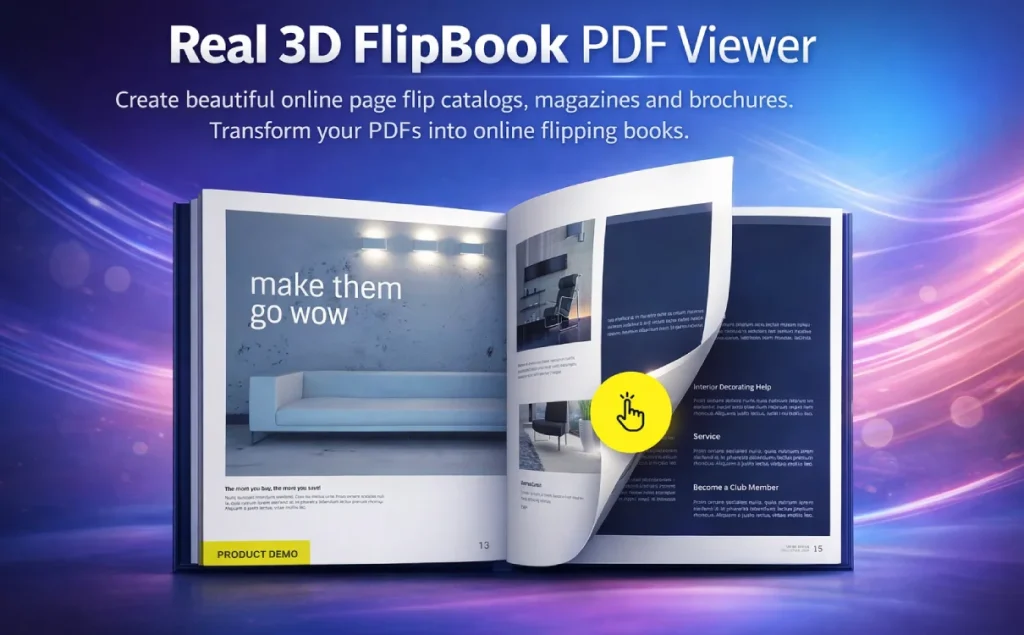
The core value of Real 3D FlipBook is to upgrade “static PDF files” into “online interactive content carriers” with more reading experience and conversion performance. It uses WebGL to achieve a more realistic 3D page flip (page bending, light and shadow effects), while providing CSS3 lightweight page flip mode to take into account the different devices and performance scenarios; adapted for mobile, can be used on desktop and mobile with different layouts (e.g., a single-page view is better suited for (e.g. single page view is more suitable for small screen reading).
In terms of content presentation, it supports generating page-turning books directly from PDFs: users don't need to download PDFs or leave the site to read them; PDF pages can be rendered “page-by-page,” allowing readers to start reading before the full file is loaded; and PDF internal/external links are automatically available, and support for text selection and keyword search highlighting.
For operation and management, it provides book library management (can be edited, copied, deleted, exported), and supports rapid embedding through short code; the directory (TOC) can be customized multi-level structure, and can read PDF comes with the outline; also supports deep links to the specified page, to facilitate marketing placement, customer service guidelines and content distribution.
Key Features
WebGL Realistic 3D Page Flip Effect: page curvature, lighting and shadows closer to the real book reading experience
3D + Lightweight CSS Mode: Flexibility to switch between “immersion” and “performance-first”.
PDF Direct Read and Progressive Load: PDF pages are rendered page by page, so users can start reading earlier.
Link/Search/Checked TextPDF internal and external links automatically clickable; support for text selection and search highlighting
Multiple display methods: Lightbox pop-ups, responsive embeds, full-screen overlay pages, and more!
Customizable interface: Multiple skins and UI layouts, icon sets available, support for advanced UI customization
Interactive content page: HTML content can be added to the page (links, buttons, video, audio, iframes, etc.)
Table of Contents and Structured Reading: support for multi-level catalogs, and can read the PDF's own outline
Deep link: Can be opened directly to a specific page via URL
RTL Right-to-Left Page: more friendly for right-to-left reading scenarios, such as Arabic
Target audience and usage scenarios
Suitable for
- Enterprises/teams that need to use PDF for content display and customer acquisition conversion: marketing, product, sales support, brand operations
- Design/publishing/education practitioners: picture books, e-books, courseware, journals, portfolio presentations
- WordPress webmasters and developers: want shortcodes/blocks for quick embedding and scalability to ecosystems such as Elementor, WooCommerce, and more!
Typical Scenario
- Corporate Brochure/Brand Book: Make PDF brochures a page-turner to increase retention and sharing.
- Catalogs/Instructions/White Papers: PDF links are automatically validated, support for search, easy for customers to quickly locate the information
- Magazines/Journals/E-books: 3D reading experience is closer to physical reading, with single-page view for mobile switching
- Multilingual site: Support RTL page turning, more adaptable to the reading habits of users in some regions.
Comparison of similar plugins
Comparison object (common alternatives/similar programs):
- DearFlip (dFlip): One of the WordPress 3D Flipbook plugins, provides flipbook/reader and other viewers.
- 3D Flipbook PDF Viewer & Embedder (WordPress.org: pdf-embed-viewer): Supports both traditional and 3D modes, and offers Elementor widgets and multiple archive templates
- Wonder PDF Embed: A PDF embedded reader based on Mozilla PDF.js, more along the lines of “standard PDF display”.
Note: ✅ means explicitly mentioned/mainly supported in publicly available information; ❌ means not explicitly stated or not usually part of its main functionality (may vary from version to version, recommended to refer to the respective documentation).
| Core functional items | Real 3D FlipBook | DearFlip | 3D Flipbook PDF Viewer | Wonder PDF Embed |
|---|---|---|---|---|
| 3D Page Turning Mode | ✅ | ✅ | ✅ | ❌ |
| Standard/Reader Mode (non-3D) | ✅ | ✅ | ✅ | ✅ |
| Lightbox pop-up window opens | ✅ | ✅ | ❌ | ✅ |
| Elementor Visualization Components | ✅ | ❌ | ✅ | ❌ |
| Bookshelf/Cover Wall Display | ✅ | ✅ | ❌ | ❌ |
| Add interactive content to the page | ✅ | ❌ | ❌ | ❌ |
| Deep link to a specific page | ✅ | ❌ | ❌ | ❌ |
| Short code migration/conversion | ✅ | ❌ | ❌ | ❌ |
A more prominent point of the current product (Real 3D FlipBook):
- WebGL real 3D page flip (light/shadow/bending) + CSS lightweight mode combination, balancing experience and performance.
- PDF “page-by-page rendering” and “link auto-enforcement + text search/selection” are more suitable for “readable, usable, convertible” content display.
- Interactive content, catalogs (including PDF outlines), deep links, etc., more suitable for marketing landing and content distribution
Alternatives may be more salient points:
- 3D Flipbook PDF Viewer & Embedder: Provide a variety of PDF archive templates (list/grid/ebook/newsletter), counting and categorization, etc., more in favor of the “PDF database/list display” requirements
- Wonder PDF Embed: more “standard PDF.js reader embedding” and can be used with its Lightbox/Carousel plugin to extend the presentation form
- DearFlip: provides multiple viewers (reader/flipbook, etc.) with Lightbox customizable triggers, bookshelf displays, and more!
User Feedback Highlights
Extremely fast loading and beautifully designed: A number of experienced users have commented that the plug-in guarantees high-quality 3D rendering, while the loading speed is still excellent, and the front-end UI design is very modern.
Strong performance and hassle-free for large files: User feedback, even if the number of pages of very large PDF files, the plug-in can be smoothly parsed and stable operation, eliminating the need to purchase additional large document processing plug-ins trouble.
Configuration flexibility is extremely high: Reviews generally appreciate the fact that its backend offers an extremely rich set of customizable parameter options, and the author's continuous updates keep the product at the forefront of the industry.
Suggestions for pairing with other plugins/themes
Elementor: You can use the official Elementor Addon to insert/create a flipbook as an Elementor element and adjust the settings in the editor (selecting an existing book, uploading a PDF, filling in a URL, etc.).
Gutenberg Block Editor: The plugin is labeled Gutenberg-friendly in the CodeCanyon message (appropriate for the content production process of a block editor site).
WooCommerce (digital content delivery/post-purchase visibility): The official WooCommerce Addon supports Lightbox to open a flipbook when the product page image is clicked, with the ability to set “Show/display different version only for users who have already purchased or have an active subscription”.
Content Operations Enhancement (Picture Wall/Database): Use Bookshelf Addon as a “shelf/cover wall” to display multiple PDF albums on the same page, suitable for case studies, product catalogs, and resource centers.
Performance and Loading Experience: If your scenario is more “fast open + low load”, consider PDF Tools Addon to convert PDF to JPG/JSON, etc. (retaining the text layer and links) to reduce runtime processing and improve load speed performance.
Frequently Asked Questions (FAQ)
Q1: What can Real 3D FlipBook be used for? What content formats are supported?
It is used in the WordPress site to the PDF or image to “flip book / e-book” in the form of display, support for responsive and mobile optimization, and provide Lightbox pop-up windows, single / double page view, deep links and other capabilities.
Q2: Do I need Flash? What are the browser requirements?
No Flash required, HTML5 based presentation.
Q3:What is the difference between WebGL mode and CSS mode? Which one should I choose?
- WebGL Mode: More realistic 3D page turnover (page curvature, lighting, shadows), better suited for “texture-first” album/magazine presentations.
- CSS3 mode: only CSS animation, lighter, suitable for “performance-first” or higher compatibility requirements.
General recommendation: desktop first WebGL; mobile or weak performance devices can be downgraded with CSS/single page view.
Q4: How is the mobile experience? Can it automatically switch to single page reading?
Supports mobile optimization and provides Single page mode, which can be enabled as the default mode or only on mobile.
Q5: How to insert a flipbook into a page?
There are two common ways:
- Gutenberg Block: Add Real 3D FlipBook block directly in the block editor and select the book from the dropdown box.
- Shortcode: Embed flipbook into any page/article, for example:
[real3dflipbook id="123"]
[real3dflipbook pdf="https://example.com/your.pdf"]
Q6:Can I use a “popup/lightbox” to open it? Can I make it pop up automatically when I enter the page?
Lightbox mode is supported and can be controlled by short code parameters (e.g. setting the page to open automatically when you enter it).
[real3dflipbook id="123" mode="lightbox" lightboxopened="true"]Q7:Can I click on the directory, hyperlinks and external links in PDF?
Supports PDF hyperlinks; and provides settings to support opening PDF links in Lightbox/spotlight mode (better suited to staying in the station's reading path).
Q8:Support PDF text search, text selection / copy?
Supports PDF text search (including highlighting) and supports reader capabilities such as text selection (selectability is also usually related to whether the PDF contains a text layer).
Q9:Can I share a link to a “specific page”? (e.g. open it and it goes to page 12)
Support Deep linking (deep linking), you can link directly from the URL to the specified page; you can also customize the deep linking prefix, which is convenient for you to generate regularized links in the advertising/customer service guidelines.
Q10: Can I add interactive content such as buttons, videos, audio, forms, etc. to the page?
Support for Interactive pages: HTML content (links, iframes, media, etc.) can be overlaid on a page; a dedicated page editor extension is also available for those who wish to visualize their editing more efficiently.
Q11:My PDF is very large/has a lot of pages, will it be slow? What are the acceleration programs?
Common Acceleration Ideas:
- If you don't need “Interactive PDF Functions” such as text search/text selection/links, you can use “PDF to JPG” to generate page flip books (lighter and more stable).
- If you need to retain interactive capabilities, use PDF Tools Addon to convert PDF to image + JSON for faster page rendering and try to retain interactive elements such as text search.
Q12:I want to make a “library/e-album bookshelf”, is it OK to display many covers on one page?
Yes, with Bookshelf Addon you can display multiple publications in a bookshelf format, with support for multi-row auto-arrangement and more.
Q13:Can I use it with page builders like Elementor / WPBakery?
Possible. Provides Elementor Addon to add/configure flipbook in Elementor editor; also provides extensions like WPBakery Addon.
Q14:Can it work with WooCommerce? For example: click on the product image to pop up the gallery; purchased/unpurchased show different versions?
WooCommerce Addon supports to open flipbook in Lightbox by clicking the product image on the product page; and show different versions of the flipbook according to “Purchased/Unpurchased” or “Subscription Status” (suitable for manual/full version, etc.). WooCommerce Addon supports to open flipbook in Lightbox by clicking the product image on the product page; and can show different versions of flipbook according to "purchased/unpurchased" or "subscription status" (suitable for manuals, sample/full version, etc).
Q15: Does it support right-to-left (RTL) page turn direction such as Arabic?
Right-to-left page flip mode is supported.
Q16:What should I do if the PDF is placed on other domains or CDNs and fails to load/report CORS?
If the PDF comes from a different domain, you usually need to enable CORS on the resource server side, otherwise the browser may block the loading.
Q17:What are the common reasons for failing to save settings in the background/unable to add a new flipbook?
A common cause is that the server's max_input_vars is too low, causing form data to be truncated; raise it from the default (e.g. 3000) and restart the service and try again.





No Comments