


Download Version
- FlyingPress v5.6.4 + 1-Year Official Activation License for One Domain
FlyingPress Core Overview
FlyingPress is a comprehensive performance optimization plugin designed to streamline the WordPress performance optimization process. It converts dynamically generated WordPress pages into static HTML caches, reducing the number of times the server needs to execute PHP and database queries when visitors request pages, thereby lowering server response times.
In addition to page caching, FlyingPress also addresses several key factors that affect page rendering speed, including removing unused CSS, generating critical CSS, deferring or delaying non-critical JavaScript, minifying CSS and JavaScript, lazy-loading images and videos, optimizing Google Fonts, preloading above-the-fold images and fonts, and minimizing layout shifts caused by missing image dimensions.
Starting with FlyingPress 5, the plugin uses a real browser via a cloud server to load and analyze website pages.This approach helps the plugin identify above-the-fold resources, background images, critical fonts, third-party scripts, and page elements suitable for deferred rendering, and generates corresponding optimization results for different pages, rather than simply applying the exact same static rules across the entire site.
FlyingPress also offers built-in image optimization features that can compress images in the media library to AVIF, WebP, or retain their original format, and supports both lossy and lossless compression as well as automatic optimization of new images. Image processing is performed on FlyingPress’s cloud servers, so it does not directly consume a significant amount of CPU resources on your website’s host, while also allowing you to retain and restore the original images.
For websites with a high volume of dynamic content, FlyingPress supports integration with Redis object caching to reduce redundant database queries in WordPress. This feature is particularly well-suited for scenarios where static page caching cannot be fully utilized, such as the WooCommerce shopping cart, checkout page, user dashboard, member backend, and logged-in user pages.
Overall, FlyingPress is ideal for users who want to handle most common performance optimization tasks within a single plugin, as it reduces functional overlap and configuration conflicts among multiple plugins for caching, image optimization, database cleanup, and Core Web Vitals monitoring.
Key Features
Page Caching and Automatic Preloading
FlyingPress can generate static HTML pages and serve them directly to visitors from the server, reducing the need for WordPress, PHP, and the database to process the same data repeatedly with each visit. When website content is updated, the plugin automatically clears the cache for the relevant pages and adds them back to the preload queue, ensuring that important pages are cached before real visitors arrive.
Analysis of Real Browser Pages in the Cloud
The plugin uses a real browser in the cloud to analyze each page, identifying above-the-fold images, background images, critical fonts, third-party scripts, unused CSS, and page elements suitable for deferred rendering, ensuring that the optimization rules more closely align with the page’s actual structure.
Remove Unused CSS
FlyingPress can extract the CSS actually used by a page, apply the styles needed for the above-the-fold area to the page, and defer the loading of the remaining styles. This reduces the number of CSS resources that block page rendering, helping to improve the above-the-fold display and the Largest Contentful Paint metric.
JavaScript Delayed and Deferred Execution
Non-critical JavaScript can be deferred until after HTML parsing is complete, or loaded only after user interactions such as scrolling, clicking, or tapping occur, thereby reducing the impact of third-party analytics, chat tools, ads, and marketing scripts on initial page rendering.
Built-in Image Optimization
It supports converting images to AVIF or WebP, or keeping them in their original format, and offers both lossy and lossless compression modes. Users can automatically optimize images for subsequent uploads, restore the original images, or delete the original files after verifying the results to save space.
Smart Media Lazy Loading
FlyingPress automatically identifies above-the-fold images, videos, and iframes to ensure that critical media loads immediately, while deferring the loading of media resources below the fold that are temporarily out of view and automatically preloading important above-the-fold images.
Deferred Rendering of Page Elements
In addition to images and videos, FlyingPress can also defer the rendering of more complex sections at the bottom of a page, reducing the cost of initial layout, painting, and DOM rendering. It is ideal for long pages that contain a large number of products, article lists, reviews, FAQs, or complex Elementor sections.
Google Fonts Localization and Font Preloading
The plugin downloads Google Fonts to your website's local server and loads them from your current domain, reducing external font requests, DNS lookups, and third-party dependencies. At the same time, the cloud optimizer automatically detects the fonts used on the first screen and preloads them.
Cloudflare Full-Page Caching
FlyingPress can cache entire HTML pages on Cloudflare edge nodes, not just images, CSS, and JavaScript. This integration supports the Cloudflare Free plan and synchronizes page exclusion rules, bypasses cookies and mobile caching settings, and automatically clears the relevant Cloudflare cache after content is updated.
Real-User Core Web Vitals Monitoring
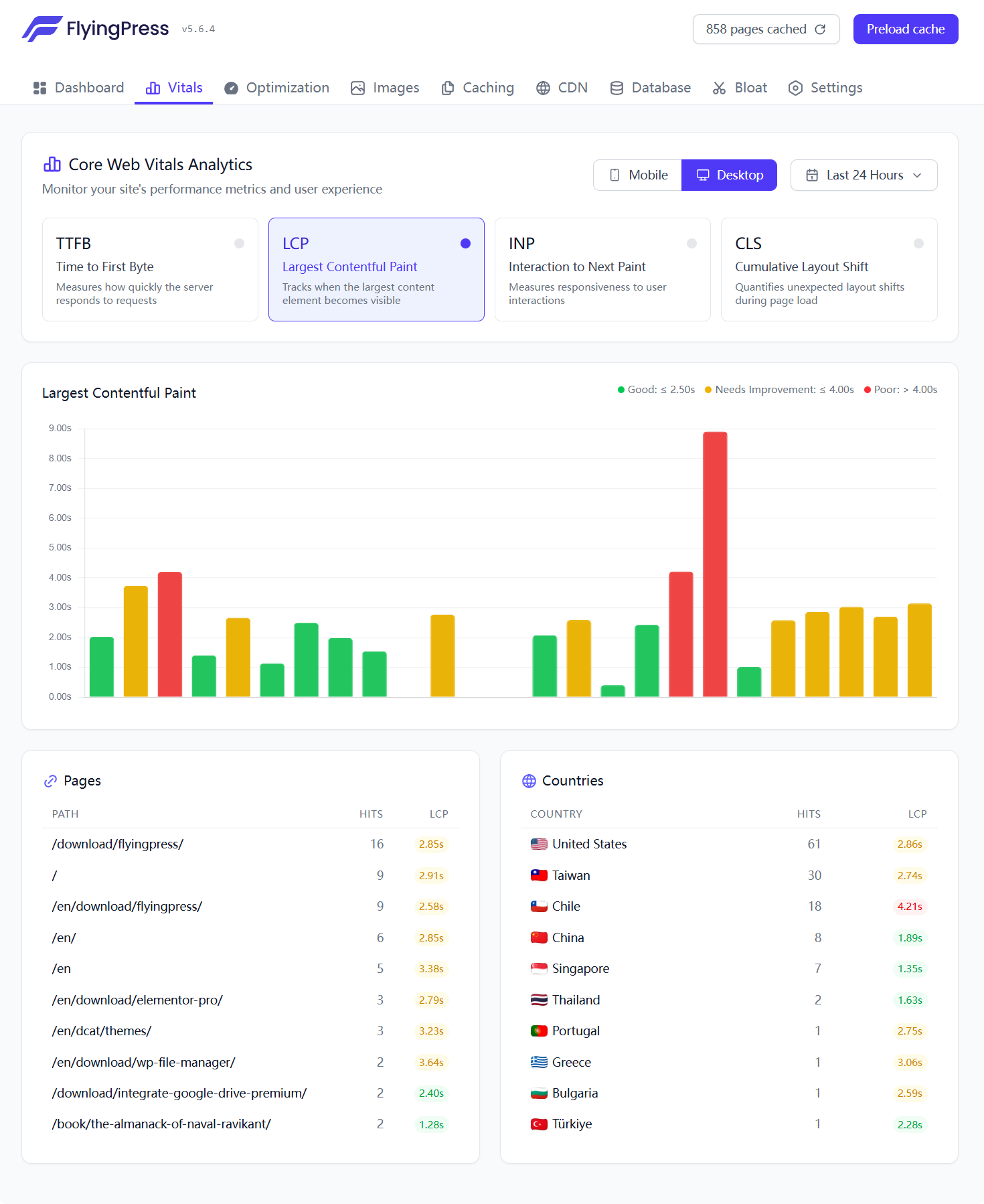
FlyingPress can collect TTFB, LCP, INP, and CLS data based on actual website visitors and filter the results by device, time range, page, and country. Compared to one-time lab tests, this data is better suited for observing real user experiences and long-term changes before and after optimization.
Redis Object Caching
If Redis is already installed and running on the server, you can enable object caching directly from the FlyingPress admin panel and view the cache hit rate, Redis memory usage, and connection status to help improve response times for the login page, user dashboard, shopping cart, and other dynamic requests.
Automatic Database Cleanup
It supports the periodic deletion of post revisions, auto-drafts, spam comments, Recycle Bin contents, and expired transients, and can optimize database tables. Cleanup tasks can be scheduled to run automatically on a daily, weekly, or monthly basis.
Cleaning Up Redundant Features in WordPress
You can disable non-essential resources such as Emoji, Dashicons, jQuery Migrate, XML-RPC, RSS, oEmbed, and some Block Editor CSS as needed, as well as limit post revisions and reduce the Heartbeat API frequency.
Link Preload on Hover
When a visitor hovers over an internal link, FlyingPress can use the browser’s preloading mechanism to load the target page in advance, making page transitions faster, while automatically excluding special links such as those for the shopping cart, checkout, login, and links containing query parameters.
Target audience and usage scenarios
Corporate Websites and International Trade Showcase Websites
Ideal for business websites looking to improve the loading speed of their home pages, product pages, service pages, and marketing landing pages. Cloudflare's full-page caching can further reduce network latency for visitors in different countries and regions.
Content Websites and SEO Websites
Suitable for websites with a large number of articles that rely on organic search traffic. Page caching, image optimization, font optimization, and Core Web Vitals monitoring can help reduce page performance issues, but final rankings ultimately depend on multiple factors, including content quality, website structure, servers, and the competitive landscape.
WooCommerce Mall
FlyingPress includes built-in WooCommerce compatibility rules that automatically exclude dynamic pages such as the shopping cart, checkout, and “My Account,” and clear the cache for product pages and related category pages after product inventory or prices are updated. When combined with Redis object caching, it can further optimize dynamic requests that cannot use full-page caching.
Member Website and User Center
Ideal for websites that include pages for logged-in users, member centers, online courses, user dashboards, or personalized content. Static pages can use page caching, while dynamic pages can reduce redundant database queries through Redis object caching.
Elementor and Other Page Builder Websites
Suitable for websites built with Elementor, Divi, Breakdance, Bricks, Beaver Builder, Oxygen, WPBakery, Visual Composer, SeedProd, or Gutenberg. Given the large amounts of CSS, JavaScript, and complex blocks generated by page builders, removing unused CSS, deferring JavaScript, and delaying the rendering of elements are particularly useful.
Multilingual website
Supports WPML, Polylang, TranslatePress, and Weglot, allowing you to cache different language versions separately and clear and preload the corresponding language pages after content is updated in a specific language. Supports multilingual structures such as subdirectories, subdomains, and independent domains.
Website Developers and Maintenance Service Providers
Ideal for developers who need to centrally deploy caching, resource optimization, image optimization, database cleanup, and performance monitoring for their clients' websites. FlyingPress also provides WP-CLI, PHP functions, filters, and APIs that can be used for automated deployment and custom caching workflows.
Users who do not want to configure multiple performance plugins
FlyingPress consolidates many commonly used performance features into a single set of settings, making it ideal for users who want to reduce the number of plugins, minimize feature duplication, and simplify maintenance.
Comparison of similar plugins
The table below compares the currently available built-in features of each product; it does not include standalone plug-ins that must be purchased, installed, or connected separately.
| core functionality | FlyingPress | WP Rocket | LiteSpeed Cache | Perfmatters |
|---|---|---|---|---|
| Built-in full-page caching | ✅ | ✅ | ✅* | ❌ |
| Automatic Caching and Preloading | ✅ | ✅ | ✅* | ❌ |
| Remove Unused CSS | ✅ | ✅ | ✅* | ✅ |
| Delay JavaScript Execution | ✅ | ✅ | ✅ | ✅ |
| Built-in image compression and AVIF/WebP conversion | ✅ | ❌ | ✅* | ❌ |
| CWV Monitoring Based on Real Visitors | ✅ | ❌ | ❌ | ❌ |
| Full-Page HTML Caching on Cloudflare's Free Plan | ✅ | ❌ | ❌ | ❌ |
| Redis Object Cache Backend Management | ✅ | ❌ | ✅* | ❌ |
| Plugin Script Manager for Uninstalling Plugins by Page | ❌ | ❌ | ❌ | ✅ |
| Built-in Database Cleanup | ✅ | ✅ | ✅ | ✅ |
LiteSpeed Cache's full-page caching relies on LiteSpeed Enterprise, OpenLiteSpeed, or other compatible LiteSpeed caching environments; on standard Apache or Nginx servers, its front-end optimization features can be used, but LiteSpeed's server-level page caching cannot be used directly. Its image optimization and some CSS services typically require a connection to QUIC.cloud, while object caching requires the server to already provide Redis, Memcached, or LSMCD.
WP Rocket itself does not compress images or generate WebP or AVIF files; it must be used in conjunction with Imagify or another image optimization plugin. Its Rocket Insights feature allows you to run a GTmetrix test on a specific page from the dashboard, but this is a periodic lab test and does not rely on Real User Monitoring data collected from actual website visitors.
Perfmatters is primarily designed for front-end resource management and optimizing WordPress performance; it does not provide full-page caching on its own and typically needs to be used in conjunction with server-side caching or other page caching plugins. Its standout feature is the Script Manager, which allows you to disable unnecessary plugin scripts and styles based on pages, post types, devices, or user status.
Key Features of FlyingPress
Compared to the alternative products mentioned above, FlyingPress’s main distinction lies not in any single feature, but in the fact that it brings the following capabilities together within a single user interface:
- Full-page caching and automatic preloading;
- Analysis of real browser pages in the cloud;
- Optimization of CSS, JavaScript, fonts, and above-the-fold resources;
- Built-in image compression and AVIF/WebP conversion;
- Core Web Vitals monitoring based on real visitors;
- Cloudflare's free plan offers full-page caching;
- Redis object cache;
- Cleaning Up Database and WordPress Redundancy Features.
This integration approach is suitable for websites that want to reduce the number of separate performance plugins, minimize duplicate configuration, and simplify maintenance processes.
Scenarios where alternative products are unique or better suited
WP Rocket:Ideal for users who prefer a mature, automated configuration, want to quickly enable common caching optimizations after installation, and are already using Imagify or another image optimization solution.
LiteSpeed Cache:In a LiteSpeed Enterprise or OpenLiteSpeed server environment, you can take full advantage of server-level page caching, private caching, ESI, and the QUIC.cloud service. This is ideal for users who require in-depth configuration and are familiar with server caching mechanisms.
Perfmatters:This is suitable for users who already have a reliable page cache but need fine-grained control over CSS, JavaScript, REST APIs, Heartbeat, and background redundancy features for each plugin. It can also be used as a supplementary tool for performance optimization, but you should not enable the same CSS, JavaScript, or lazy-loading features that are already provided by other plugins.
User Feedback Highlights
The following information is based on user feedback displayed on the FlyingPress official website and reviews on Trustpilot; it does not imply that all websites will achieve exactly the same results.
The setup is relatively simple
Several users noted that the FlyingPress admin interface is fairly intuitive, with the options requiring manual configuration grouped together in one place, eliminating the need to wade through a large number of complex parameters one by one, as is often the case with some highly customizable performance plugins.
Significant improvements in Core Web Vitals
Some users have reported that after switching from other caching plugins, they saw improvements in Core Web Vitals, actual loading experiences, and performance test results on mobile devices, and they particularly praised the plugin’s ability to optimize critical CSS and modern front-end resources.
Positive Feedback on Technical Support
User reviews frequently mention support response times, troubleshooting, and plugin updates. The reviews featured on the FlyingPress official website also repeatedly highlight the quality of support and the experience of issue resolution.
As of the search conducted in August 2026, the Trustpilot page shows that FlyingPress has a rating of 4.7 out of 5, with approximately 320 reviews. This data is subject to change as new reviews are added, so it is recommended to verify it periodically before posting it on the product page.
Recommendations for Use with Other Plugins and Themes
Page Builder
FlyingPress is compatible with the following page builders:
- Elementor and Elementor Pro
- Gutenberg Block Editor
- Bricks Builder
- Breakdance
- Divi
- Oxygen
- Beaver Builder
- WPBakery
- Visual Composer
- SeedProd
We recommend disabling duplicate CSS minification, JavaScript deferral, image lazy loading, and resource preloading options in page builders or themes to prevent the same resource from being processed multiple times by different tools. When a page builder allows you to choose the CSS output method, prioritize using external CSS files, as this generally makes it easier to identify and process unused CSS.
WooCommerce
FlyingPress can be used directly with WooCommerce stores. The plugin automatically handles caching for the shopping cart, checkout, account pages, and product updates.
For websites with a large number of products, a high volume of user logins, or a heavy backend query load, you can enable FlyingPress object caching, provided the server supports Redis.
If your online store uses complex dynamic currencies, region-based pricing, personalized recommendations, or non-AJAX shopping cart quantity updates, we recommend checking the corresponding cookie and dynamic page cache exclusion rules.
Multi-language plug-ins
Recommended Pairings:
- WPML
- Polylang
- TranslatePress
- Weglot
FlyingPress generates separate caches for pages in different languages, making it ideal for multilingual websites that use language subdirectories, subdomains, or separate domain structures.
SEO Plugin
It can be used in conjunction with popular SEO plugins such as Rank Math SEO, Yoast SEO, and All in One SEO. Performance plugins do not replace title tags, meta descriptions, structured data, sitemaps, or content optimization, but they can improve the user experience and address certain technical factors that affect Core Web Vitals.
The official FlyingPress test list explicitly includes Rank Math SEO and Rank Math SEO PRO.
Forms and Email Plugins
The official compatibility list includes:
- WPForms
- Gravity Forms
- WP Mail SMTP
- FluentSMTP
After enabling JavaScript delay, you should test form validation, CAPTCHA, pop-ups, chat tools, and submission functions in practice. If any interactions behave abnormally, you can add the corresponding scripts to the JavaScript delay exclusion list.
Cloudflare
If your website is already connected to Cloudflare, you can use FlyingPress’s built-in Cloudflare full-page cache integration. We recommend that you do not enable Cloudflare APO at the same time to avoid having two sets of full-page cache rules.
The FlyingPress integration synchronizes cache exclusions, cookie bypasses, and mobile cache settings, and automatically clears the corresponding Cloudflare page cache when WordPress content is updated.
Redis
If Redis and the PHP Redis extension are already installed on the server, you can enable object caching directly through the FlyingPress admin panel.
We do not recommend enabling Redis Object Cache, LiteSpeed Cache, and a second WordPress object cache drop-in provided by the hosting control panel or other plugins at the same time, because WordPress can only use one primary object-cache.php Implementation. The FlyingPress object cache requires Redis to be accessible and installed. phpredis Extend, and allow for wp-content Write to the object cache file.
Image Optimization Plugin
FlyingPress now includes built-in image compression and AVIF/WebP conversion. Once this feature is enabled, it is generally no longer necessary to have ShortPixel, Imagify, EWWW Image Optimizer, Smush, or LiteSpeed Cache process the same images simultaneously.
If you decide to continue using a standalone image optimization plugin, you can use only FlyingPress’s page caching and front-end resource optimization features to avoid having two sets of tools simultaneously convert or replace image URLs.
Precautions Before Use
Some of FlyingPress 5’s advanced optimizations rely on its cloud-based optimizer accessing the website, so the website must be publicly accessible via the Internet. When testing websites in a local environment, or when the website uses HTTP password protection, a login wall, CAPTCHA blocking, or REST API restrictions, the cache preloading and page analysis features may not function properly.
The current official minimum system requirements include WordPress 4.7 or later, PHP 7.4 or later, and MySQL 5.6 or MariaDB 10.0 or later, and require wp-content The directory has write permissions. For actual deployment, we still recommend using the latest stable versions of WordPress, PHP, and the database.
FlyingPress can run on Apache, Nginx, LiteSpeed, and OpenLiteSpeed environments, and supports shared hosting, VPS, dedicated servers, and managed WordPress hosting. Performance improvements may vary depending on the combination of hosting, themes, plugins, and third-party scripts. After enabling advanced CSS, JavaScript, or caching features, you should test the site on desktop and mobile devices, as well as check functionality while logged in, and verify that forms, shopping carts, and the checkout process work properly.






No Comments